
When to Switch from Manual Review Responses: A Practical Checklist
Your review queue is growing, but every reply still depends on someone finding time to write it. That’s when to switch from manual review responses: not when human judgment stops mattering, but when the current process can’t keep pace without sacrificing consistency or customer care.
Manual replies have real value. They let your team respond with personal context and care. But when responses take staff away from customers, arrive at uneven speeds, or vary in tone across locations, it’s time to reassess the workflow. AI can help draft replies and bring more consistency, while people check the details, add context, and decide what’s ready to send.
This practical checklist will help you spot workload, quality, and risk signals that indicate manual handling is slowing your business down. You’ll also learn how to choose the right level of AI assistance, keep human judgment in control, and consider how review workflows can fit with communication channels such as WhatsApp, SMS, and email, plus the tools your business already uses. The goal isn’t automation for its own sake. It’s a faster, more dependable process that still sounds like your business.
Key Takeaways
- Use backlog, missed reviews, uneven tone, and unclear ownership to identify when to switch from manual review responses.
- Learn how AI can help draft replies while your team checks context and decides what to publish.
- Compare manual, AI-assisted, and human-reviewed workflows to find the right balance of efficiency and oversight.
- Build a practical pilot by tracking current response delays, recurring reply types, and tone consistency.
- See how review invitations through WhatsApp, SMS, and email can fit into a wider review-management workflow.
When manual review responses start holding your business back
Personal replies show customers that a real person has heard them. If your team values that care but struggles to keep up, the answer isn’t to abandon human judgment. It’s to check whether the current process gives people enough time and clear ownership to respond well. The question of when to switch from manual review responses is best answered by looking for repeated signs of strain, not by counting reviews against a universal cutoff.
The switch point is a workflow-capacity decision, not an anti-human choice.
Use this checklist to assess what’s happening in your day-to-day workflow:
- A growing backlog: Replies are postponed because staff can’t fit them around service, appointments, sales, or other customer-facing work.
- Uneven tone: Customers receive different levels of warmth or detail depending on who writes the response or which location they visited.
- Missed reviews: Feedback goes unnoticed because someone must remember to check each review source, or it’s unclear who monitors them.
- Divided ownership: Several people assume someone else is replying, or responsibility changes with shifts, leave, or location.
One busy week may be an exception. A recurring backlog, repeated gaps in coverage, or the same review waiting while staff decide who owns it points to a process problem. Look at patterns across ordinary weeks, not just a seasonal rush or one unusually busy day.
Which signs show manual replies are no longer sustainable?
Pay attention to the time between a review appearing and a team member noticing it. A delay can happen even when staff are willing to reply: monitoring may be irregular, notifications may go to the wrong person, or the owner may be busy with customers. Shared responsibility adds another risk. Without a clear handoff, replies can be missed; when several people write separately, voice and detail may vary. If those problems keep returning, manual handling is putting pressure on the workflow.
A useful way to assess the gap is to trace a recent review from arrival to response. Who saw it first? Who decided what to say? Did anyone have enough context to make the reply specific? This simple check helps separate an isolated delay from a repeatable weakness in monitoring, assignment, or follow-through.
Does every business need to switch at the same time?
No. A single-location business with occasional reviews and a clear owner may be able to keep replies personal without creating a backlog. A multi-location group or high-volume operation faces more handoffs, sources, and competing priorities. The same number of reviews can also feel very different depending on how much staff time is available and when someone is responsible for monitoring feedback.
Consider how often reviews arrive, how much time your team can reliably devote to responses, and whether coverage matches the hours when reviews may appear. If useful, explore how Natural Language Processing (NLP) helps software work with human language, including interpreting text and generating it. That technology can support a workflow, but your readiness decision should rest on observable needs: persistent delays, uneven replies, missed feedback, or unclear ownership. The checklist indicates fit, not a universal numeric rule.
What changes when AI supports manual review responses?
AI-assisted response management means software helps generate a draft reply while a person stays responsible for judgment and the final decision. It changes the starting point, not the purpose of the response. Instead of writing every routine reply from a blank page, staff can review a draft, correct details, and make sure it reflects the customer’s experience.
That distinction matters when deciding when to switch from manual review responses. AI can help with drafting, but it doesn’t replace the separate work of collecting reviews, monitoring feedback, or sharing reviews elsewhere. Review invitations encourage customers to leave feedback. Response tools help compose replies. Review reuse puts selected customer feedback to work on channels such as a website or social media. These functions may support a broader reputation workflow, but they aren’t interchangeable.
How does an AI-assisted response workflow work?
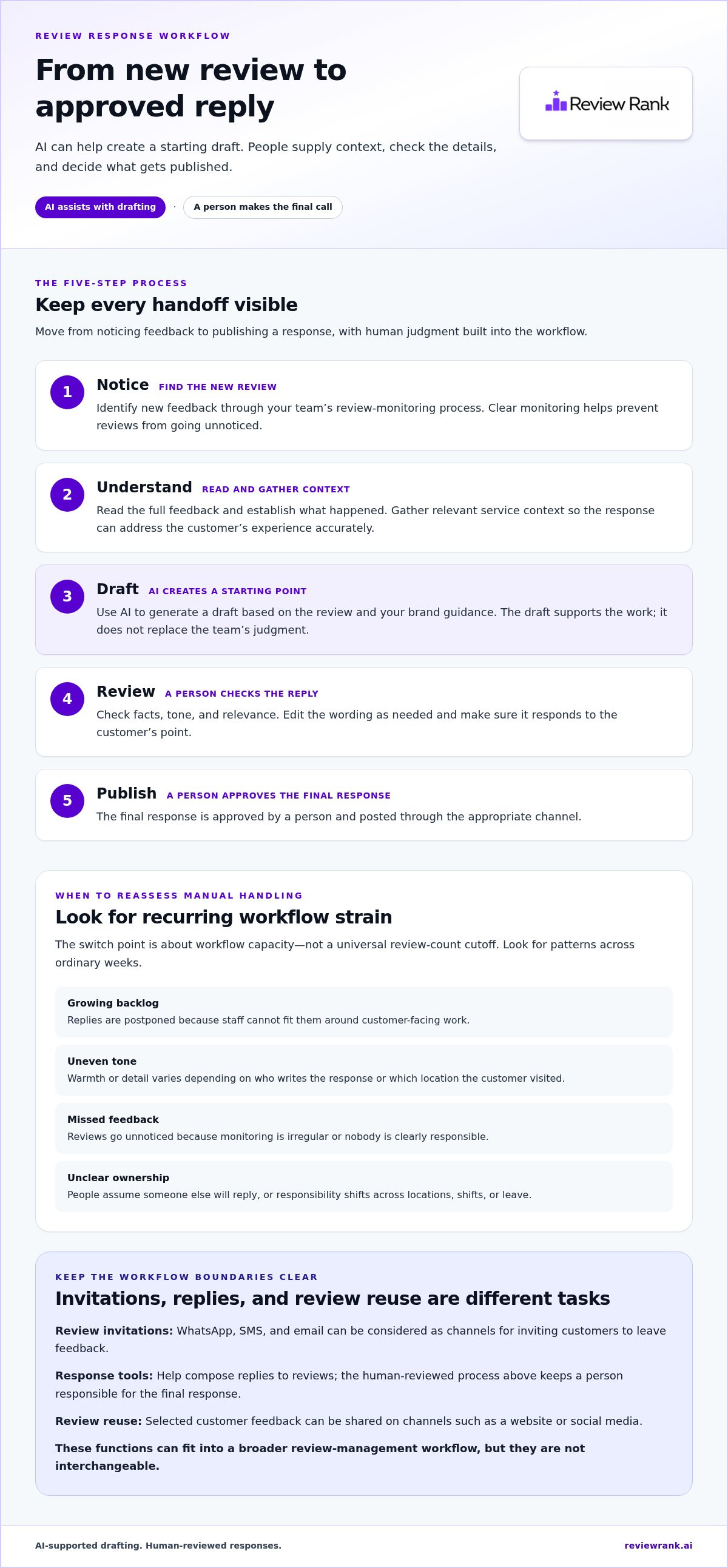
A practical process keeps each decision visible. First, someone notices new feedback. Next, they read it and establish what happened, including any relevant service context. The software can then produce a draft based on the review and the business’s guidance. A person checks the wording and facts, edits as needed, and decides whether to publish the response. AI supports the draft; it doesn’t make the final call.
- Notice: Identify the new review through the team’s review-monitoring process.
- Understand: Read the full feedback and gather any context needed to respond accurately.
- Draft: Use AI to generate a starting reply based on the review and brand guidance.
- Review: Check facts, tone, relevance, and whether the draft addresses the customer’s point.
- Publish: A person approves and posts the final response through the appropriate channel.
For a broader overview of how AI supports customer-facing work, see Zendesk’s discussion of AI in customer service. The same principle applies here: use the technology to assist the workflow while keeping people involved where context and care matter.
Which response tasks can AI help streamline?
A draft gives staff something concrete to improve. For recurring routine feedback, such as a brief compliment about friendly service, a consistent starting point can reduce repetitive writing and help maintain a recognizable voice across a team. Review Rank Ai generates AI-powered review responses, and its AI review response guide explains how response generators can support that process. A draft still needs a careful read before anyone uses it.
Where should human judgment remain central?
People should lead when a review is ambiguous, describes a serious complaint, or calls for service recovery. A public reply may need empathy, a correction, or a specific next step, and speed alone can’t supply the missing context. Have a person review sensitive cases and any draft that sounds generic, assumes facts, or doesn’t answer the concern. Explore AI-generated review responses as one way to support drafting without handing over the final judgment.
Manual vs AI-assisted replies: compare control, consistency, and workload
The right workflow depends on what your team needs each reply to do. Manual writing offers direct control, AI assistance provides a draft to work from, and human-reviewed AI combines a suggested starting point with a person’s final judgment. Compare them by task, not by assumption: AI support doesn’t guarantee faster replies, better ratings, or stronger rankings. Results still depend on the process and the people using it.
- Staff time: Manual replies require someone to compose each response. AI-assisted replies provide a draft that staff can edit. Human-reviewed replies also require review time, but can reduce the effort of starting from a blank page.
- Consistency: Manual tone can vary between writers. AI can offer a more consistent starting point, while human review helps keep the final wording aligned with the business’s voice.
- Contextual judgment: A person can draw on service details and interpret nuance. AI can help draft from the review context, but staff should handle ambiguity and decide whether the proposed response fits.
- Oversight: Manual replies are written by staff. With AI assistance, oversight depends on the chosen workflow. A human-reviewed process places approval with a person before publication.
- Review type: Routine feedback may suit a draft-and-edit approach. Sensitive complaints or unusual situations call for deliberate human judgment, whether the reply starts as a draft or is written individually.
When does manual handling still make sense?
If reviews arrive at a manageable pace and one person can respond promptly with a consistent voice, manual handling may be the simplest fit. It also makes sense when a reply needs careful, case-specific wording, such as feedback about a complicated service issue. Personal voice and complexity are reasons to choose the right level of assistance, not automatic reasons to rule out AI for every routine response.
When does AI assistance offer a clearer advantage?
Repeatedly writing similar replies, uneven coverage between shifts, or different approaches across locations can make a structured drafting process useful. Multi-location teams may use shared guidance to give staff a more consistent starting point, while keeping local context in the final check. For each review type, decide whether the team will write from scratch, edit an AI draft, or require a person to review every draft. The broader automated reputation management guide explores how response work fits into a wider workflow.
To judge when to switch from manual review responses, match the approach to the work: keep manual replies where personal judgment is central, and consider AI drafting where repetitive writing consumes staff capacity. Review Rank Ai supports AI-generated responses as part of that workflow. Explore AI review response support as you compare the level of control and consistency your team needs.
Use this checklist to switch without losing the human touch
A safe transition starts with evidence about your current workflow, not a blanket decision to automate. Before piloting AI assistance, review how feedback moves through your team. Note the review volume and sources, who owns each response, where delays occur, how tone varies, and which reply types recur. This baseline helps you choose a narrow, useful starting point and later see whether the process is working as intended.
- Volume and sources: Identify how often reviews arrive and where staff need to check for them.
- Ownership: Name the person or role responsible for noticing, drafting, reviewing, and publishing replies.
- Delays: Record where feedback waits, such as before anyone sees it or while a reply is assigned.
- Tone: Compare existing replies for consistency with your brand voice.
- Recurring types: Separate routine comments from complaints, unclear cases, and issues needing follow-up.
A safe transition automates repeatable drafting, not accountability. Keep people responsible for what the business says publicly, especially when a response could affect a customer relationship.
How can a team pilot AI-assisted responses?
Choose a limited set of routine scenarios for the first pilot, such as straightforward praise or common feedback with an established response approach. Keep other review types in the existing manual workflow. Compare each AI draft with your team’s standards for accuracy, tone, relevance, and appropriate detail. Note recurring edits, such as removing a stock phrase or correcting an assumption, then refine your guidance. Treat those notes as workflow learning, not proof of better results.
- Set the scope: Define which routine review types can receive an AI draft and which remain human-written.
- Compare drafts: Check each suggested reply against actual review details and your usual voice.
- Log edits: Track repeated changes so the team can improve instructions and spot patterns.
- Reassess the process: Decide whether the approach is useful based on quality, workload, and unresolved feedback, not speed alone.
What guardrails protect trust during the transition?
Assign a clear owner to review drafts and route escalations. Require human handling for complaints, unclear facts, sensitive details, or cases needing service recovery. Before publishing, remove unsupported promises, private personal information, and generic language that could make a customer feel unheard. Review response quality and unresolved feedback regularly with the people doing the work. If drafts repeatedly miss context or edits become burdensome, narrow the pilot and adjust the guidance before expanding it.
Use the checklist to decide when to switch from manual review responses and how much assistance fits each type of feedback. To put AI-generated response drafts into a human-led review workflow, explore Review Rank Ai’s review response tools.
Choose a review response workflow that can scale with your business
Your checklist results can guide a practical software evaluation. If reviews are spread across locations, replies have unclear owners, or routine drafting is taking staff away from other work, look for a workflow that supports those needs while preserving human oversight. Don’t choose based on automation alone. Check how the process handles review invitations, response drafting, approval, and monitoring as distinct tasks.
Review Rank Ai supports AI-generated review responses and review invitations sent through WhatsApp, SMS, and email. Invitations help request feedback; AI-generated responses support the work of replying to it. Consider whether those invitation channels suit the way your customers prefer to communicate, and whether the response process leaves your team with clear responsibility for reviewing drafts.
How do integrations fit into a review workflow?
Integrations can connect review management with tools and processes a business already uses, helping teams reduce disconnected steps. Start by mapping where customer feedback originates, who needs to act on it, and where staff currently manage related communication. Then compare that map with the Review Rank Ai integrations and workflows described in the integration directory. The goal is a more coherent process, not an assumption that every business tool or review source connects.
For example, a multi-location team may need a clear way to coordinate review response ownership across branches, while a single-location business may focus on keeping feedback and reply tasks visible to one responsible person. In either case, establish which actions an integration supports and where a human must still make a decision. Treat connections as workflow support, not a substitute for checking context or approving public replies.
What should a business assess before adopting a platform?
Match the platform to the operational picture you documented. Review volume helps show how much work enters the process; locations reveal how many teams or handoffs may be involved. Response ownership and required oversight determine who needs to see drafts and who makes the final decision. If those responsibilities remain unclear, software alone won’t resolve the gap.
- Workflow fit: Can the team distinguish review monitoring, invitations, response drafting, human review, and publishing?
- Channel fit: Do WhatsApp, SMS, and email invitations align with how your customers prefer to receive review requests?
- Oversight fit: Can staff retain the review and approval steps needed for sensitive or unusual feedback?
- Visibility fit: Does the available monitoring help the team track the local search presence it wants to observe?
Review Rank Ai includes a Google Local 3-Pack Leaderboard for monitoring local visibility. Treat it as a monitoring tool, not a promise of ranking results. The best-fit workflow is one your team can use consistently, with clear ownership and human judgment in the right places. Explore automated review management software to see how a coordinated review workflow could fit your business.
Make your next review workflow decision with confidence
The best time to reassess your process is before a backlog becomes the norm. Use what you’ve observed to choose a manageable next step, then keep checking whether the workflow gives your team enough capacity without weakening the care behind each reply. As your business changes, your approach can change with it.
For teams ready to explore software support, Review Rank Ai brings AI-generated review responses, review invitations through WhatsApp, SMS, and email, and a Google Local 3-Pack Leaderboard into the conversation. The right fit depends on how your team manages reviews and where it needs support. The goal is a workflow that can adapt while keeping people responsible for customer-facing judgment.
Deciding when to switch from manual review responses doesn’t mean giving up the personal touch. It means making a deliberate choice about where technology can help your team work with confidence. Explore Review Rank Ai’s review management platform and consider how it could fit your next stage. Your team can build a process that scales and still feels human.
Frequently Asked Questions
When should a business stop replying to every review manually?
Consider changing the process when manual replies repeatedly compete with essential work or create gaps in coverage. The decision about when to switch from manual review responses depends on patterns, not a fixed review count. For example, track whether reviews are noticed, assigned, and answered consistently during normal operating weeks. If routine replies regularly wait because the person responsible is unavailable, test AI drafting for a narrow set of straightforward responses.
Can AI write review responses that still sound personal?
Yes, an AI-generated draft can feel more personal when it refers accurately to details in the review and follows clear brand guidance. A reply to praise for a helpful staff member, for example, should acknowledge that specific compliment rather than offer a generic thank-you. Staff should remove invented details, check names and service references, and revise phrases that sound unlike the business before using the draft.
Should a person review every AI-generated response before it is published?
A person should review drafts before publication, especially while a team is learning how the tool handles its feedback. That check can catch wrong assumptions, missed details, or a tone that feels impersonal. Businesses can also define extra review steps for sensitive topics and escalation cases. Keep the approval process clear: a generated draft is a suggestion for staff to assess, not a finished public reply.
Are negative reviews always better handled manually?
No. A minor, clearly described issue may be suitable for an AI-assisted draft if a person checks the facts and wording. Complaints involving disputed details, a requested remedy, or a situation that needs follow-up call for closer human attention. For example, if a customer says an appointment was cancelled unexpectedly, staff should establish what happened and what response is appropriate before publishing anything.
Can a small business benefit from AI-assisted review responses?
Yes. A small team may find draft assistance useful when the person who handles reviews also manages bookings, sales, or customer service. Start with a recurring response type, such as a brief thank-you for positive feedback, and compare drafts with replies the business already considers on-brand. If editing each draft takes more effort than writing it, keep that category manual and try a better-fitting one.
How can a business tell whether its review response process is working?
Track practical workflow measures over time: how many new reviews are noticed, how many receive a response, how long replies remain unassigned, and how often drafts need substantial correction. Also record whether complaints needing follow-up reach the right person. These measures help reveal bottlenecks and quality issues. Compare similar operating periods, and use the findings to adjust ownership, review steps, or which reply types receive drafting assistance.
Can review requests be sent through WhatsApp, SMS, and email?
Yes. Review Rank Ai can send review invitations through WhatsApp, SMS, and email. A business can consider which channel best fits its existing customer communication and how it wants to organize follow-up. For example, a team might use the channel already familiar to customers after a completed service. Keep invitation messages clear and ensure staff understand how incoming feedback will be monitored and handled.