
SMS Review Request Tool: Turn Customer Follow-Ups into More Reviews
A great customer experience can still end without a review if the follow-up gets lost in a busy day. An sms review request tool can make asking more consistent, but the message needs to arrive at the right moment and through a channel that suits the customer.
It’s understandable to want one simple process. Yet a generic text sent too soon can feel intrusive, while an email that arrives late may be overlooked. Review Rank Ai supports automated review invitations through SMS, WhatsApp, and email, giving businesses a way to align follow-ups with customer communication preferences.
In this article, you’ll learn how SMS review requests work, how the channel compares with email and WhatsApp, and what to consider when choosing timing and message flow. We’ll also look at how integrations can connect review requests with the tools your business already uses, and how automation can make follow-up a practical part of day-to-day operations across different customer journeys.
Key Takeaways
- An sms review request tool helps make follow-ups more consistent, while customers remain free to decide whether and what to review.
- Build a clear workflow around a customer journey trigger, a suitable channel, a thoughtful message, and a review of outcomes.
- Choose SMS, WhatsApp, or email based on how customers communicate and the kind of follow-up that fits the experience.
- Connect review invitations with documented integrations and existing business workflows to reduce separate manual follow-up tasks.
- Look beyond sending requests: consider how review visibility, responses, and repurposing can support a broader reputation workflow.
What an SMS review request tool does, and where it fits in the customer journey
An sms review request tool helps a business invite customers to share feedback by text. It supports the follow-up process; it doesn’t write the customer’s review or decide what they should say. The customer chooses whether to respond and what to share.
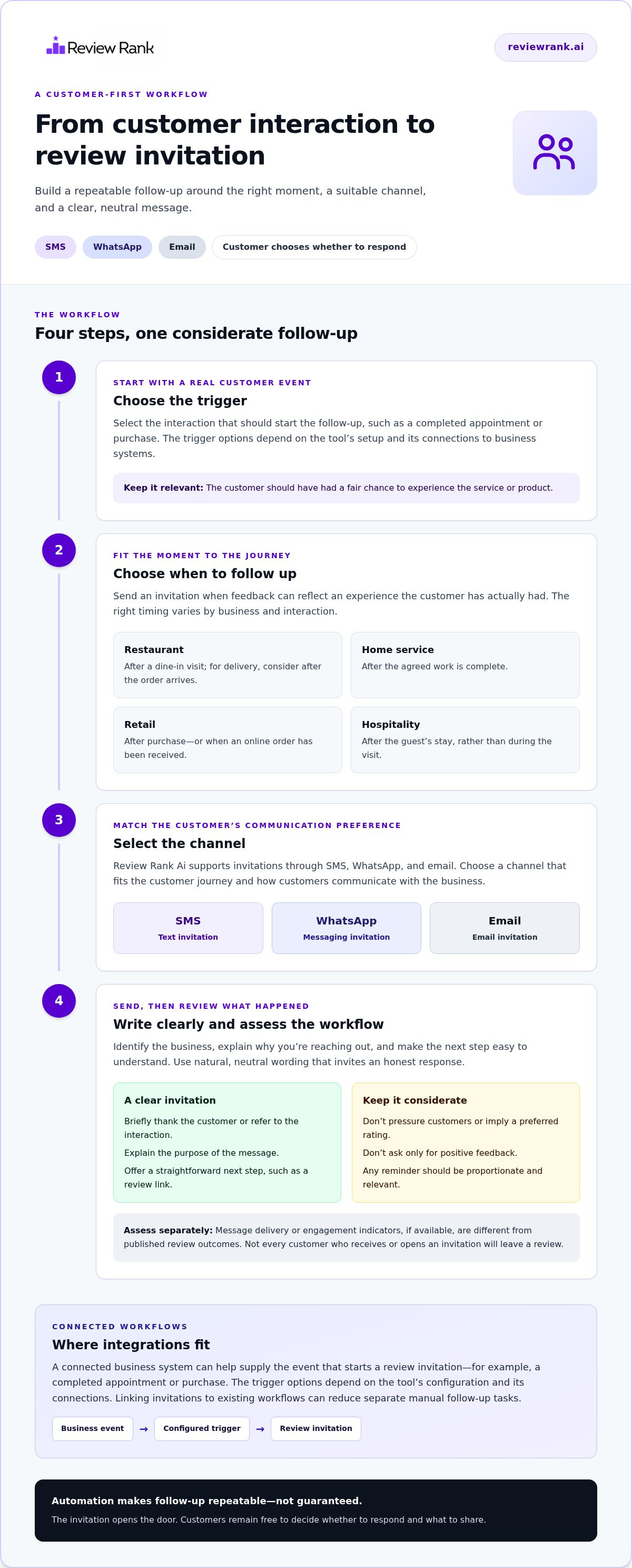
A request may fit after a completed service, purchase, appointment, or other meaningful interaction, once the customer has had a fair chance to experience what the business provides. The best moment depends on the journey. A restaurant might follow up after a visit, while a home services business may wait until the work is complete. The aim is to make a relevant invitation, not to send a text simply because a transaction occurred.
Text-based invitations are one use of SMS marketing. Automation can help make follow-ups more consistent, but it can’t guarantee that customers will leave reviews or that a business will earn a particular search ranking. The invitation opens the door. The customer decides whether to walk through it.
How a review request moves from customer interaction to invitation
A straightforward workflow has four stages: a customer interaction, a suitable follow-up moment, an invitation, and, if appropriate, an optional reminder. The trigger might relate to a completed appointment or purchase, but the right setup depends on the business’s process and the tools involved.
Keep the message clear: explain why the customer is receiving it and make the next step easy to understand. For example, a short note can thank someone for visiting and invite them to share feedback through a review link. Avoid wording that pressures customers or suggests the response they should leave.
Automation handles the repeatable send. Staff can keep the experience personal by choosing language that reflects the business’s tone and by making sure the follow-up fits the interaction. A reminder should feel like a considerate nudge, not an obligation.
Which businesses can use SMS review requests?
The approach can suit businesses with different customer journeys, but timing shouldn’t be copied blindly from one industry to another. Consider what the customer has experienced and when feedback would be most relevant.
- Restaurants: A follow-up may make sense after a dine-in visit, while a delivery business may consider the experience after an order arrives.
- Clinics: A request could follow an appointment, with timing and wording suited to the service and patient journey.
- Local services: A cleaning or repair business might wait until the agreed work is complete.
- Retail: A store may follow up after a purchase, while an online seller may consider when the customer has received the order.
- Hospitality: A hotel may invite feedback after a stay, rather than during the guest’s visit.
For high-volume businesses, a repeatable workflow can reduce the chance of missed follow-ups. Businesses with longer or more personal interactions may need more care around the moment and wording. The right process fits the customer experience first.
How an SMS review request tool works from message setup to review tracking
An automated review invitation is a message sent after a customer interaction to invite the customer to share feedback. An sms review request tool helps businesses organize that invitation workflow, but its available triggers and reporting depend on the specific product setup.
Think of the process as a sequence, not a single send:
- Choose a trigger: Decide which customer event should start the follow-up, such as a completed appointment or purchase. The available trigger options depend on how the tool is configured and connected to business systems.
- Select a channel: Match the invitation to the customer journey and communication preference. Review Rank Ai supports invitations through SMS, WhatsApp, and email.
- Prepare the message: Make the purpose clear and include a straightforward next step, such as a link to leave feedback.
- Send and assess: Review whatever reporting the setup provides, then use the findings to spot gaps in the workflow.
A reminder can be part of the process, but it should be considered carefully. Repeated messages may feel unwelcome, so keep any follow-up proportionate and relevant to the interaction. Automation makes the process repeatable; it doesn’t guarantee that a customer will respond or publish a review.
What makes a review request message clear and customer-friendly?
Good wording is direct, natural, and neutral. Identify the business, briefly explain why you’re reaching out, and make the requested action easy to understand. A restaurant might thank a guest for visiting and invite them to share feedback; a clinic could use language suited to its appointment experience.
Invite an honest response. Don’t pressure customers, ask only for positive feedback, or hint at a preferred rating. A personal tone comes from relevant details and considerate wording, not from pretending an automated message was individually typed.
What should businesses track after sending a request?
Separate the stages of the journey. Delivery or engagement indicators, if available, describe what happened to the message. Published review outcomes are a different measure, and not every customer who receives or opens an invitation will leave a review.
Use available reporting to ask practical questions: Are invitations reaching customers? Does one step appear to lose momentum? Are requests being sent after the intended interaction? Confirm which measures your platform setup actually provides before building decisions around them. Review Rank Ai’s review invitation workflow can be considered as part of a broader process for managing customer feedback.
SMS vs. WhatsApp vs. email: choose the review request channel that fits
The best channel isn’t automatically the one that feels fastest or most familiar to the business. It’s the one that makes sense in the customer relationship. Review Rank Ai supports review requests through SMS, WhatsApp, and email, so businesses can consider the customer’s usual communication context when planning follow-ups.
Channel choice should match the communication context, not a one-size-fits-all rule. Use this comparison to guide the decision:
| Channel | Customer context | Message format | Workflow fit |
|---|---|---|---|
| SMS | A text fits the existing relationship and the customer’s expectations. | Concise, direct message with a clear invitation and next step. | Useful for a brief follow-up when texting is already an appropriate way to reach the customer. |
| The business and customer already use WhatsApp to communicate. | A message delivered through the familiar WhatsApp channel. | Fits a follow-up process that already includes WhatsApp communication. | |
| The customer journey already includes email follow-ups. | An email invitation that can sit within the business’s existing email communication. | Works naturally when email is already part of the post-purchase or post-service routine. |
When might SMS suit a review invitation?
SMS can be a sensible option for a concise follow-up when texting aligns with the relationship. For example, a customer who has already received appointment updates by text may find a brief review invitation consistent with that experience.
Keep it relevant. Identify the business, connect the message to the interaction, and make the requested action clear. A text that arrives unexpectedly or feels generic can undermine trust, even if its link works. The channel should serve the customer experience, not just the convenience of the sender.
When might WhatsApp or email fit better?
Choose WhatsApp when it’s already an established way the business communicates with customers. Choose email when the existing follow-up journey is built around email and customers expect to receive updates there. Neither channel is universally better; the fit depends on how the relationship works.
Channel support and integrations are separate considerations. Review Rank Ai supports review invitations through all three channels, but businesses should base workflow decisions on the tools and connections documented for their setup. A channel choice is strongest when it’s familiar, relevant, and easy for the customer to act on.
Connect review requests to integrations and everyday business workflows
A review invitation works best when it follows a natural customer handoff, not when it becomes another task staff must remember between appointments, orders, or service calls. Before choosing an sms review request tool, map the journey from the customer interaction to the follow-up. Then decide where automation can make that step more consistent without disrupting how the business already operates.
How to map a review request workflow before adopting a tool
Start with the moment that makes a request relevant. A completed service, purchase, or visit may be the natural starting point, but the right point depends on when the customer has had a chance to experience the service. Next, map who or what recognizes that moment, who handles any exceptions, and which communication channel fits the relationship.
Keep the map focused on the process, not assumptions about software. A single-location business may have one team managing follow-ups. A multi-location group may need a repeatable approach across branches, with clear responsibility for local differences. In either case, identify where a manual step could be missed and where staff judgment should remain part of the handoff.
What to explain about integrations
An integration can connect tools or information used in a workflow, but the practical details matter: what connects, where the connection happens, and what task it supports. Don’t assume that an integration automatically detects a purchase, transfers customer details, or sends a message. Those capabilities depend on the documented setup.
Review Rank Ai supports review invitations through SMS, WhatsApp, and email. For any connection to other business tools, distinguish a documented integration from a manual process or another connection method. Confirm the specific supported tools and workflow in the Review Rank Ai integrations documentation before describing how data or events move. This keeps the workflow plan useful and avoids promising a connection that may not match the actual setup.
Once the handoff is clear, the request process can sit within a wider approach to automated reputation management software and review invitations. Keep the focus on practical fit: a trigger that reflects a real customer interaction, an appropriate channel, and a clearly owned follow-up process. Explore Review Rank Ai’s review invitation workflow as you plan how requests can fit into everyday operations.
Evaluate an SMS review request tool, and see how Review Rank Ai fits
Choosing an sms review request tool means looking beyond the send button. The right fit should support a repeatable customer follow-up and make sense alongside the rest of your reputation workflow. Use this checklist to assess what matters:
- Channels: Can invitations be sent through the channels that suit your customers, such as SMS, WhatsApp, and email?
- Workflow fit: Can the process follow a meaningful customer interaction without adding a step staff are likely to miss?
- Integrations: Are the available connections and their documented workflows relevant to the tools your business uses?
- Visibility: Can you review reputation signals that help you understand your local search presence?
- Follow-up: Does the workflow support what happens after an invitation, including responding to reviews and making useful feedback visible elsewhere?
These points help separate a convenient message sender from a process that supports ongoing reputation management. They also make it easier to identify what the tool does, and what still depends on customer choice or staff action.
How Review Rank Ai supports a multi-channel review workflow
Review Rank Ai supports review invitations through SMS, WhatsApp, and email. Businesses can align the channel with their customer communication context, then connect review collection to other reputation activities. AI-generated review responses can support the response stage, while review repurposing can bring reviews to websites and social media. The Google Local 3-Pack Leaderboard offers a way to monitor local search visibility. These capabilities support different parts of the workflow; none guarantees a review or a particular ranking.
Integrations should be assessed by their documented purpose and workflow, rather than assumed to trigger messages or move data in a specific way. Review Rank Ai’s integrations page describes the available connections. Match those documented details against your customer handoff and existing tools before settling on a process.
Automation can make review invitations more consistent, but it can’t guarantee reviews or search rankings. Customers decide whether to leave feedback, and search visibility depends on more than sending invitations.
What to do next if the workflow fits your business
If the channel options and broader reputation features align with your customer journey, explore how the workflow could fit your operations. For a wider view of how review collection connects with responses, visibility, and reuse, read our automated reputation management guide.
Make every customer follow-up count
A reliable review process starts with a relevant moment, a clear invitation, and a channel that suits the customer. An sms review request tool can help make follow-ups more consistent, while SMS, WhatsApp, and email offer options for different communication journeys. The customer always decides whether and what to share.
Review Rank Ai brings those request channels together with AI-generated review responses and a Google Local 3-Pack Leaderboard, connecting invitations with other parts of reputation management. Automation can support the process, but it can’t guarantee reviews or search rankings.
Ready to build a more consistent review workflow? Explore Review Rank Ai and see how review invitations can fit your customer follow-up process. Start with a thoughtful workflow, then keep improving it around the experience your customers expect.
Frequently Asked Questions
What is an SMS review request tool?
An SMS review request tool is software that helps a business invite customers to share feedback by text. It can make follow-ups more consistent after interactions such as a completed purchase or appointment. The tool sends the invitation, not the review itself. Customers choose whether to respond and what to say, so messages should invite honest feedback without suggesting a particular rating.
How does an automated SMS review request work?
An automated SMS review request follows a set workflow: a customer interaction prompts a follow-up, the business sends a text invitation, and the customer can choose whether to leave a review. The trigger and available reporting depend on the tool’s setup. Keep the message recognizable and the next step clear. Automation can reduce missed follow-ups, but it can’t make a customer respond.
Can a review request tool send invitations through WhatsApp and email too?
Yes. Review Rank Ai supports review invitations through SMS, WhatsApp, and email. This gives businesses channel options for different customer journeys. For example, a business might use email for an established post-purchase follow-up and WhatsApp when it’s already a familiar communication channel. Choose based on customer expectations and your workflow, rather than assuming one channel is right for every interaction.
When should a business send an SMS review request?
Send an invitation after the customer has had a reasonable opportunity to experience the product or service, and choose a moment that fits the journey. A completed home repair may be the natural point for a local service business; a hotel might wait until after a guest’s stay. The right timing varies. A relevant follow-up feels considered, while an unrelated or premature message can feel intrusive.
Are automated review requests impersonal?
Not necessarily. Automation handles the repeatable act of sending a request, while the business can shape its wording and timing to suit the customer experience. Use a natural tone, identify the business, and refer clearly to the interaction. Avoid overly generic language or pressure for a positive rating. A well-considered message can feel consistent without pretending it was individually typed.
What should I look for in an SMS review request tool?
Look for channel options that fit your customers, a workflow that follows a meaningful interaction, and clear information about available integrations and how they work. Consider what reporting is provided, and how the wider process handles review responses and visibility. For example, Review Rank Ai offers SMS, WhatsApp, and email invitations, AI-generated review responses, and a Google Local 3-Pack Leaderboard.
Can an SMS review request tool guarantee more reviews or higher Google rankings?
No. An SMS review request tool can help make invitations more consistent, but customers decide whether to leave a review. No request workflow can guarantee review volume or a specific Google ranking. Review Rank Ai includes a Google Local 3-Pack Leaderboard to help businesses monitor local search visibility, alongside its review invitation and response features. Treat automation as process support, not a promised outcome.