
Review Management Platform: How to Choose the Right System in 2026
A review management platform should make it easier to request feedback consistently, respond to customers, and understand what reviews reveal. More features won’t fix a process that breaks between channels, teams, and tools.
If review requests and replies are handled differently across locations, or review activity sits apart from the tools your team uses, choosing by feature list alone may leave the problem untouched. Start by mapping your current workflow. Identify where requests happen, who monitors feedback, and which handoffs slow the team down.
This guide compares platforms by how they handle invitations, responses, measurement, and business fit. It also explains how integrations can connect review work with tools used by restaurants, clinics, hotels, and other businesses. Review Rank Ai combines automated invitations through WhatsApp, SMS, and email with AI-generated responses and local visibility monitoring, giving you a focused system to assess against your workflow.
Key Takeaways
- Choose a review management platform by mapping the work your team needs it to handle, not by counting features.
- Build a consistent review cycle: request feedback, choose the right channel, respond, and learn from the results.
- Assess how integrations can connect review work with the tools and platforms your business already uses.
- Set priorities around your business model, whether you manage one location, multiple branches, or a high volume of customer feedback.
- Compare how Review Rank Ai’s WhatsApp, SMS, and email invitations work alongside AI-generated review responses.
What Is a Review Management Platform, and What Should It Actually Manage?
A review management platform is software that helps a business organize the process of requesting, monitoring, responding to, measuring, and reusing customer reviews. It does more than count stars. The goal is to make review work repeatable: requests go out at the right point in the customer journey, feedback is visible to the right people, and replies and results are easier to manage consistently. This work is part of Online Reputation Management, the broader practice of managing an organization’s presence and reputation online.
Use the workflow as your baseline when comparing software. The specific review sites, request channels, reporting, and integrations vary by platform, so prioritize the capabilities that support your team’s actual work.
Which review tasks can a platform bring together?
A practical review workflow starts with an invitation after a customer interaction. The customer leaves feedback, the team monitors it, and someone prepares or assigns a response. The team can then review activity over time and look for recurring themes. Reporting may help staff compare activity across locations, while some platforms also let businesses reuse reviews on websites or social media. That can extend the value of feedback, but it does not replace reliable requests, monitoring, and replies.
Map the handoffs before comparing tools. Decide who sends invitations, who sees new feedback, who drafts or approves replies, and who shares recurring issues with the people responsible for service. Then look for software that supports those steps. Automation can reduce repetitive work, but staff still need to respond thoughtfully and act on valid customer concerns.
Who benefits from review management software?
Any business that regularly receives customer feedback can benefit from a clear process. A restaurant can set a routine for inviting diners and tracking comments about service. A clinic can organize feedback monitoring and manage replies carefully. A home services company can include an invitation in its follow-up after a completed job, while a professional firm can make sure feedback reaches the person responsible for responding.
The coordination challenge changes with scale. A single-location owner may need a clear view of incoming feedback and a simple way to keep requests and replies from slipping through the cracks. A multi-location team also needs defined ownership across branches and a consistent way to review activity without losing local context. As review volume grows or staff capacity tightens, scattered inboxes and informal reminders become harder to manage. A repeatable workflow makes responsibilities clearer.
Review management software supports defined tasks, such as invitations and response workflows. It is different from a full-service reputation or SEO agency, which may provide broader strategy or hands-on execution. Choose software for the review operations it supports, rather than expecting it to cover every part of managing a brand’s online presence.
How a Review Management Platform Connects Requests, Responses, and Integrations
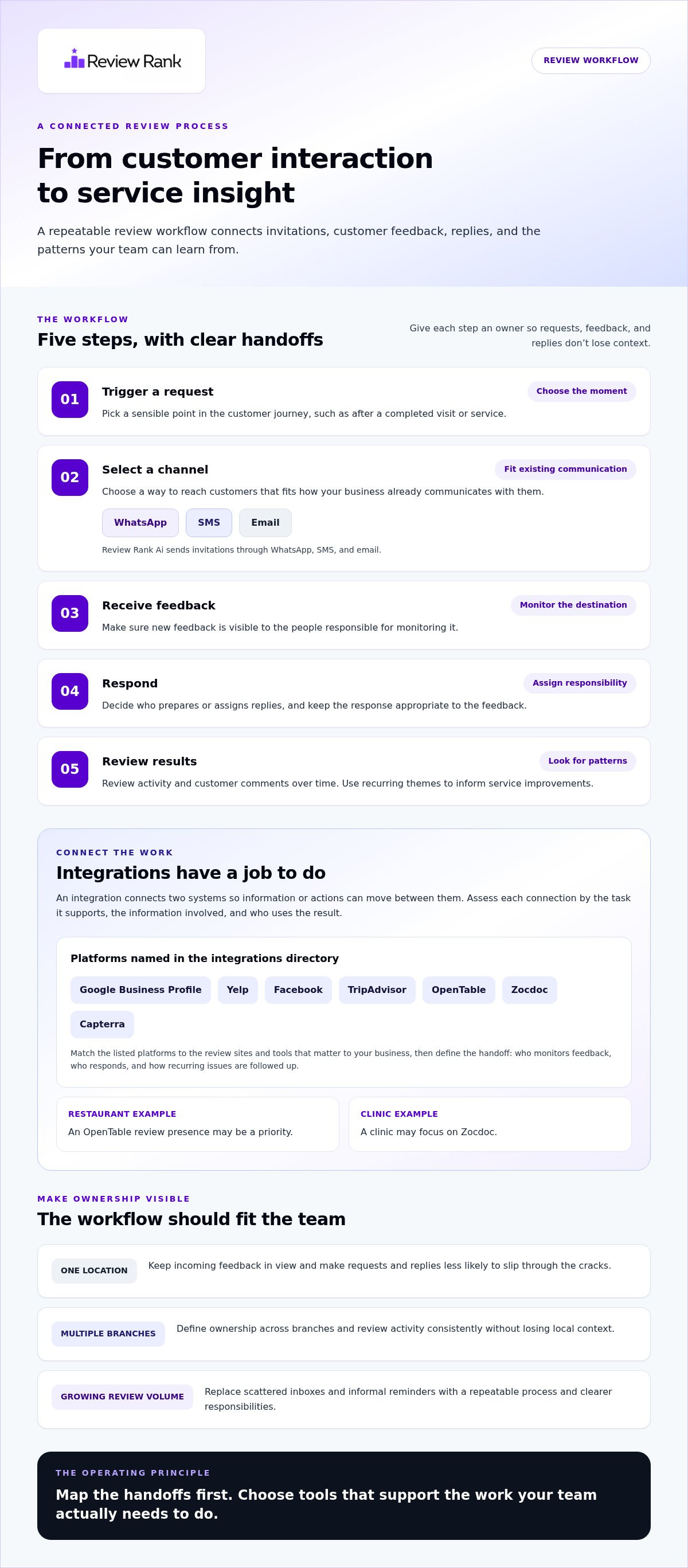
A connected workflow follows the customer experience from the invitation to the decisions your team makes after reading feedback. Give each step a clear owner and handoff. When requests sit in one system, reviews in another, and replies in a shared inbox, teams can lose context. A review management platform can bring review tasks together, while integrations can connect that work with other tools your business uses.
- Trigger a request: Choose a point in the customer journey when an invitation makes sense, such as after a completed visit or service.
- Select a channel: Send the invitation through a channel that fits how your business communicates with customers.
- Receive feedback: Monitor the review destination so new feedback doesn’t go unnoticed.
- Respond: Assign responsibility for replies and keep the tone appropriate to the feedback.
- Review results: Look for patterns in review activity and customer comments, then use those observations to inform service improvements.
How do review platform integrations work?
An integration connects two systems so information or actions can move between them. To assess its practical value, identify the task it supports, the information involved, and who uses the result. Review Rank Ai’s integrations directory names platforms including Google Business Profile, Yelp, Facebook, TripAdvisor, OpenTable, Zocdoc, and Capterra. Match the platforms listed there to the review sites and tools that matter to your business, then build your workflow around the connections shown.
For example, a restaurant may prioritize its review presence on OpenTable, while a clinic may focus on Zocdoc. Start with the platform your customers use and the task your team needs to complete. Make the handoff clear in your workflow: who monitors feedback, who responds, and how the team follows up on recurring issues. That gives integrations a defined role instead of treating a list of platform names as the goal.
Which review request channels can fit into the workflow?
Review Rank Ai sends invitations through WhatsApp, SMS, and email. Each gives a business a different way to reach customers: WhatsApp for messaging, SMS for text messages, and email for a written follow-up. Choose a channel that fits your existing customer communication and staff process. Make the invitation clear and easy to understand, and give staff a consistent way to handle any questions that come back.
After invitations go out, decide who monitors incoming reviews and who handles replies. Set a regular time to review activity and share useful themes with the team. This closes the loop: invitations create opportunities for feedback, responses show that it is being handled, and review patterns can point to customer experience issues worth addressing. For a broader view of how software can support this process, see Automated Reputation Management Software: The 2026 Guide to Market Dominance.
Review Rank Ai brings request channels and AI-generated responses into one review workflow. Explore review management tools while mapping the handoffs your team needs.
How to Compare Review Management Platforms Beyond the Feature Checklist
A long feature list won’t tell you whether a platform fits the way your team requests, handles, and learns from reviews. Compare options against real tasks, handoffs, and decisions. Before evaluating platforms, mark each requirement as essential, useful, or optional. That keeps attractive extras from taking priority over the basics.
Which capabilities belong on a platform evaluation checklist?
Use the comparison below to assess what each capability needs to do for your team. A feature earns its place when it supports a real process or answers a useful business question.
| Area | What to evaluate | Must-have question |
|---|---|---|
| Request channels | Invitation options and how they fit existing customer communications | Can staff send requests through channels they can manage consistently? |
| Response support | How incoming feedback is handled, drafted, assigned, or reviewed | Is it clear who owns replies and when a person needs to review them? |
| Reporting | Review activity and performance views for locations or teams | Can the reports answer the questions managers actually ask? |
| Integrations | Connections to the review sites and business tools used in daily work | Does a connection support a real handoff, rather than simply name a platform? |
| Business fit | Support for location count, team roles, review volume, and review reuse | Can the workflow scale without adding unnecessary steps? |
Separate core requirements from optional features. Reliable invitations, visibility into incoming feedback, a workable response process, and reporting that informs action are common priorities. Reusing reviews on a website or social media may add value if your team has a plan for that content. For integrations, define the task and information involved, then assess whether the connection supports it.
How should a business judge fit instead of chasing feature counts?
Fit depends on workload and ownership. A single-location team may need a straightforward process employees can follow without extra coordination. For multiple locations, look at how the system separates branches, clarifies roles, and gives managers an overview while preserving local responsibility. High-volume businesses should consider how automation reduces repetitive work while leaving staff able to understand feedback and handle sensitive replies thoughtfully.
Ask how review activity is grouped, whether the right people can access the right tasks, and how reviews can be reused if that matters to your business. Walk through a realistic example, from invitation to follow-up. Response tools can help teams work efficiently, but a generated draft still needs to address the customer’s actual comments. For more on that distinction, see AI Review Response Generators: Dominate Your Market with Automated Authority.
A local ranking tool can help monitor visibility, but it cannot promise a search position. Treat ranking data as one measurement alongside your workflow results. The right review management platform makes essential work clear and repeatable, rather than simply offering the longest feature checklist.
Matching Review Management to Your Business Workflow
A platform fits only if it works with the way your team serves customers. Trace the process from a completed visit or purchase to review follow-up, then identify the handoffs that cause delays or missed tasks. Use this sequence to ground your decision in daily work:
- Map the current process: Note when review requests are sent, which channels staff use, where new feedback appears, and who handles replies.
- Find the bottlenecks: Look for inconsistent requests, feedback that goes unseen, unclear response ownership, or repeated manual steps.
- Set requirements: Separate essential needs, such as channel options or location-level views, from features your team may not use.
- Test a small pilot: Run the workflow with a limited group or location, then observe whether the steps are clear and manageable.
What should a single-location business prioritize?
For one location, clarity matters more than complexity. Identify who sends invitations, which channel suits customer conversations, and who checks and responds to feedback. A café might invite customers after a visit, while a clinic could build the request into its post-appointment routine. The process should be easy for staff to follow consistently, without adding features that do not solve a real problem.
WhatsApp, SMS, and email give businesses different ways to reach customers. Choose based on how your business already communicates and what feels natural for the customer relationship. A small pilot can show whether invitations are sent as planned, feedback is visible, and staff know who follows up. Track practical observations, such as missed handoffs and staff time, rather than setting unsupported success targets.
What changes for multi-location or high-volume teams?
With multiple branches, define the split between local teams and central managers. Local staff may own replies and service follow-up, while managers need a consistent view of review activity across locations. A retailer can compare whether each branch follows the same process; a local services brand can clarify who handles feedback when customers interact with different teams. Keep local context intact while making oversight practical.
During a pilot, observe whether each location can identify incoming feedback, assign response responsibility, and surface recurring operational issues. For high-volume teams, note which repetitive steps automation removes and whether staff still have enough context to handle sensitive feedback thoughtfully. If local visibility is part of your workflow, the Local SEO Reputation Management: Dominate the 3-Pack in 2026 guide explores that topic further.
Put your workflow map into practice with Review Rank Ai’s review management platform, including invitations through WhatsApp, SMS, and email.
How Review Rank Ai Supports a Connected Review Management Workflow
Once you’ve mapped your team’s needs, compare them with the work a platform supports. Review Rank Ai brings together review invitations, response assistance, local ranking monitoring, and review reuse. Consider how those capabilities fit your process, team roles, and customer communication habits.
Which parts of the review workflow does Review Rank Ai support?
At the request stage, Review Rank Ai automates invitations through WhatsApp, SMS, and email. Choose the channel that fits your customer communications and build requests into the right point in the customer journey. The goal is a repeatable process, not a promise that one channel will produce more reviews.
For incoming feedback, the platform generates AI-powered review responses to assist with replies. This can help teams manage response work while keeping the final message relevant to the customer’s comments. Review Rank Ai also offers a Google Local 3-Pack Leaderboard for monitoring local ranking activity. Use it to observe visibility, not as a promise of a particular search position.
The platform includes negative feedback filtering as part of its review workflow. This is distinct from preventing or suppressing public negative reviews. Reviews can also be repurposed on social media and company websites, helping businesses use customer feedback beyond review platforms. That is review reuse, not social media content management.
Integrations help connect review work with the tools your team uses. Start by naming the systems involved and the task each connection supports. Review Rank Ai’s integrations directory provides a place to review its named platform connections and match them to your workflow. Clear roles and handoffs make the resulting process easier for staff to follow.
For a broader view of how review requests, feedback, and responses can work together, explore an automated reputation management workflow.
How can a team take the next step?
Use your requirements as the test. List the tasks you need to support, the channels that fit customer interactions, who owns responses, the questions reporting should answer, and the integrations your team uses. Then compare that list with Review Rank Ai’s capabilities. A café, clinic, local service company, or multi-location brand can use the same method while prioritizing different handoffs.
Build a practical implementation plan: choose when to send requests, decide who reviews incoming feedback, and set a routine for assessing activity. Keep the process clear enough for staff to follow and flexible enough to learn from customer comments. A system can support consistent work, but it does not replace judgment or guarantee business growth.
If you’re ready to discuss how Review Rank Ai could fit your operation, book a conversation about your review workflow.
Make Your Next Review Workflow Count
Your next step is not to chase the platform with the biggest feature list. Choose one review task that regularly gets delayed or handled differently by each team member. Assign an owner, define what a consistent process should look like, and use that as your starting point for evaluating a review management platform.
Then give the process room to improve. Notice where handoffs still break down, which steps feel unnecessarily manual, and what customer feedback prompts your team to reconsider. Use those observations to refine responsibilities and make the workflow easier to sustain. A system delivers practical value when it supports how your business works and helps the team act on feedback consistently.
To put that process into action, explore the Review Rank Ai platform and see how its invitations, AI-generated responses, and local visibility monitoring fit your review workflow.
Frequently Asked Questions
What is a review management platform?
A review management platform is software that helps a business organize review tasks, from inviting customers to monitoring feedback and managing replies. It supports a defined workflow; it is not automatically a full-service SEO or reputation agency. Before choosing a platform, identify who owns each task and what the software needs to help them do. This makes it easier to compare practical tools with broader consulting or marketing services.
How does a review management platform work?
A review management platform can coordinate invitations, incoming feedback, response work, and activity monitoring. Test the process with a realistic example, such as a customer who leaves feedback that needs follow-up. Check whether staff can find the relevant review, understand who should act, and record what happened next. This can reveal workflow gaps that a feature list may not show.
Can a review management platform send requests through WhatsApp, SMS, and email?
Some platforms offer several invitation channels, while others support fewer. Review Rank Ai supports review requests through WhatsApp, SMS, and email. Choose channels based on how your customers already communicate with the business. Decide which channel belongs in your normal follow-up process and make sure staff know how to handle questions that come back through it.
What integrations should a review management platform have?
The useful integrations are the ones that support real handoffs in your business, not simply the longest list of connected tools. Note where customer interactions begin, where review activity needs to go, and which team members need the information. Then compare those needs with the platform’s integrations directory. Review Rank Ai’s integrations directory lists platform connections you can match to your workflow.
Is a review management platform useful for a single-location business?
Yes, it can help when review tasks are easy to forget or take staff away from other work. A single-location business can start by choosing a clear owner for invitations and a routine for checking feedback. An accounting firm, for example, might decide who reviews new comments and how relevant themes reach the person responsible for client experience. Start with the actual bottleneck, not a long list of advanced features.
How should multi-location businesses compare review management platforms?
Compare how each platform supports local ownership and central oversight. A useful test is whether managers can distinguish one branch’s activity from another and whether teams use consistent definitions in reporting. Decide how staff will organize recurring feedback so comparisons are meaningful. Also identify who handles location-specific follow-up and how central teams can spot issues affecting several branches.
Can a review management platform guarantee a Google Local 3-Pack position?
No. A platform can provide tools to monitor local visibility, but it cannot guarantee a particular Google Local 3-Pack position. Treat leaderboard data as a way to observe ranking activity, not as a promised result. Use it alongside customer feedback and the actions your team takes. Review Rank Ai’s Google Local 3-Pack Leaderboard supports monitoring, while search positions remain outside a software feature’s control.