Local 3-Pack Drop: Check Your Profile and Business Details
A local 3-pack drop usually points to a change in relevance, distance, or prominence, or to business information that no longer matches what people search for. If you’re asking why your business fell out of the local 3-pack, start with the details you control: your profile information, reviews, photos and videos, and the business name shown on your website. A small mismatch can make it harder for Google to connect your business with a relevant local search.
A drop is frustrating, especially when your business details seem unchanged. But checking the profile and website side by side can reveal inconsistencies that are easy to miss. This article walks you through the key details to review, including business hours, categories, customer feedback, media, and name consistency. You’ll also learn how to monitor local visibility and keep review activity organized, so you can take practical steps to address the drop instead of guessing at the cause.
Key Takeaways
- Compare your profile with your current business details, including your address, hours, and category, to spot gaps that can affect local visibility.
- Review how clearly your profile matches the services and searches you want to be found for.
- Build a consistent review routine and respond to customer feedback to keep your profile active and informative.
- Refresh profile photos and videos so they accurately show what customers can expect from your business.
- Check that your business name matches across your Google Business Profile and website, then monitor local visibility for changes.
1. Keeping business information accurate and complete
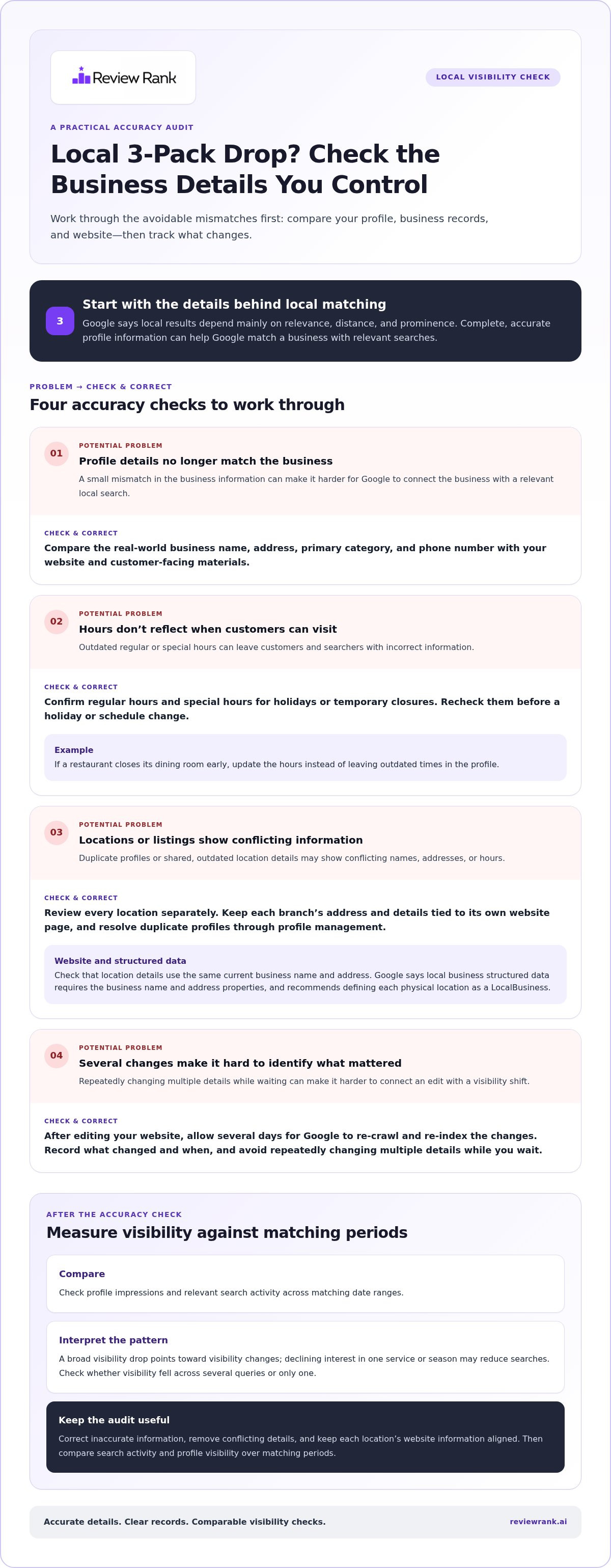
A local visibility drop can follow a change in your details, not just a competitor gaining ground. Google says local results depend mainly on relevance, distance, and prominence. Complete, accurate profile information can help Google match your business with relevant searches. Start by comparing your Google Business Profile with your current business records and website.
Check the core details first. A customer-facing location should show its full address. Confirm your primary business category, phone number, and business hours, including special hours for holidays or temporary closures. For example, a restaurant should update its hours when the dining room closes early, rather than leaving customers and searchers with outdated information.
Next, review details that help explain the customer experience. Add accurate information about relevant features, such as parking or Wi-Fi. Google says local business structured data requires the business name and address properties, and recommends defining each physical location as a LocalBusiness. For a chain, keep each location’s address and details tied to its own page.
How can you tell whether a local 3-pack drop reflects a ranking change or lower search demand? Compare profile impressions and relevant search activity across matching date ranges, then check whether visibility fell for several queries or only one. A broad drop points toward visibility changes; declining interest in a specific service or season may reduce searches.
Can duplicate listings or inconsistent business information hurt local rankings? Inconsistent details can make it harder for Google to identify the right information for a search. Duplicate profiles may also show conflicting addresses, hours, or names. Identify duplicates and resolve them through profile management.
Use this recovery sequence to remove avoidable accuracy problems:
- Confirm the real-world business name, address, category, and phone number against your website and customer-facing materials.
- Update regular and special hours, then check them again before a holiday or schedule change.
- Review every location separately, especially if branches share similar names or services.
- Check your website’s location details and structured data for the same current name and address.
After editing your website, allow several days for Google to re-crawl and re-index the changes. Avoid repeatedly changing multiple details while you wait, because that makes it harder to connect an edit with a visibility shift. Record what changed and when.
What steps can you take to regain local 3-pack visibility? Correct inaccurate profile information, remove conflicting details, and keep each location’s website information aligned. Then compare search activity and profile visibility over matching periods to see whether the updates address the drop.
Carefully monitor your analytics through platforms like Review Rank Ai to interpret the effect of each update. Google’s example represents a business closed all day, with both opening and closing times set to 00:00.
2. Relevance of Business Profile information
A complete profile helps only when its details match the search. Google’s local results depend mainly on relevance, distance, and prominence. Relevance measures how well a business matches what someone is looking for. A profile that describes the wrong service or leaves key services unclear may miss relevant searches, even when the business is nearby.
How do proximity, relevance, and prominence affect local 3-pack rankings? Proximity reflects the distance between the searcher and the business. Relevance reflects how closely the profile fits the query, while prominence reflects how well-known the business appears. Google weighs these factors together, so a nearby location isn’t automatically the best match.
Review your primary category first. It should describe the business’s core activity, not every service it provides. For example, a dental clinic offering orthodontics should make its main business type clear, then describe orthodontic services in relevant profile fields. A category that describes the business too broadly or inaccurately can weaken its match for specific searches.
Next, compare the terms customers use with the services your profile actually describes. A plumbing company may handle drain repairs, water heaters, and leak detection. If its profile only says “plumber,” customers and Google get less detail about those services. Add accurate service descriptions where the profile allows, using clear, customer-focused wording.
Use this relevance check to find gaps:
- Write down the searches that bring customers to each location, such as “emergency plumber” or “family dentist.”
- Match each search to a real service the business provides, not an aspirational keyword.
- Check whether the profile’s category and service descriptions make that connection clear.
- Remove outdated service details that no longer reflect the business.
Be specific without stuffing unrelated phrases into the profile. A café that serves breakfast should describe it accurately, but shouldn’t claim to be a bakery unless it provides that service. Clear details help Google connect the profile to relevant searches. Inaccurate information can make the business less likely to appear for searches in its area.
Relevance can also vary by location. A multi-location clinic may offer orthodontics at one branch but not another. Give each profile accurate, location-specific service details instead of copying identical descriptions across every branch. Then compare visibility for the same search across locations and note where services or categories differ.
To track movement across local searches, use a Google Local 3-Pack Leaderboard to monitor ranking patterns alongside profile changes. That gives you a clearer record of whether an updated category or service description aligns with visibility shifts.
3. Reviews and positive ratings
Reviews shape how customers judge a business and can contribute to local prominence. Google’s local ranking guidance identifies review quantity and positive ratings as factors that can help a business rank. A sudden visibility change is a reason to inspect review activity, not proof that reviews caused the drop.
How do competitors’ new reviews, listings, or SEO changes affect local rankings? Competitors with more reviews or positive ratings may strengthen their prominence, while more relevant profile details can improve their match for particular searches. Their changes affect the competitive landscape, but distance and your profile’s relevance still matter.
Look at your review pattern rather than focusing on one rating. Note whether reviews have slowed, whether recent feedback describes different services, or whether customers mention issues your business can address. For example, if recent hotel reviews focus on outdated rooms, investigate the service issue rather than simply pursuing more ratings.
Invite customers to leave honest feedback after a positive experience, and use a consistent follow-up process. A café might send a polite request after a completed visit. Keep the request neutral: don’t pressure customers to leave a particular rating or offer rewards in exchange for positive reviews.
Respond to reviews with useful, specific replies. Google says responses show that a business values customer feedback. If a customer praises a clinic’s clear appointment process, thank them for mentioning it. If someone reports a long wait, acknowledge the concern and explain the next step without sharing private details.
Review replies can also reveal recurring service themes. Group feedback by issue, such as appointment delays, product selection, or delivery problems, and share those patterns with the responsible team. A thoughtful public response addresses the reviewer and shows future customers that feedback receives attention.
Use a regular review check to keep the process practical:
- Compare recent review volume and rating patterns with your earlier activity.
- Read the written comments, not only the star ratings.
- Respond to feedback with a calm, relevant message.
- Ask for reviews after positive experiences, using the same fair process for customers.
Google Business Profiles can highlight five-star ratings, but a strong profile needs credible customer feedback behind it. Focus on delivering a consistent experience and inviting genuine reviews. Don’t try to manufacture a sudden burst of praise. Steady, authentic feedback gives you clearer insight into what customers value and what needs attention.
To separate review trends from other ranking changes, compare review activity with your visibility for the same searches and locations. A Google Local 3-Pack Leaderboard can help track ranking patterns while you monitor customer feedback. That makes it easier to see whether a change in reviews coincides with a broader movement in local visibility.
4. Adding photos and videos
Photos and videos show potential customers what your business offers before they visit. Google says profile media can help businesses showcase their offerings and tell their story. A restaurant might show its dining room and dishes, while a plumbing company could show its team and service vehicles. Current, relevant images make the profile more useful to people comparing local options.
Media alone won’t explain why a listing moved. Treat a photo refresh as a profile quality check, not a guaranteed ranking fix. If visibility drops, compare what customers see on your profile with your actual location, services, and customer experience. For example, a hotel should replace images that no longer represent its rooms or facilities.
Google recommends multiple high-resolution business images with a minimum combined width-and-height product of 50K pixels. It also recommends images in 16x9, 4x3, and 1x1 aspect ratios. Use these formats to provide varied views across the profile, rather than relying on one image crop for every subject.
Choose images that answer real customer questions. A café can show its entrance, seating, menu items, and accessible customer areas. A clinic can show its reception and treatment rooms without including identifiable patient information. For a local service business, clear photos of staff, equipment, or completed work can help explain what customers can expect.
Before uploading, review each file and its context:
- Use recent images that accurately represent the current business and location.
- Choose sharp, well-lit photos instead of blurry or heavily edited images.
- Include a mix of exterior, interior, team, and product or service images.
- Check that every image belongs to the correct location profile.
Video can add context that a still image misses. A bakery could show how customers enter and where products are displayed. A gym might give a brief view of its training space. Keep each clip focused on the business experience, and avoid footage that could confuse viewers about the location or services.
Build a simple media review into your profile maintenance. When a restaurant changes its dining area, update the relevant photos. When a contractor’s team or vehicles change, replace outdated images. For a business with multiple branches, label files internally by location before uploading. This helps prevent one branch’s images from appearing on another profile.
After a media update, record the date and compare profile visibility and customer interactions over time. Check whether the images are clear, current, and representative before making another change. This keeps your review grounded in what customers actually see, rather than assuming photos alone caused or will reverse a local 3-pack drop.
5. Consistent business name across the profile and website
A mismatch in business names can create doubt about whether a profile and website represent the same business. Google recommends that your Business Profile name exactly match the name displayed on your website. Check the visible name, not just the domain. For example, if your website presents “Maple Street Dental,” use that name consistently on the profile.
Start with the website header and homepage, then inspect the contact, location, and about pages. Look for small differences: “&” versus “and,” an added city name, initials, or an outdated brand. A profile called “Maple Street Dental” paired with a site branded “Maple Street Family Dentistry” presents two different names for Google and customers to compare.
Keep the business name separate from keywords. Adding a service or location to the name solely to target searches can make the profile differ from the name customers see. A bakery branded “Northside Oven” shouldn’t become “Northside Oven Best Cakes” on its profile unless that wording is genuinely part of its public-facing name. Accuracy matters more than adding extra phrases.
For businesses with branches, check each location’s identity individually. A chain might use “Harbor Coffee” across its site, with location pages labeled “Harbor Coffee, East Market” and “Harbor Coffee, Riverside.” Make sure each profile clearly connects to its corresponding location page, while preserving the business name actually used for that branch.
Use this audit to catch mismatches:
- Compare the profile name with the name shown prominently on the homepage.
- Review location pages, page headers, and contact details for older branding.
- Check spelling, punctuation, abbreviations, and any location wording.
- Use the same current business name wherever customers identify the business online.
If you’ve rebranded, update customer-facing pages and profiles consistently. Check linked location pages, directory references you manage, and branded materials that still show the old name. Record each change and its date. That helps you assess whether name consistency improved after Google processes website updates.
Name alignment won’t explain every visibility shift, but it removes a preventable source of confusion while you investigate relevance, distance, prominence, and profile activity. Compare visibility for the same location and queries after making changes, rather than judging the result from a single search. Results can vary with the searcher’s location.
For a clearer view of local visibility patterns, track local ranking changes alongside your name and website updates.
Once the name is aligned, keep the profile complete and current. A business with a customer-facing location should provide its full address in its Google Business Profile, along with business hours, including special hours, and its business category. Add other relevant details, such as parking or Wi-Fi availability. Verification tells Google that the profile owner is authorized to represent the business, which can help the business appear in search results.
A complete profile can also help customers take the next step. Google Business Profiles can enable clients to book appointments at any time of day, 24/7. Retail businesses in eligible countries or regions can show their in-store products on their Google Business Profile, and those products might appear in local search results. Keep these details consistent with the information customers find on the website, so the profile provides a reliable picture of the business.
Review Rank Ai: Automated Review Invites
Review Rank Ai helps businesses organize review requests with Automated Review Invites sent through WhatsApp, SMS, and email. CRM sync and customer import connect records from business tools to the invitation process, helping teams use existing customer information for outreach. Use this workflow when manual collection makes consistent follow-up harder. AI-Generated Review Responses can assist with replies, while Negative Feedback Filtering helps manage incoming feedback.
Reviews can also be automatically repurposed for social media and websites. These tools support review management alongside the profile and business information checks covered above. Visit Review Rank Ai to explore how its review tools could fit your workflow.
Turn Local Visibility Into a Process You Can Track
If you’re still asking why your business fell out of the local 3-pack, make your next move measurable. Set a regular review point for local visibility, profile activity, and customer feedback. Record meaningful changes as you make them, so you can distinguish a useful adjustment from a guess. Then keep the work moving instead of waiting for another sudden drop to trigger action.
Review Rank Ai offers a Google Local 3-Pack Leaderboard to monitor local ranking patterns, alongside Automated Review Invites and AI-Generated Review Responses to support review activity. Use those tools as part of a consistent visibility and feedback routine, not as a substitute for accurate business information.
Contact Review Rank Ai for help building a clearer process for tracking local visibility and customer reviews. Every informed step gives you a stronger basis for what to do next.
Frequently Asked Questions
Can changes to business categories, address, or service area cause a ranking drop?
Yes. A category change can alter which searches your profile matches, while an address change can affect how close your business appears to searchers. If you’re asking, “Why did my business fall out of the local 3-pack?” compare the timing of profile edits with the visibility change. For example, changing a clinic’s category from general practice to a specialty may shift its relevance for broad searches. Make sure each detail accurately describes the business.
How do reviews, ratings, and review velocity affect local pack visibility?
Review quantity and positive ratings can contribute to prominence, one factor in local results. If you’re asking, “Why did my business fall out of the local 3-pack?” check whether review activity changed around the same time, but don’t assume that timing proves a cause. Compare review patterns with visibility for the same searches and locations. A steady, genuine invitation process can help customers share feedback, while thoughtful replies show that you value it.