
How to Turn Positive Reviews Into Marketing Content That Builds Trust
The most convincing review isn’t the one with the most polished wording. It’s the one that answers a real customer question in the customer’s own voice. Learning how to turn positive reviews into marketing content means choosing feedback with useful detail, then sharing it without changing what the customer meant.
It’s frustrating when strong reviews stay on review platforms, while your website and social channels need credible proof. And repurposing each comment by hand can take time, especially when you’re unsure which excerpt belongs on which channel. The good news: a clear process can make customer feedback easier to use and more authentic.
This article shows you how to select reviews that address common concerns, adapt them for formats like website testimonials and social posts, and build a repeatable sharing workflow. You’ll also learn why permission and transparency matter when feedback becomes promotional content, and how tools such as CRM connections and review requests through WhatsApp, SMS, and email can support a steadier flow of customer feedback.
Key Takeaways
- Learn how to turn positive reviews into marketing content by choosing specific customer details that answer real questions while keeping the original meaning intact.
- Use a simple collect, select, adapt, publish, and review workflow to turn feedback into useful content without making it sound forced.
- Match the review detail to the format: a website testimonial, service page, social post, email, or blog example each serves a different purpose.
- Build a steady feedback flow with review requests through WhatsApp, SMS, and email, and connect customer information through CRM sync or customer import.
- See how Review Rank Ai brings review management together in a single dashboard, with Google Business Profile support and sharing of strong feedback across websites and social media.
Why positive reviews can become more than testimonials
A customer review can do more than sit on a review platform. With careful selection and editing, it can help a prospective customer understand what an experience with your business is actually like. Review repurposing is the practice of adapting customer feedback for marketing while preserving the reviewer’s original meaning.
That distinction matters. Business-written copy describes what you offer; a review provides a customer’s account of what they experienced. A testimonial is a form of endorsement, as explained in What is a Testimonial? Used thoughtfully, a review can support your message with a real customer perspective. It isn’t a promise that every customer will have the same experience, or that sharing a quote will guarantee sales.
Specificity is what makes feedback useful. “Great service” is positive, but it doesn’t tell a potential customer much. A comment that describes clear communication, a smooth booking process, or help resolving a particular issue gives the reader something concrete to consider. Those details can address real questions at a decision point: What happens after I get in touch? Will I know what to expect? Can the business help with the problem I have?
Star ratings offer a quick signal, but they don’t tell the full story. A five-star score alone doesn’t explain what worked or why the reviewer valued the experience. To understand how to turn positive reviews into marketing content, look beyond the rating for a detail that helps someone assess whether your business may suit their needs. Keep the review as proof of one customer’s experience, not as a broad claim about every customer.
What makes a positive review useful as marketing content?
Look for a detail that is both clear and relevant to a prospective customer’s concern. For example, if a reviewer specifically mentions receiving a clear explanation before a service, that detail may help someone who is unsure what to expect. The useful asset isn’t simply the praise; it’s the context that makes the praise meaningful. Choose feedback about service, communication, the experience, or an outcome the reviewer actually describes.
How to keep customer feedback authentic
Select an excerpt that still means what the full review meant. Keep any context needed to understand the experience, and don’t cut words in a way that suggests a different result or level of satisfaction. If you shorten a quote, make sure the remaining wording reads naturally and accurately. Put the customer’s words in quotation marks, then separate them from your own caption or explanation so readers can tell which is which.
Before publishing, read the excerpt beside the original review. Ask whether a reader would come away with the same understanding of what happened. If the quote needs a business-written sentence for context, keep that sentence factual and clearly distinct from the reviewer’s words. This simple check protects the credibility that makes customer feedback valuable in the first place.
How to turn a positive review into a useful content asset
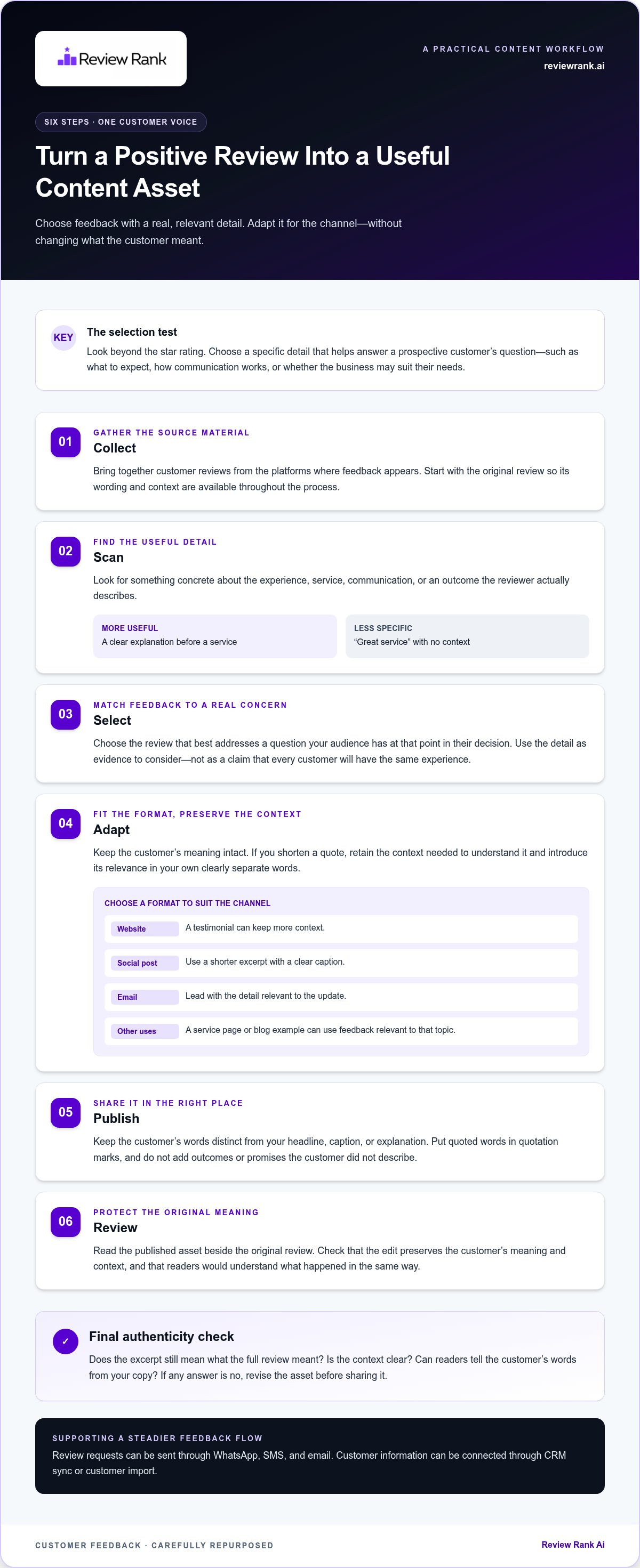
A repeatable process keeps the customer’s voice intact while making the feedback work in the right place. Effective review repurposing preserves the reviewer’s meaning, even when the format changes. Use the steps below to move from a raw review to a polished, accurate asset.
How to choose the right review and extract its strongest detail
Start with feedback that describes an experience, not just a high rating or general praise. Scan for themes such as responsiveness, expertise, convenience, or customer care. Then connect a specific detail to a question people ask before choosing a business. A useful excerpt gives the reader evidence to consider, not a claim that every customer will have the same experience.
Illustrative example, not a real customer review: “[Customer’s exact words describing a specific detail of their experience.]” Treat the bracketed text as a placeholder, not a testimonial. In a real review, identify the detail the customer actually described, then decide whether it helps answer a prospective customer’s question.
How to adapt a review without changing its meaning
Let the channel set the format. A website testimonial can keep more context; a social post may need a shorter excerpt and a clear caption. For an email, the relevant detail might lead into a related update. Keep the reviewer’s wording separate from any brand-written headline or call to action, and don’t add outcomes or promises that the customer didn’t describe.
Apply the workflow in order:
- Collect: Bring together customer reviews from the platforms where feedback appears.
- Scan: Look for a concrete detail about the experience, service, communication, or outcome.
- Select: Choose the review that best addresses a question your audience has at that point in their decision.
- Adapt: Use an excerpt if needed, retain its context, and add a brief introduction that explains its relevance.
- Publish: Place the content in a format suited to the channel, keeping the customer’s words distinct from your copy.
- Review: Check the published asset against the original. Confirm the edit preserves the meaning and the format serves its intended purpose.
For the illustrative placeholder, the selection decision would depend on the actual detail behind the brackets. If it addresses a question relevant to a service page, that context may suit the page. If the detail is too long for a social post, shorten it only where the remaining words still represent the customer’s experience accurately. Don’t fill the placeholder with a claim the reviewer never made.
This is the practical core of how to turn positive reviews into marketing content: match a true customer detail to an audience need, then shape the presentation without rewriting the experience. A review-sharing workflow can help businesses organize this work across their marketing channels.
Which review content formats fit your marketing goal?
The right format depends on what a prospective customer needs to understand and where they are in their decision. A detailed review may suit a service page, while one focused observation could work as a social post. Choose the placement to serve the reader, not simply to spread the same quote everywhere. These formats are options, not promises of improved rankings, conversions, or revenue.
| Format | Suitable goal | Review detail to feature | Adaptation tip |
|---|---|---|---|
| Website testimonial | Offer customer perspective on the business | A clear description of the overall experience | Keep enough context for the quote to make sense on its own. |
| Service or landing page | Address a question about a particular service | A relevant detail about communication, process, or customer care | Place the excerpt near the service or question it relates to. |
| Social post | Share one concise customer observation | A specific, easy-to-understand moment or detail | Pair the excerpt with a factual caption that adds context without extending the customer’s claim. |
| Email content | Support a useful message to an existing audience | A detail connected to the email’s subject | Make the review relevant to the message rather than inserting praise as filler. |
| Blog example | Illustrate an answer to a recurring customer question | Feedback that relates to the question being explained | Build the article around the reader’s need; use the quote as supporting context. |
Where website and landing-page testimonials work best
Place a testimonial near the service, product, or decision point it speaks to. A quote about communication belongs closer to information about how customers work with you; a comment about a specific service can sit alongside that service’s explanation. Use concise excerpts, but retain enough context to make the experience understandable. If several themes matter, organize them in a dedicated review section instead of stacking unrelated quotes in one place.
How to use reviews in social, email, and blog content
Social posts benefit from a focused excerpt and an accurate caption. Email works best when the review supports a message that already gives readers value. For blog content, start with a recurring customer question and use relevant feedback as an example, not as a substitute for a helpful answer. This keeps each format purposeful and the customer’s words in their proper context.
Choosing a format is one part of how to turn positive reviews into marketing content. The larger task is maintaining a reliable process for collecting, selecting, and sharing feedback across channels. That connection between review activity and wider reputation management is explored in this guide to automated reputation management software.
How to build a repeatable review-to-content workflow
Strong review content shouldn’t depend on someone remembering to check a platform or copy comments at the last minute. A repeatable workflow connects review requests, feedback selection, channel adaptation, and performance review. It also separates public replies to reviewers from using selected feedback in marketing. For guidance on responding to reviews, see this guide to AI-powered review response guidance.
How review collection and follow-up support a steady content source
Review Rank supports requests through WhatsApp, SMS, and email, with a two-day auto-follow-up feature. These touchpoints can make it easier to include feedback requests in your customer communications. A request is an invitation, though, not a guarantee that someone will leave a review or that their feedback will be positive. The aim is to invite honest responses and build a pool of feedback to assess.
During campaign setup, CRM sync and customer import connect customer information with the review-request workflow. CRM sync links customer records from a CRM, while customer import brings customer information into the setup process. This helps connect customer data with campaign activity without assuming that every customer will respond.
How to organize review selection and distribution
Set a regular time to assess new feedback and identify details that are useful and representative. Keep a simple record for each content asset: its source review, the excerpt selected, the intended destination, and the publication date. This makes it easier to revisit the original context, track where a quote has appeared, and keep the process organized as new feedback comes in.
Use a clear sequence:
- Request: Invite customers to share feedback through an appropriate channel.
- Review: Look for relevant themes and details, without assuming every review belongs in marketing.
- Select: Choose feedback that addresses a customer question and represents the original review accurately.
- Adapt: Shape the length and framing for its destination while keeping customer wording distinct from business copy.
- Publish and log: Record where the content appears and when it was published.
- Assess: Review engagement or other indicators your business has defined for that channel. Use what you learn to guide future decisions, not as a guarantee of results.
Keep the tracking practical. If a quote is reused, note each destination so your team can preserve its context and avoid presenting the same review as separate customer evidence. A shared dashboard can help bring review activity together, while a consistent selection process helps teams identify feedback that fits each channel.
Build a more organized review-sharing workflow with Review Rank’s review management tools.
How Review Rank helps share strong customer feedback
A review workflow is easier to sustain when collection, review management, and content sharing work together. Review Rank helps businesses manage Google reviews and share strong customer feedback across websites and social media. Its single dashboard brings review activity together, while Google Business Profile support connects review management with a key business profile. The goal is to make valuable feedback easier to put to use, without losing sight of what the customer actually said.
What Review Rank automates in the review workflow
Review Rank includes automated review requests, AI-powered responses, and a single dashboard for managing review activity. Requests can be sent through WhatsApp, SMS, and email. CRM sync and customer import fit into the Connect step by bringing customer information into campaign setup. This helps link customer data with the process of inviting feedback, without requiring you to treat each activity as a separate workflow. Review Rank is offered with no long-term contract.
For content, Review Rank supports sharing strong feedback across websites and social media. The business still needs to choose feedback that is accurate, relevant, and appropriate for the intended channel. Automation can support the process, but it doesn’t replace judgment about whether an excerpt fairly represents the customer’s experience.
A restaurant example illustrates how review collection and sharing can work alongside each other: the case reports 239 new 5-star reviews and social media repurposing. This is an example, not a promised result. Individual results may vary.
How to get started with review-based marketing
Start with one clear focus. Choose a customer question you want to address or a marketing channel where customer feedback would be useful. Then look through existing reviews for a specific detail that answers that question clearly. Keep the customer’s wording and relevant context intact, and decide where the excerpt belongs before sharing it. A service page, website testimonial area, or social post may call for different framing.
Next, connect that content choice to your review workflow. Customer information can be brought into campaign setup through CRM sync or customer import, and review requests can help invite new feedback over time. Review the responses that come in, select suitable details, and consider where each one can help a prospective customer understand the experience. Not every review will be a fit for marketing, and requests won’t always produce a review.
That’s the practical path for how to turn positive reviews into marketing content: build a steady invitation process, select feedback with care, and share it where it helps answer a real question. If you’re ready to put that workflow into action, explore the Review Rank platform.
Put your next customer insight to work
Your next step doesn’t need to be a full campaign. Choose one customer question, find a review that addresses it, and plan a single placement where that insight can help someone make a more informed decision. Then use what you learn to guide the next piece. A steady, thoughtful practice can make customer feedback a useful part of your marketing without turning it into generic promotional copy.
Review Rank shares strong customer feedback across marketing channels, including websites and social media. The platform has a 4.9/5 overall user rating. If you’re ready to make how to turn positive reviews into marketing content a practical, repeatable process for your business, explore Review Rank and share your strongest customer feedback.
Start with one genuine detail. Keep the customer’s meaning intact. Build from there.
Frequently Asked Questions
How can I turn a customer review into a social media post?
Choose a short, self-contained line from the review and pair it with a caption that gives accurate context. For example, a home services business might feature a customer’s specific comment about appointment communication, if that’s what the review says. Keep the quote distinct from your brand’s wording, check that the excerpt still represents the full review, and get the reviewer’s permission before using their words in promotional content.
Can I use Google reviews on my business website?
Yes, customer reviews can be useful on a business website, but treat the reviewer’s words as their own content. Ask permission before republishing a review as a testimonial, preserve its meaning, and identify it clearly as customer feedback. Place it near relevant information so visitors can understand its context. Don’t edit a quote to suggest a different experience or imply that Google endorses your business.
How do I choose which positive reviews to feature in marketing?
Prioritize reviews that give prospective customers a useful detail, not only a high rating or general compliment. Consider whether the feedback speaks to a common concern, describes an experience clearly, and fits the channel where you plan to use it. Look across different customer themes, too. Featuring a range of relevant perspectives can give a fuller picture than repeatedly using the same type of praise.
What is the best way to repurpose customer reviews without changing their meaning?
Start with the original review and select only wording that remains accurate outside its original setting. Keep qualifications or context that affect how the comment should be understood, and avoid combining separate phrases in a way that creates a new claim. Mark the customer’s words as a quote, then write any introduction or caption separately. If a shortened excerpt feels misleading, use a longer one.
Can positive reviews be used in email marketing?
Yes. A review can add a customer perspective to an email when it supports the message rather than interrupting it. For instance, an appointment-based business could include relevant feedback in an email explaining what a first visit involves, provided the review genuinely relates to that topic. Keep the excerpt brief enough to read easily, preserve its context, and distinguish the customer’s statement from your promotional copy.
How can businesses share reviews across marketing channels automatically?
Use a review management platform that supports sharing customer feedback across the channels your business uses. Review Rank can share strong feedback across websites and social media, helping businesses make selected reviews available beyond review platforms. Keep a human review step in your process: check that each excerpt is appropriate for its destination, accurately represents the original, and has the context needed for readers to understand it.
Does Review Rank send review requests through WhatsApp, SMS, and email?
Yes. Review Rank supports review requests through WhatsApp, SMS, and email, giving businesses different ways to invite customers to leave feedback. Choose a channel that fits how your business communicates with customers, and keep requests neutral so customers can share an honest response. A request is an invitation, not a guarantee that someone will leave a review or that the feedback will be positive.
Can customer reviews help a local business attract more customers?
Reviews can help prospective customers understand other people’s experiences as they compare local businesses. A detailed comment may answer a practical question, such as what communication was like or what a service involved. That context can support a more informed decision, but reviews don’t guarantee new customers, sales, or a particular search position. Share feedback accurately and use it alongside clear information about your own business.