
How to Showcase Customer Testimonials on Your Website
Customer testimonials do more than praise a business. They give visitors firsthand insight into what it’s like to work with you. To learn how to showcase customer testimonials on a website, feature genuine reviews, social posts, and customer stories where people are deciding what to do next, such as on your homepage and relevant service pages.
It makes sense to want positive experiences to stand out. Present them clearly and honestly, with enough context for visitors to understand who shared the feedback and where it came from. Get written permission before using a customer’s quote in marketing.
This guide explains what counts as a testimonial and how to choose the right format and placement. You’ll see how dedicated testimonial pages, prominent page sections, customer-created content, and detailed stories can work together to make real experiences easy to find and understand.
Key Takeaways
- Choose testimonial formats that fit the experience you want to highlight, from written reviews to customer stories and videos.
- Keep a dedicated testimonials page updated, and feature relevant feedback on the pages where visitors make decisions.
- Make standout reviews easy to notice on your homepage, while using sidebars, About pages, and footers for supporting proof.
- Get written permission before using customer quotes or social posts, and clearly identify the customer and original source.
- Build trust with genuine customer experiences and a simple process for inviting feedback.
1. Dedicated testimonial pages
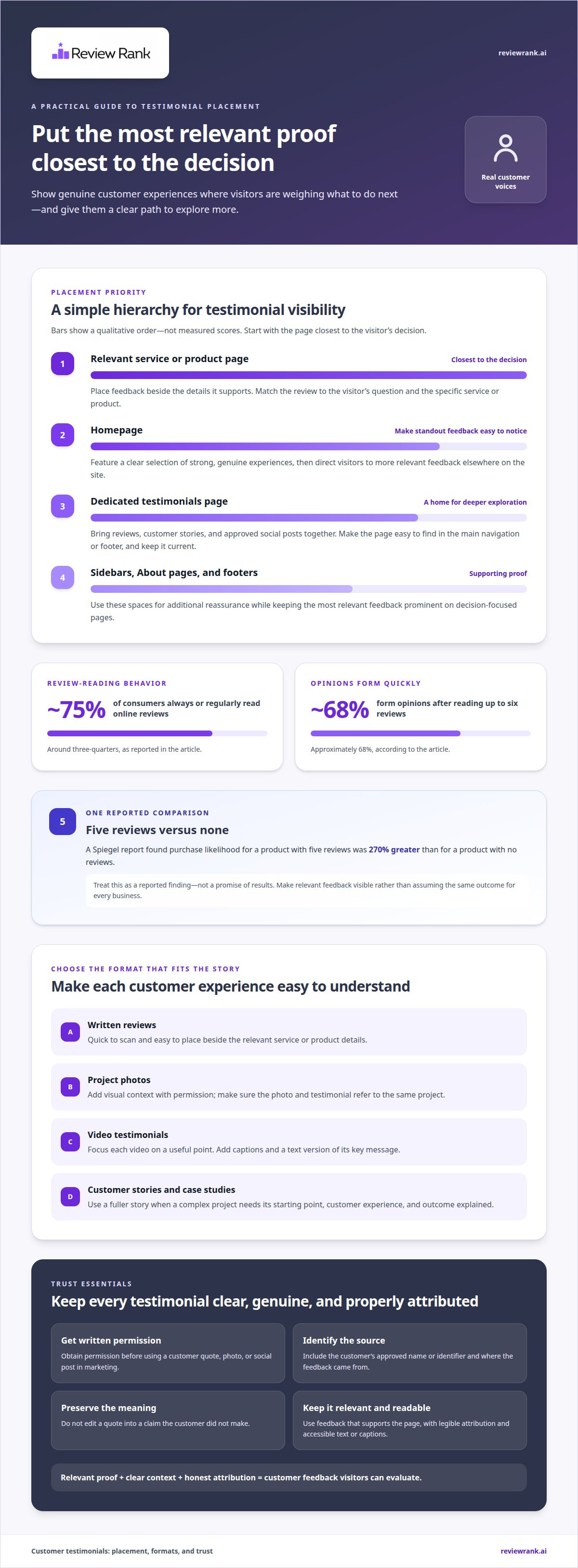
A testimonial page gives customer feedback a clear home on your website. Bring written reviews, customer stories, and approved social posts together so visitors can compare experiences without searching across unrelated pages. Make the page easy to find in your main navigation or footer, and keep it current as new feedback arrives.
Organize testimonials around what visitors need to decide. A dental clinic might group comments by appointment experience and service, while a hotel could sort them by room, dining, or staff experience. Use short labels, readable formatting, and clear links to relevant service pages. Visitors looking for a specific service can then find matching feedback quickly.
Include enough context to make each comment useful. Add the customer’s name or approved identifier and the original source, such as a public review platform. Mention the service or product discussed only when the feedback supports that detail. Don’t edit a quote in a way that changes its meaning, and get written permission before using customer comments in marketing.
Customer feedback can help visitors evaluate their options. Around 75% of consumers always or regularly read online reviews, and approximately 68% form opinions after reading up to six reviews. These figures support a practical approach: lead with a few relevant testimonials, then let visitors explore additional comments on the dedicated page.
How do you measure whether website testimonials improve conversions? Compare conversion rates, form submissions, or booking clicks on comparable page versions, with testimonials visible in one version. Measure both over the same period and check whether visitors engage with reviews before taking action.
The strongest testimonial page examples match feedback to the decision at hand. A restaurant could feature comments about service and menu choices, while a cleaning company could highlight customer accounts of recurring home visits. For complex projects, a case study can explain the customer’s starting point, experience, and outcome in greater depth.
Build a reliable feedback collection process, too. Ask for feedback after a completed project or service, and make it easy for customers to respond. The U.S. Environmental Protection Agency advises contacting several references to learn whether they’re satisfied with the service provided. The same principle makes a testimonial page more useful: include varied, genuine customer perspectives rather than relying on a single glowing quote.
Review the page regularly as part of your website updates. Replace outdated details, remove duplicate comments, and add testimonials that reflect your current services. A clear structure, specific examples, and transparent attribution turn praise into practical evidence visitors can use.
2. Why add all your best reviews to all these landing pages?
A visitor on a specific service page needs evidence about that service, not praise for something unrelated. Place a relevant review beside the details it supports, such as a software customer describing onboarding on a product page. A Spiegel report found purchase likelihood for a product with five reviews was 270% greater than for a product with no reviews. Treat that finding as a reason to make relevant feedback visible, not as a promise of results.
Written reviews are quick to scan and easy to place near a decision point. Choose comments that describe a specific experience, then include the source and the customer’s approved name or identifier. A landscaping company, for example, could place a review about a garden redesign beside that service page. If you’re deciding how to showcase customer testimonials on website landing pages, match each quote to the visitor’s immediate question.
Project photos add visual context to written feedback. A renovation company could show an approved photo of a finished kitchen beside the customer’s account of the work. Identify what the image shows and ensure the testimonial refers to that same project. Use authentic customer photos with permission. Don’t present a staged or unrelated image as proof of a customer’s experience.
Video testimonials let visitors hear a customer’s voice and delivery. Keep each video focused on one useful point, such as how a consultant explained a complex process. If the story includes several distinct details, edit separate short clips rather than one long recording. Test different lengths on comparable pages, then compare completion and engagement data to choose the version that serves visitors better.
For US-facing marketing, use genuine endorsements, get written permission, identify the customer and original source, and preserve the quote’s meaning. Don’t edit a customer’s words into a claim they didn’t make. Clear attribution helps visitors understand whose experience they’re reading and where the feedback came from.
Make every format readable and accessible. Use clear text, strong contrast, descriptive headings, and captions for spoken video content. Add a text version of each video’s key message, and make controls usable with a keyboard. Keep customer names and attribution legible on mobile screens, where long quotes may need a shorter excerpt and a link to the full story.
To add testimonials through a CMS, create a reusable review block, enter the approved quote, attribution, source, and relevant service, then place it on the matching page. With a review widget, choose which reviews appear and preview the result on desktop and mobile. Check the published page for layout and readability issues. A clear publishing process keeps reviews relevant and easy to find.
Automated review repurposing can help share feedback across your website and social media without rebuilding each display by hand. Use approved, relevant reviews and check how they appear in each format. This keeps customer feedback aligned with the page and channel where visitors see it.
3. Testimonials on home pages, sidebars, about pages, and footers
Place a standout testimonial near the top of your homepage, where visitors can notice it early. A hotel might pair a guest’s comment about a smooth check-in with its booking introduction. Keep the excerpt concise and identify its source. Link to the full review or dedicated testimonials page so interested visitors can explore more customer experiences.
Match homepage testimonials to your main audience and offer. A dental clinic could feature feedback about a welcoming first appointment, while a bakery might highlight a customer’s comments about custom cakes. Choose a quote that helps visitors understand the experience you provide. Rotate examples as your priorities change, while keeping each featured review relevant to the page’s main message.
Use a sidebar when a longer service page needs supporting evidence without interrupting its main content. An accounting firm, for example, could place a short client quote beside its tax preparation description. Keep the quote easy to read, and avoid crowding the column with several testimonials. A single relevant comment can support the surrounding information more directly.
An About page can connect your business’s stated values with customer experiences. If a cleaning company emphasizes reliable communication, feature a customer comment about clear appointment updates. Place the quote near the relevant explanation, not in a disconnected block. This pairing helps readers see how a business commitment shows up in an actual service experience.
A footer can offer a final reminder across pages, but it shouldn’t carry the full burden of proof. Add a brief, attributed quote or a link to customer feedback. A real estate agency, for instance, could use a short comment about a helpful home-buying experience. Keep footer text readable on mobile, where multiple columns may collapse into a narrow layout.
Visibility matters. Visitors may miss a testimonial buried below unrelated content, so place important feedback near the page section it supports. On a plumbing service page, a quote about a completed repair belongs near the service explanation or booking information. On an About page, a broader comment about the team may fit better. Each placement should address a visitor’s immediate concern.
Review placements by opening the homepage, About page, and a service page on desktop and mobile. Confirm each quote appears near relevant content, remains readable, and identifies its source. Then compare page engagement or completed actions before and after a layout change. Keep effective placements and revise areas where visitors overlook the testimonial or its supporting link.
4. User-generated content and social media posts
A customer’s social post can capture details that polished brand copy may miss. A café could feature a guest describing its quiet seating area, while a hotel might share a traveler’s account of the breakfast experience. Choose posts that show a specific part of the customer journey. These details give visitors a clearer sense of the experience.
Match each post to a page where it helps answer a real question. A wedding venue’s page could feature a couple’s post about arranging the reception layout. A dog groomer might display a customer’s post about a particular grooming style. Keep the surrounding copy focused on the same service so visitors understand why the post appears there.
Context makes customer-created content easier to understand. Add a short caption identifying the service or experience described, and preserve the customer’s original meaning. If a post refers to a seasonal menu, label it as seasonal rather than implying the item is available year-round. Clear context keeps an appealing post from creating the wrong expectation.
Curate for variety, not just appearance. A restaurant might choose posts showing different dishes, dining occasions, and parts of its space. A travel agency could feature distinct trip experiences rather than several nearly identical beach photos. A varied selection helps visitors see different facets of the business without turning the page into an unfiltered social feed.
Present source details clearly. Identify the platform and account name where appropriate, and distinguish the customer’s caption from your own description. A florist, for example, can label a shared bouquet post with its original platform and event type. Keep names legible, captions readable, and attribution close to the content it identifies.
Consider how the post reads outside its original platform layout. A social caption may rely on hashtags, emojis, or comments that don’t make sense on a service page. Edit only presentation details that don’t change the meaning, and add a concise explanation when needed. A customer’s post about a custom cake, for instance, benefits from a caption identifying the occasion.
Check how the content appears on mobile screens. A wide social embed may push important service information below the fold or make captions difficult to read. A selected quote with a source label can be easier to scan. Choose a format that keeps the customer’s contribution visible without overwhelming the page’s main purpose.
Refresh the selection as your business and customer experiences change. A bakery can replace an outdated seasonal post with a current example, while a hotel can rotate content reflecting different guest experiences. Check that each post still fits the page, reads clearly, and accurately represents the customer’s message. Thoughtful curation makes social content useful context rather than visual clutter.
5. Authenticity and genuine customer experiences
A testimonial earns trust through specific details, not polished praise alone. A customer describing a clear appointment process gives a dental clinic more context than a generic compliment. Preserve the original meaning, and don’t add claims the customer never made. An accurately represented experience is stronger than a dramatic quote readers may question.
How do you get permission to publish customer testimonials? Ask in writing, and specify the quote, photo, video, or social post you want to use. Explain where it will appear, how you’ll identify the customer, and how they can approve the final version before publication.
Make the permission request easy to understand. A photography studio, for example, can send a customer the exact portrait and caption proposed for its website. The customer can approve that specific use or suggest a change. Save the approval with the testimonial so your team can match the published material to the agreed version.
How can you verify testimonials and prevent fake or misleading reviews? Connect feedback to a real customer interaction, preserve its original source, and check that the wording accurately reflects the service received. If a review’s origin or details are unclear, leave it unpublished until you resolve the concern.
A consistent process helps a restaurant or local service business keep feedback credible. Invite customers to share honest opinions after an experience, rather than asking only those you expect to be pleased. Keep positive and critical feedback in your review record. Don’t rewrite a mixed review to make it sound wholly complimentary.
ReviewMonitoring found that 81% of consumers trust friends and family, compared with 76% who trust online reviews. That finding makes transparent attribution especially useful. Name the customer as approved, identify the original review source, and distinguish customer words from your business’s description.
Check each testimonial before publishing. Compare the quote with its source, confirm the customer approved the intended use, and review edits for changes in meaning. A contractor should verify that a project quote describes the work actually completed. A therapist should avoid exposing private details that aren’t needed to explain the customer’s experience.
Keep your standards visible in every format. A written review, video, or social post should reflect a genuine customer experience and carry clear attribution. If your team needs a simpler way to share approved feedback across channels, explore customer review management options.
Review Rank Ai: Automated Review Invites
Review Rank Ai’s integrations let businesses send review requests through WhatsApp, SMS, and email. These channels connect the invitation step with the communication methods customers already use, giving businesses several ways to request feedback. Choose the channel that fits your customer interactions, then feature genuine reviews on relevant website pages.
Review Rank Ai also offers AI-Generated Review Responses and automatically repurposes reviews for social media and websites. If you want to connect review collection with your existing customer communication workflow, contact Review Rank Ai.
Turn customer feedback into a stronger next step
Choose a page where customer proof can support an important business decision. Then decide how to showcase customer testimonials on your website in a way your team can maintain: select relevant feedback, make its source clear, and revisit the placement as your offerings evolve. A deliberate process makes customer stories more useful than quotes left unseen.
Review Rank Ai’s Google Local 3-Pack Leaderboard helps businesses monitor and improve their local search rankings. Pairing reputation work with visibility monitoring can help you assess how your online presence is progressing, without losing sight of the customer experiences behind it.
Ready to make customer feedback a more active part of your online presence? Explore Review Rank Ai and choose a practical next step for your business. Keep listening, keep learning from real customers, and let their experiences help shape what comes next.
Frequently Asked Questions
What is a testimonial?
A testimonial is a customer’s account of an experience with a business, product, or service. It may be a written comment, a recorded interview, or a detailed customer story. A tutoring client, for example, might describe how lessons fit their schedule and what they valued about the teaching approach. Unlike business-written promotional copy, a testimonial presents the customer’s own perspective.
Where to Put Reviews on Website?
Put reviews on pages where they help visitors evaluate a specific choice. An online store could place a product review beside product details, while a home inspection company could feature relevant feedback near its inspection service description. A central review page can hold a broader collection. Choose placements based on the visitor’s decision, and make sure reviews don’t distract from essential details or next steps.
Why add all your best reviews to all these landing pages?
Use the most relevant review on each landing page, rather than repeating the same collection everywhere. A catering company’s event-planning page might feature feedback about menu coordination, while its corporate catering page highlights a workplace delivery experience. This helps visitors find proof that matches their needs. Curate selectively: repeated, unrelated praise can feel generic, while a well-matched comment gives the page useful context.
Why are testimonials important for online businesses?
Testimonials help online businesses show what customers experienced when shoppers can’t examine a service in person. A software company, for example, can use a customer’s account to explain how a feature fits a real workflow. Specific feedback can address practical concerns a product description misses. Represent customer perspectives accurately so visitors can judge whether the experience relates to their own needs.
Where should customer testimonials appear on a website?
Place testimonials beside the content they support, such as a quote about delivery near shipping information or feedback about a consultation near booking details. An About page can feature comments about the team’s approach. A footer works for a brief reminder, but shouldn’t be the only location. Review the page flow and place each quote where a visitor may need that evidence.
What types of customer testimonials work best on websites?
The most useful format depends on the question a visitor needs answered. A concise written review suits a quick impression of a service, while a customer story can explain a more involved project. Video can convey a customer’s voice and manner, and an approved customer photo can add visual context. A property manager, for example, might use a detailed account for a complex rental-management experience.
Do photos, videos, names, and job titles make testimonials more effective?
Testimonials can add helpful context when they’re accurate and approved. A video lets visitors hear a customer describe an experience, while a relevant photo can connect a quote to a completed project. A name or role may clarify whose perspective is represented, especially in business-to-business feedback. Use only details the customer agreed to share, and never add a job title or image that implies an untrue endorsement.