
How to Manage Google Reviews: A Practical System for 2026
Review management rarely fails because a team doesn’t care. It breaks down when requests go out inconsistently, a difficult review sits unanswered, or feedback gets scattered across locations and channels. To manage google reviews well, you need more than occasional replies. You need a repeatable routine for inviting honest feedback, responding thoughtfully, and learning from what customers say.
You already know reviews can shape how people see your business. The challenge is handling them consistently without adding another manual task to an already busy team. This guide will help you build a practical, policy-aware system for requesting reviews, monitoring activity, and responding to positive, negative, and complex feedback.
We’ll cover how to organize review workflows across locations, use integrations to connect review management with existing tools, and turn customer feedback into operational improvements. Review Rank Ai supports review invitations through WhatsApp, SMS, and email, alongside AI-generated responses. The goal is simple: a process your team can repeat, measure, and improve.
Key Takeaways
- Manage google reviews with a repeatable workflow for inviting feedback, monitoring activity, replying, and learning from customer comments.
- Keep review invitations neutral and consistent, and make sure every customer has an equal opportunity to share honest feedback.
- Tailor replies to the customer’s specific experience so responses feel thoughtful rather than copied from a generic script.
- Use integrations to connect review activity with relevant business tools and reduce scattered, manual workflows.
- Track operational measures separately from business outcomes, and use local search position monitoring as a signal, not a promised result.
What managing Google reviews actually involves
Google review management is the ongoing process of inviting honest customer feedback, monitoring new reviews, responding to customers, and using their comments to improve the business. It’s an operating routine, not a one-off campaign. To manage google reviews effectively, a team needs clear steps for each stage, from sending an invitation to following up on a recurring service issue.
Managing a Google Business Profile is related, but it isn’t the whole job. Profile management focuses on the business’s information and presence on Google. Review management covers the wider workflow around customer feedback, including who sends requests, who checks incoming reviews, who replies, and how useful themes reach the people responsible for service. This broader view is part of online reputation management, where public feedback is one part of how people form an impression of a business.
Consistency matters because customers should receive clear, considered communication rather than silence from one location and a thoughtful response from another. A dependable process also helps teams spot patterns, such as repeated comments about booking, delivery, or communication. It supports better service and public accountability. It doesn’t guarantee higher search rankings, and it shouldn’t be treated as a shortcut to them.
Which parts of Google review management belong in a routine?
Give each step an owner. That prevents a new review from being overlooked or answered twice, and makes follow-up part of the work instead of an afterthought.
- Review invitations: Decide when customers receive a neutral request and who oversees the process.
- New-review monitoring: Assign someone to check for feedback and flag issues that need attention.
- Response ownership: Set a clear reviewer or approver for public replies, especially when a concern needs input from another team.
- Feedback follow-up: Route recurring or actionable comments to the person who can investigate and improve the service.
For example, if customers repeatedly mention confusion about appointment reminders, the response can acknowledge each person’s experience while the team reviews its reminder process. Public communication and operational improvement work together.
What should businesses avoid when managing reviews?
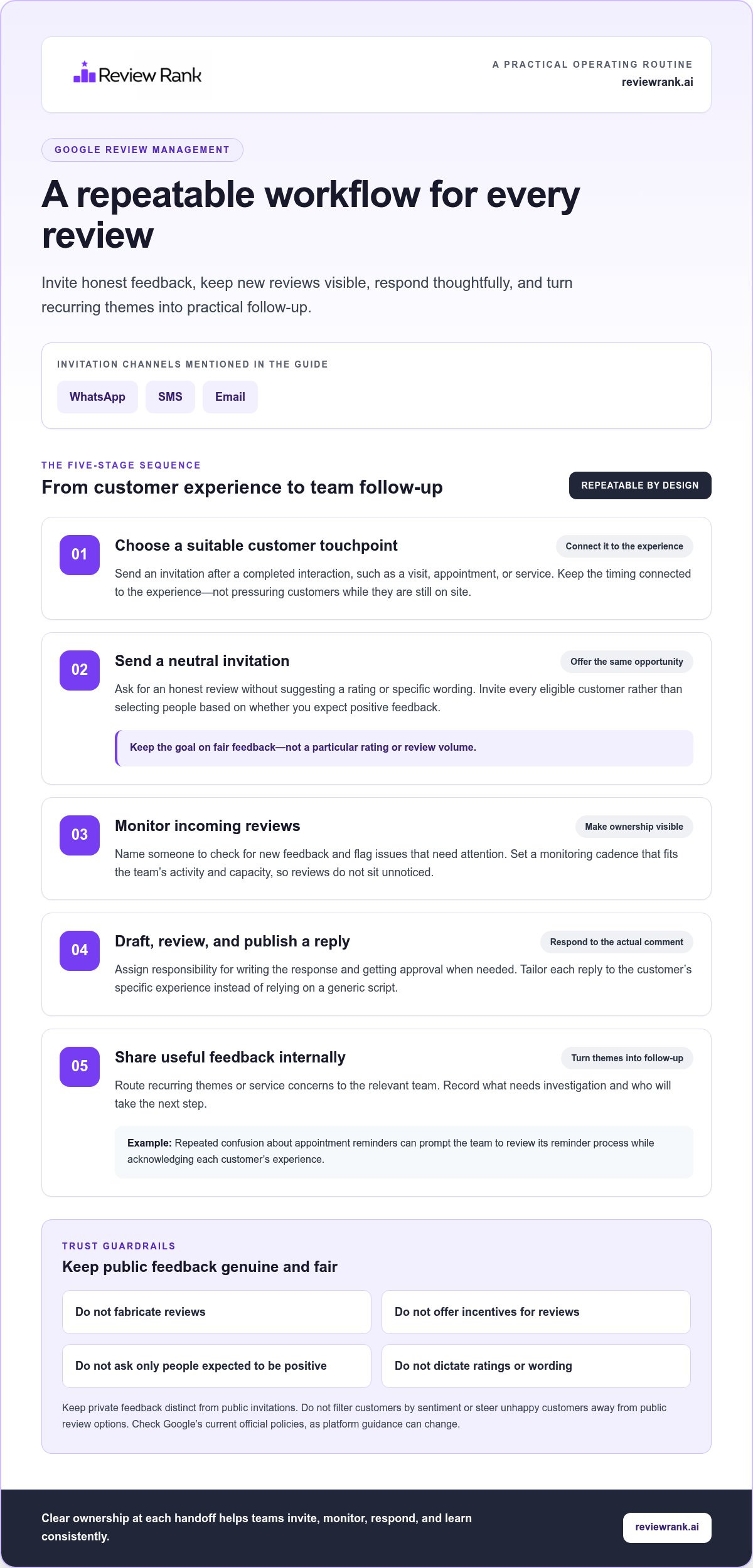
Keep feedback genuine. Don’t fabricate reviews, offer incentives in exchange for reviews, or ask only customers expected to leave positive public feedback. A request should invite honest feedback without dictating a rating or wording. Selective invitations can distort the picture customers see and undermine trust.
Private feedback collection can help a business understand an experience in more detail. It becomes a concern if customers are screened by sentiment and only those who appear satisfied are directed to post publicly, or if unhappy customers are steered away from public review options. Keep private feedback and public invitations distinct, and make the public invitation available without filtering customers by their response. Google’s platform guidance can change, so verify its current official policies before describing specific rules or procedures.
Build a repeatable workflow for Google review requests and replies
A review process works when it fits the customer journey and the team’s daily operations. Set a clear sequence, define who owns each handoff, and make the steps easy to repeat across locations. A platform such as Review Rank Ai can send invitations through WhatsApp, SMS, and email, giving teams communication channels to incorporate into that workflow.
A complete review-management cycle invites customers to share honest feedback, monitors new reviews, routes replies to the right owner, and turns recurring themes into practical follow-up.
- Choose a suitable customer touchpoint. Send an invitation after a completed interaction, such as a visit, appointment, or service. Make the timing feel connected to the experience, not like pressure to review while the customer is still on site.
- Send a neutral invitation. Use clear wording that asks for an honest review without suggesting a rating or specific comments. Offer customers the same opportunity, rather than selecting people based on whether you expect positive feedback.
- Monitor incoming reviews. Decide who checks for new feedback and how often, based on the team’s activity and capacity. Make ownership visible so reviews don’t sit unnoticed.
- Draft, review, and publish a reply. Assign responsibility for writing the response and, where needed, getting approval. Replies should address the actual comment, not rely on a generic script.
- Share useful feedback internally. Route recurring themes or service concerns to the relevant team. Record what needs follow-up and who will take the next step.
How can businesses request Google reviews consistently?
Keep the invitation process simple and repeatable. Use consistent wording, adapt the communication channel to your workflow, and invite every eligible customer to give honest feedback. The automated review invites guide offers related context on building a request routine. The aim is a fair opportunity to review, not a particular rating or volume.
How should a team handle new reviews?
Set a monitoring cadence and name a role responsible for review ownership. For a business with multiple locations, each branch can flag local context while a central owner maintains consistent standards. Sensitive concerns should follow the business’s internal escalation process; keep private customer details out of public replies. A respectful response can acknowledge the concern and, when appropriate, invite the customer to continue the conversation through a private channel.
Separate the work into clear responsibilities: one person monitors, an appropriate team member drafts, and a designated reviewer approves replies that need additional care. This avoids duplicated responses and uncertainty about who should act. For teams looking to bring review invitations and replies into a more organized workflow, review management tools can support consistent handling without replacing human judgment.
Respond to positive, mixed, and negative Google reviews with care
A reply is part of the customer experience, and future customers may read it too. The strongest response is specific, calm, and proportionate. Thank someone for a detail they shared, recognize what fell short in a mixed review, or acknowledge a complaint without becoming defensive. A polished response doesn’t need to sound like a press release. It needs to sound like your business listened.
How should replies change for different reviews?
Match the response to the substance of the review. For praise, thank the customer and refer to a specific detail they mentioned. For a mixed experience, appreciate the positive point while recognizing the part that needs attention. For a complaint, acknowledge the concern and indicate an appropriate next step without making promises you can’t verify or keep.
- Positive: “Thanks for mentioning how the team helped with your booking. We’re glad the process felt straightforward.”
- Mixed: “We appreciate your kind words about the service, and we’re sorry the wait was longer than expected.”
- Negative: “We’re sorry to hear this didn’t meet expectations. We’d like to understand more, so please contact our team through a private channel.”
These examples are starting points, not copy-and-paste scripts. Repeating the same generic reply can make a business seem inattentive, even when the intention is good. The AI review response generator guide explores response drafting in more depth.
What makes a Google review response useful?
Address the reviewer’s actual point, keep the tone professional, and make the reply concise enough to read quickly. Don’t disclose personal information or debate sensitive details in public. If the issue needs investigation, recognize the concern briefly and move the case-specific conversation to an appropriate private channel. Avoid claiming that an issue has been fixed until the business has confirmed it.
Specificity builds credibility. If a customer praises clear instructions, acknowledge that detail rather than replying with a generic “Thanks for your feedback.” If the review describes a service problem, don’t challenge the customer’s account in public. A calm, measured reply shows that the business takes feedback seriously without turning the response into an argument.
How can AI support responses without replacing judgment?
AI-generated responses can provide a useful first draft, but a team member should check every reply before publishing. Confirm that it reflects the actual review, uses accurate business details, protects privacy, and responds to the customer’s concern. Add context the tool may not have, remove unsupported claims, and adjust wording that sounds impersonal. The automated reputation management guide covers the wider role of automation.
Use extra care when a review involves a disputed event, a sensitive personal matter, or an unresolved service issue. Follow the business’s internal escalation process before replying. For teams that manage google reviews at several locations, a consistent review standard can guide replies while leaving room for local context and human judgment.
Connect review requests to the tools and channels your team uses
Review requests are easier to manage when they fit the way work already moves through your business. A completed appointment, order, stay, or service can be the point to consider an invitation. From there, the request channel, review monitoring, and team follow-up need clear owners. Integrations can help connect parts of this workflow when supported by the product configuration, reducing repeated manual steps without assuming that every system shares the same data.
Where can integrations fit into the review workflow?
Map the process before connecting tools. Identify where the customer interaction is recorded, how an invitation is sent, where the review is monitored, and who handles follow-up. Then confirm which steps the actual configuration supports. This keeps expectations grounded: an integration may support a specific handoff, but it shouldn’t be assumed to trigger requests or transfer information unless that data flow is available.
| Workflow stage | Relevant tool or channel | Team consideration |
|---|---|---|
| Customer interaction completed | Existing business workflow | Identify a suitable point for an invitation. |
| Invitation sent | Review Rank Ai with WhatsApp, SMS, or email | Choose a channel that fits the customer context and established communication practice. |
| Review monitored | Review-management workflow | Assign someone to check and route feedback. |
| Follow-up needed | Relevant internal team or process | Share the feedback with the people who can act on it. |
This map is a planning tool, not a claim that every stage connects automatically. For a multi-location business, document which steps are shared centrally and which are handled by each branch. Clear handoffs help prevent repeated data entry where supported, while preserving responsibility for reviewing feedback and taking appropriate action.
How do WhatsApp, SMS, and email fit different business processes?
Review Rank Ai can send review invitations through WhatsApp, SMS, and email. The right option depends on the way your business already communicates and the context of the customer interaction. A service business may use a familiar message channel after an appointment; an online business may find email fits its existing customer communication. Keep the invitation neutral and offer customers an honest opportunity to review.
Before relying on a connected workflow, confirm that its stages and data flows match the product configuration in use. Don’t assume an integration sends an invitation, syncs customer details, or routes responses unless that capability is actually available. This practical check gives teams a more dependable process and a clearer view of who owns each step.
If you’re ready to bring review invitations into your existing routine, explore automated review management with Review Rank Ai.
Measure review activity and turn feedback into the next improvement
Measurement turns a review routine into a learning loop. Track what your team does, what customers say, and what changes as a result. Keep those categories separate: sending more invitations or completing more replies shows process activity, while customer retention, revenue, and local visibility are broader business outcomes influenced by many factors. To manage google reviews effectively, use measures to guide decisions, not to claim cause and effect without evidence.
Which signals help teams review their process?
Choose a small set of signals that clarify whether the workflow is operating as intended. Depending on the records available to your team, review:
- Invitation activity: whether requests are being sent consistently after customer interactions.
- Response coverage: which reviews have received a reply and which still need attention.
- Feedback themes: recurring praise, questions, or complaints that may point to a service opportunity.
- Location patterns: differences in review activity or feedback topics across branches, where location-level information is available.
Compare these signals over time and note changes in staffing, service processes, or request routines that could affect the results. A change in review activity alongside a change in business performance is a trend to examine, not proof that one caused the other. Review-process measures describe invitations, replies, and feedback patterns; they don’t guarantee ranking gains or revenue growth.
The Google Local 3-Pack Leaderboard can help teams monitor local search positions as one visibility signal. Treat it as a way to observe movement over time, not a promise that review activity will secure a particular position. Pair that view with customer feedback and operational context before deciding what to change.
When does review-management software make sense?
Automation becomes useful when manual steps make requests or replies inconsistent, or when several locations need a shared operating rhythm. Review Rank Ai supports automated invitations, AI-generated response drafts, negative feedback filtering, and automatic repurposing of reviews for websites and social media. Use each capability within a clear workflow: keep people responsible for decisions, review drafts for accuracy, and use feedback themes to identify areas for follow-up.
Start with the friction your team can name. If invitations are easy to forget, standardize that step. If replies accumulate, clarify ownership and use drafts as a starting point. If customer comments repeat, bring the pattern to the team that can address it. Then review the process measures regularly and adjust the routine based on what you learn.
For a more consistent operating system, explore a review-management platform built for consistent operations.
Turn customer feedback into your next improvement
Your next step doesn’t need to be a full process overhaul. Choose one repeatable action, such as setting a regular time to review customer comments or sharing a recurring theme with the team responsible for that part of the experience. Make the owner clear, agree on what follow-up looks like, and revisit whether the change addressed the feedback. That’s how review activity becomes an ongoing input to better decisions.
As the routine takes shape, tools can help keep the work moving. Review Rank Ai supports review invitations through WhatsApp, SMS, and email, alongside AI-generated responses and a Google Local 3-Pack Leaderboard for monitoring local search positions. Use these capabilities to support your team’s process, while keeping decisions grounded in real customer feedback and business context.
Ready to make it easier to manage google reviews as part of your operations? Explore automated review management and build a workflow your team can maintain. Start with a practical next step, then keep learning from what customers tell you.
Frequently Asked Questions
How do I manage Google reviews for multiple business locations?
Use one shared process with clear responsibility at both the central and local level. Assign someone to monitor each location’s reviews and route location-specific concerns to the right team, while a central owner maintains consistent response standards. For example, a retail group could review common feedback themes across branches while letting each manager add relevant local context. Compare locations carefully, since differences in customer experience or volume can affect the patterns you see.
Can I ask every customer to leave a Google review?
You can invite customers broadly to share honest feedback, rather than choosing only those you expect to be happy. Keep the invitation neutral: don’t request a particular rating, suggested wording, or a positive review. Make the request after the customer interaction, without pressure. A consistent invitation approach gives customers an equal opportunity to respond and helps avoid a review record shaped only by selected experiences.
Can a business offer incentives for Google reviews?
No. Don’t offer discounts, gifts, loyalty points, or other benefits in exchange for a Google review, a positive rating, or a changed or removed review. Incentives can undermine the authenticity of customer feedback and conflict with Google’s review policies. Keep requests separate from rewards: invite customers to share honest feedback without tying the request to a purchase benefit or the content of their response.
How should I respond to a negative Google review?
Respond calmly, acknowledge the concern, and avoid arguing about disputed details in public. If a customer says an appointment started late, for example, recognize the frustration without sharing booking records or personal information. Offer a suitable private way to continue the conversation, then investigate through your internal process. Don’t claim the problem has been resolved unless your team has verified the outcome.
Does responding to Google reviews improve local rankings?
Replying helps show customers that the business pays attention, but don’t treat a response as a guaranteed ranking boost. Local search positions depend on multiple factors, and a change after you begin replying doesn’t prove the replies caused it. Track response activity separately from visibility. A local-position tool such as Review Rank Ai’s Google Local 3-Pack Leaderboard can help monitor position changes without promising a specific result.
Can I send Google review requests through WhatsApp, SMS, and email?
Yes. Review Rank Ai can send review invitations through WhatsApp, SMS, and email. Choose a channel that fits your customer communication practices and the context of the interaction. For example, a business that already follows up with customers by email may use that familiar route, while another may use WhatsApp or SMS. Keep the invitation straightforward and give customers the option to share honest feedback.
Can Google remove a review that violates its policies?
Google may remove reviews that violate its content policies, but a business can’t assume that an unfavorable review will be taken down. If you believe a review breaks a policy, use the review reporting option in your Business Profile and provide the relevant reason. Google assesses the report. While it’s under review, avoid pressuring the customer or posting private details in a public reply. Check Google’s current guidance for the reporting process.