
How to Look Like a 5-Star Business Online: A Practical 2026 Guide
What if a customer sees a polished website, then finds outdated business details and unanswered reviews elsewhere? That mismatch can weaken trust before you ever get a chance to speak with them. Learning how to look like a 5-star business online isn’t about chasing a perfect rating. It’s about showing consistent, credible proof of the experience you deliver.
If your profiles feel neglected, recent reviews are thin, or feedback takes too long to answer, you’re not alone. These gaps are fixable with a clear process. This guide will help you identify the online touchpoints customers use to assess your business, strengthen the details and proof they find there, and build an ethical routine for requesting and responding to reviews.
You’ll also learn how to track progress and choose tools that fit your workflow. Review Rank Ai provides automated review invitations, AI-generated responses, and a Google Local 3-Pack Leaderboard to help businesses monitor local search rankings. The goal isn’t to manufacture a five-star image. It’s to make the quality of your real customer experience easier to see, wherever people discover your business.
Key Takeaways
- Learn how to look like a 5-star business online by making customer-facing details and proof consistent across channels, not by chasing a perfect rating.
- Use a structured audit to spot mismatched hours, services, contact details, images, and links before deciding what to fix.
- Build a review routine around completed customer interactions, with the same fair invitation process for all customers and thoughtful responses to feedback.
- Compare manual and automated workflows by staff effort, consistency, response oversight, and reporting needs.
- Track review recency, response coverage, profile accuracy, and customer inquiries separately to see where your online presence needs attention.
What Does It Mean to Look Like a 5-Star Business Online?
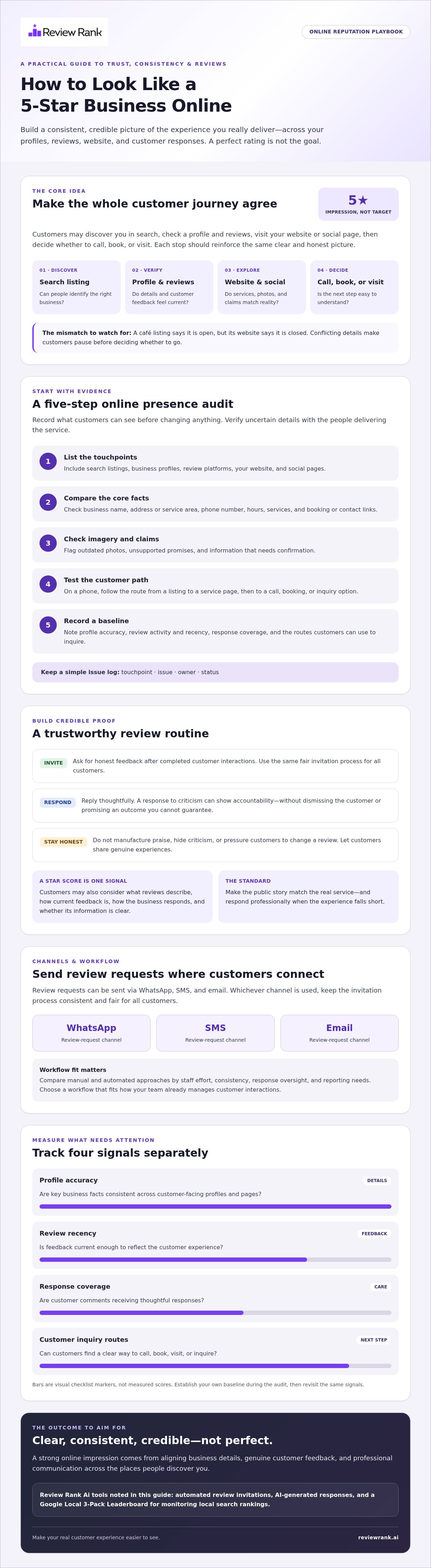
A five-star online impression is the consistent, credible picture customers get from your business information, customer feedback, and responses across the places they check before contacting you. It doesn’t require a perfect rating. It requires the details customers see to match the experience you actually provide.
That picture forms across a journey: someone spots your business in search results, checks its profile and reviews, visits your website or social page, then decides whether to call, book, or visit. Each step can build confidence or create doubt. Online presence management offers a broader frame for this work, covering how a business presents itself across digital channels.
Which online touchpoints shape a customer’s first impression?
Customers may encounter search listings, business profiles, review platforms, your website, and social pages in different combinations. Accurate names, phone numbers, hours, service descriptions, and links help them confirm they’ve found the right business and understand what to expect. A polished page can’t make up for a wrong phone number or outdated hours elsewhere.
Illustrative scenario: A customer searching for a nearby café sees its listing, checks opening hours, reads a few reviews, and visits the café’s website to view the menu. If the listing says it’s open but the website says it’s closed, the customer has to resolve the mismatch before deciding whether to go. Consistent details make the next step clearer.
Does looking like a 5-star business mean having a perfect rating?
No. A star score is one part of the picture. Customers may also consider what reviews describe, how current the feedback is, whether the business responds with care, and whether its public information is clear. A thoughtful response to criticism can demonstrate accountability. It shouldn’t dismiss the customer or promise an outcome the business can’t guarantee.
Don’t aim to make every review positive. Invite honest feedback through a consistent process, and let customers share their genuine experiences. Manufactured praise, hidden criticism, or pressure to change a review may make a profile look polished, but it weakens credibility. A trustworthy reputation comes from matching the public story to the real service, then responding professionally when the experience falls short.
That’s the practical answer to how to look like a 5-star business online: align the details, evidence, and communication customers encounter, then keep them grounded in the experience your business truly delivers.
How to Audit Your Online Presence Before Changing Anything
Start with evidence, not a new tool or campaign. A simple audit shows where customers may encounter conflicting details, unanswered feedback, or unclear next steps. Record what you find before making changes so you can compare the same touchpoints later.
How do you check whether your profiles and website agree?
Review the public profiles and pages customers are most likely to use. Compare the business name, address or service area, phone number, hours, services, photos, and links. Check key service pages and contact routes on a phone, too. Can a visitor quickly understand what you offer and how to reach you? For more profile and visibility guidance, see this local SEO reputation management guide.
Use this five-step audit:
- List the touchpoints. Include search listings, business profiles, review platforms, your website, and social pages.
- Compare core facts. Note mismatched names, contact details, hours, service descriptions, and booking or contact links.
- Check imagery and claims. Flag outdated photos, unsupported promises, and information that needs confirmation from the people delivering the service.
- Test the customer path. On mobile, follow the route from a listing to a service page and then to a call, booking, or inquiry option.
- Record a baseline. On the audit date, note profile accuracy, review activity and recency, response coverage, and the routes customers can use to inquire.
Keep a simple log with the touchpoint, issue, owner, and status. Mark uncertain details for human verification rather than guessing. A review-management resource such as Harvard Business Publishing’s Online Reputation Management can also provide broader context for monitoring public feedback.
What should you learn from existing customer reviews?
Look for themes across positive, mixed, and negative feedback. Group comments by topics such as communication, wait times, service clarity, or follow-up. The aim isn’t to cherry-pick flattering quotes. It’s to spot what customers repeatedly value, where expectations seem unclear, and which issues the business can address.
Prioritize operational fixes before highlighting praise. If customers describe confusion about appointment details, for example, review the instructions they receive and the information on your profile. Use customer stories or quotes only when they’re genuine and appropriate to share, and protect personal details. This audit gives you a practical starting point for deciding what to improve. If review activity is hard to manage consistently, explore Review Rank Ai’s review management platform as one possible workflow tool.
How to Look Like a 5-Star Business Online Across Every Channel
Your online presence earns trust when each channel tells the same clear, verifiable story. Make four things work together: clarity about what you offer, consistency in key details, genuine customer evidence, and responsive service. A strong review profile can’t compensate for a website that overpromises or contact details that lead nowhere.
Start with the customer’s practical questions. State the service, who it’s for, how to get in touch, and what happens next. Make contact options easy to find, and set expectations the business can meet. For example, a clinic should describe the services it provides and how patients can inquire, rather than implying every treatment or appointment is available.
How should a business present reviews without overclaiming?
Share authentic review excerpts with enough context to preserve their meaning. Don’t edit a comment to suggest a broader result, imply every customer is satisfied, or promise that another customer will have the same experience. Check that you have appropriate permission before republishing a review, and avoid including personal details that aren’t needed. For a broader process, see this automated reputation management guide.
Reviews can support service claims, but they shouldn’t replace clear explanations of what you actually do. If a customer praises a helpful team member, present it as that person’s experience, not proof that every visit will be identical. Keep the original meaning intact.
How can responses show customers that feedback is taken seriously?
A trustworthy review response is specific, respectful, and grounded in facts. Acknowledge the customer’s actual point first. Then explain a relevant next step, if there is one, without arguing, making unsupported promises, or disclosing private customer information. Keep replies concise and professional, even when the feedback is difficult to read.
For instance, if a customer mentions a confusing booking process, recognize that concern and say how they can contact the business to discuss it. Don’t reveal appointment, payment, health, or other personal details in a public reply. The response should show care while moving any sensitive conversation to an appropriate private channel.
Consistency matters across locations and platforms, but each response should still address the review in front of you. AI-generated responses can help teams maintain a steady workflow, yet a person should check that each reply is accurate, appropriate, and specific before it’s published. Explore examples and workflow ideas in this AI review response generator guide.
That’s how to look like a 5-star business online without relying on cosmetic polish: make claims customers can verify, present real feedback fairly, and respond in a way that reflects the service you aim to provide.
How to Request Reviews and Use Automation Without Losing Trust
A dependable review process starts with a real customer interaction, not a target rating. Invite honest feedback consistently, make it easy to respond, then review what customers say and use it to improve the experience. Automation can make the steps easier to repeat. It shouldn’t decide whose opinion deserves to be heard.
How can review invitations stay consistent and customer-friendly?
Use clear, neutral wording. Ask customers to share an honest account of their experience, without requesting a specific rating or suggesting that only positive feedback is welcome. Apply the same invitation approach across customer experiences rather than screening people based on whether you expect a favorable review.
- Identify a completed interaction. Choose a clear point in your existing process when it makes sense to ask for feedback.
- Choose a suitable channel. Pick a channel that fits your customers and the way your business already communicates.
- Document the workflow. Record when invitations are sent, which channel is used, and who oversees the process. Set timing based on your service flow, not an invented universal interval.
- Monitor and learn. Review incoming feedback, respond appropriately, and identify recurring service issues as well as strengths.
Before launching or changing a process, check the current guidance from each review platform you use. If automation sends invitations, staff should still oversee the wording, handle customer concerns, and decide how to respond. That balance keeps the workflow efficient without making messages feel generic.
How do review integrations work with other business tools?
An integration can connect tools so information moves between steps in a workflow, potentially reducing repetitive entry. The exact systems, triggers, and data flows need to be confirmed before you rely on them. Review the Review Rank Ai integrations page to check which tools are currently supported and what each connection does. Don’t assume a particular system or workflow is available unless the page confirms it.
Before adopting an integration, verify what information is shared, what action starts the process, and what setup or staff input is needed. Your team remains responsible for accurate customer records, appropriate invitations, and reviewing responses for accuracy and privacy. If you use negative feedback filtering, check how it works and make sure it does not divert unhappy customers away from public review platforms or selectively suppress criticism.
Make feedback requests consistent, keep them neutral, and preserve human judgment where it matters. Explore the review management workflow overview to see how Review Rank Ai may fit your process.
How to Measure Progress and Choose a Reputation Workflow
Measurement turns reputation work into a repeatable process. Start with the baseline from your audit, then compare equivalent periods. Keep each indicator separate so a change in one area doesn’t hide a problem in another.
Which measures show whether your online presence is improving?
Track these indicators consistently:
- Review volume and recency: Record how many reviews appear and when customers leave them.
- Response coverage: Note whether reviews receive a response and where follow-up is still needed.
- Profile accuracy: Check whether key business details remain correct across public profiles.
- Customer inquiries: Monitor inquiries coming through the contact routes you can track, and note whether customers mention finding you through a profile, review, or website.
- Local visibility: Use the Google Local 3-Pack Leaderboard to monitor visibility over time, not as a promise of placement.
Compare the same measures across equivalent periods, and avoid inventing a target before you have a baseline. Pair the numbers with human review: read customer feedback, check whether profile details are still accurate, and ask whether the actual service experience supports the impression your online presence creates.
Review count, response coverage, profile accuracy, and leaderboard visibility are trackable indicators. None guarantees a particular search ranking, inquiry volume, or revenue result. That distinction keeps reporting useful and honest.
When does an automated reputation platform make sense?
A manual workflow may be sufficient when staff can send invitations consistently, keep track of reviews across relevant channels, and respond with appropriate oversight. Automation may be worth considering when those tasks are easy to miss or take too much staff time. Compare options by consistency, effort, response review, and the reporting your team actually needs.
Review Rank Ai offers automated review invitations, AI-generated review responses, a Google Local 3-Pack Leaderboard, negative feedback filtering, and review repurposing for websites and social media. These features can support a more organized workflow, but staff should still check messages and responses for accuracy and fit. See the Google review impact on local SEO guide for related search visibility context.
Choose a process your team can maintain, then review the same indicators against your baseline. To explore whether the features fit your workflow, visit the Review Rank Ai platform overview.
Make Your Next Reputation Improvement Count
A credible five-star impression comes from consistent business details, genuine customer feedback, and thoughtful responses. Start by auditing the places customers find you, fixing mismatches, and setting a fair, repeatable process for inviting and learning from reviews.
That’s the practical foundation for how to look like a 5-star business online. Measure review activity, response coverage, profile accuracy, and customer inquiries separately. Use those signals to guide improvements, not as promises of rankings or revenue.
If review requests and responses are difficult to manage consistently, Review Rank Ai offers automated invitations, AI-generated responses, and a Google Local 3-Pack Leaderboard. Explore the tools and see whether they fit your workflow: See how Review Rank Ai can streamline your review workflow.
Keep the process honest and focused on the customer experience. Each clear update and considered response helps make your business easier to trust.
Frequently Asked Questions
How can a small business look more trustworthy online?
Make your business information accurate, consistent, and easy to verify. Check that your name, hours, contact details, services, and links agree across search listings, profiles, and your website. Keep service descriptions clear, respond to feedback professionally, and invite customers to share honest reviews. To understand how to look like a 5-star business online, focus on aligning the customer experience with the details and evidence people find before they contact you.
Do you need a perfect five-star rating to look like a five-star business?
No. A perfect score isn’t required to create a credible impression. Customers may also consider what reviews say, how recent they are, whether the business responds thoughtfully, and whether its public information is clear. A mix of genuine opinions can look more authentic than a profile that seems too polished. Treat criticism as useful feedback, and look for patterns that point to service improvements rather than trying to remove every negative impression.
How can a business get more genuine online reviews?
Build a consistent, neutral invitation process around completed customer interactions. Ask customers to share honest feedback, make it straightforward to leave a review, and avoid wording that pushes for a specific rating. Choose a suitable channel for your customers and existing process. Review Rank Ai supports automated review invitations. Monitor the feedback you receive, respond appropriately, and use recurring comments to identify what your team can improve.
Is it okay to ask every customer for a review?
A fair approach is to invite customers consistently, without choosing only people you expect to leave positive feedback. Keep the request neutral and make clear that you welcome an honest account of their experience. Don’t pressure customers to leave a review or ask them to change their rating. Before setting up a process, check the current policies of the review platforms you use, since their guidance can differ.
Can automated review requests feel personal?
Yes, automation can handle repeatable steps without making every message sound detached. Keep the wording clear and courteous, and choose a channel that fits how your business already communicates with customers. Staff should still oversee the process, check that messages suit the customer interaction, and handle questions or concerns that need a thoughtful human response.
How should a business respond to a negative online review?
Respond calmly, acknowledge the specific concern, and offer a relevant next step when appropriate. Keep the reply professional and factual. Don’t argue, reveal private customer information, or promise a fix you can’t confirm. If the issue needs investigation, invite the customer to continue the conversation through a suitable private channel. Review similar comments over time to see whether they point to a service issue your team can address.
What should I look for in a review management tool?
Choose a tool based on the work your team needs to manage. Consider supported invitation workflows, response generation, local visibility monitoring, review repurposing, reporting, and how any integrations connect with your existing tools. Confirm current compatibility and data flows rather than assuming a connection is available. Review Rank Ai offers automated invitations, AI-generated responses, a Google Local 3-Pack Leaderboard, negative feedback filtering, and review repurposing. Keep human oversight in the workflow, and treat metrics as indicators, not guaranteed business results.