
How to Ask for More Google Reviews Without Review Gating
More reviews come from consistent, fair requests, not from steering customers toward five-star ratings. To learn how to get more reviews than local competitors, invite every customer to share honest feedback, make your Google review link easy to use, and never offer rewards or screen requests based on apparent satisfaction. That builds review momentum without review gating.
Reviews can influence whether a nearby customer chooses your business. But asking can feel awkward, and a long or confusing process gives people a reason to put it off. A simple, timely request removes friction while giving customers room to share their genuine experience.
This guide explains how to ask in person and through follow-up messages, where to place your review link, and how to respond to both praise and criticism. You’ll also learn how to build a steady review habit that strengthens trust and helps your business compete ethically, without shortcuts that undermine credibility.
Key Takeaways
- Ask every customer for honest feedback at a natural point in their experience, without steering them toward a particular rating.
- Make leaving a review simpler by sharing a direct Google review link through the communication channels your customers use.
- Respond thoughtfully to both praise and criticism to show customers their feedback is heard and taken seriously.
- Build a steady review routine and track progress over time instead of relying on occasional bursts of requests.
- Avoid incentives and review gating; an ethical, consistent process helps you earn feedback without compromising trust.
Responding to positive and negative reviews
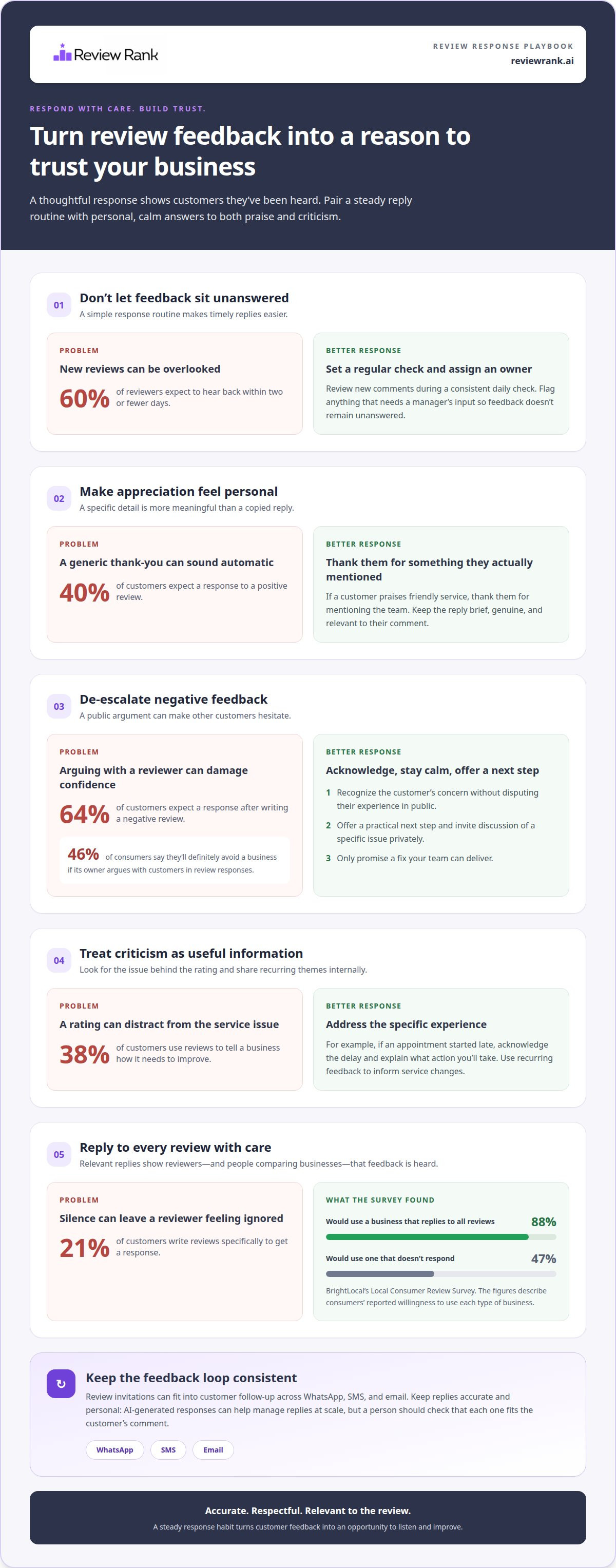
- Set a prompt response routine. Check your Google reviews regularly and assign someone to respond. Sixty percent of reviewers expect to hear back within two or fewer days. A consistent routine helps prevent feedback from sitting unanswered. For example, review new comments during a set daily check, then flag anything needing input from a manager.
- Thank positive reviewers with a specific detail. Forty percent of customers expect a response to a positive review. A brief, personal reply shows you read what they wrote. If a customer praises a café’s friendly service, thank them for mentioning the team. Avoid copy-and-paste replies that could make genuine appreciation sound like automated marketing.
- Respond to negative feedback without arguing. Acknowledge the customer’s concern, keep your language calm, and offer a practical next step. Sixty-four percent of customers expect a response after writing a negative review. By contrast, 46% of consumers say they’ll definitely avoid a business if its owner argues with customers in review responses. Never dispute someone’s experience in public; invite them to continue a specific issue privately.
- Look for the issue behind the rating. Thirty-eight percent of customers use reviews to tell a business how it needs to improve. Treat criticism as information, not a challenge to win. If a reviewer says an appointment started late, acknowledge the delay and explain what action you’ll take. Don’t promise a fix unless your team can deliver it. Share recurring themes internally so feedback can inform service changes.
- Reply to every review with care. Twenty-one percent of customers write reviews specifically to get a response. BrightLocal’s Local Consumer Review Survey found that 88 percent of consumers would use a business that replies to all its reviews; the same survey found 47 percent would use one that doesn’t respond. Those figures point to a clear habit: answer both praise and criticism, and keep each reply relevant to the review.
AI-generated review responses can help teams manage replies at scale, but a person should check that each response fits the customer’s comment. A thoughtful reply doesn’t need to be long. It needs to be accurate, respectful, and useful to the reviewer and anyone comparing local businesses.
How do I ask customers for Google reviews?
Use a simple, consistent request after a genuine customer experience. The timing and channel matter, as does making your Google review page easy to access.
- Choose platforms your customers already use. Google is a practical priority for local businesses because its reviews appear alongside local search results. Reviewers also spend time on Facebook, Yelp, and Nextdoor: 42% prefer Facebook, 36% focus on Yelp, and 16% spend the most time on Nextdoor. For restaurants or local services, start with Google, then add platforms that fit how your customers find you.
- Compare local profiles using consistent measures. Search Google for the service and area your customers would use, then note competing businesses’ review counts, average ratings, and dates of recent reviews. Compare similar businesses, not large national brands. A higher rating may look strong, but a steady flow of recent reviews can make a profile appear more active.
Consider Review Request Benchmarks
Track the share of customers who leave a review after receiving your request. Fifty-one percent of customers say they always or usually leave a review when a business asks. Treat that as an indication of willingness, not a guaranteed conversion rate for your business. Record requests and resulting reviews by channel, such as email, text, or an in-person ask, and compare the results over time.
Request Genuine Customer Reviews
Invite every customer to share an honest account of their experience. Ask after a completed appointment, meal, or service, using neutral wording that welcomes positive or critical feedback. Don’t screen customers by satisfaction or steer them toward a particular rating. A consistent request keeps the process fair and reviews grounded in real customer experiences.
- Make the request timely and easy to complete. Send a follow-up soon after the experience, while the details remain fresh. Email is preferred by 54% of customers, in-person requests by 45%, and text by 29%. A direct Google review link reduces steps; a QR code can also make access simple at a counter or checkout. Keep the message brief and include a clear, optional invitation.
- Understand what reviews can and can’t do for visibility. Google local results are based on relevance, distance, and prominence. Review count and score contribute to prominence, so reviews may support local ranking, but they don’t replace relevance to the search or the customer’s location. To assess your progress, compare your Google profile’s review count, rating, and recent activity with those of similar nearby businesses.
To make requests more consistent across email, text, and WhatsApp, use a review invitation workflow that fits your customer follow-up process.
Incentives, review gating, and Google policy
Google prohibits offering incentives in exchange for reviews, and Google and Yelp don’t allow rewards for ratings. That platform rule isn’t itself a statement of specific U.S. legal penalties, so avoid buying reviews or disguising incentives as ordinary requests.
- Audit every offer connected to feedback. Check whether staff, campaigns, or partners promise a discount, gift, contest entry, or other benefit for posting a review. Forty percent of consumers have been offered incentives in exchange for reviews, but common practice doesn’t make it appropriate for a Google profile. Remove rewards tied to writing a review or giving a particular rating.
-
Check Review Incentives and Platform Rules
Review Google’s policy before launching any customer feedback campaign. Google prohibits incentives in exchange for reviews, while Google and Yelp don’t allow businesses to reward reviews for ratings. Keep the invitation neutral: ask customers to describe their experience honestly, without suggesting a star rating or offering a perk. Apply the same approach across locations and staff.
- Keep review requests separate from promotional offers. A café can thank customers for visiting and invite honest feedback, but shouldn’t condition a coupon on posting a review. Likewise, don’t offer a prize draw for reviews, even if every rating qualifies. A reward can influence what a customer writes, making the feedback less trustworthy to future customers.
-
Avoid Incentives and Review Buying
Reject purchased reviews and requests for favorable ratings. Google advises businesses not to create fake reviews or pay for them. For U.S. legal risk, don’t represent paid or incentivized feedback as independent customer opinion; Google’s policy does not specify a particular legal penalty. Keep requests open to genuine customers and let them decide whether to respond.
- Don’t gate the request based on customer sentiment. Review gating means screening customers, then asking only those expected to be happy to post publicly. Instead, use one neutral invitation for customers, whether their experience was positive, mixed, or negative. For example, don’t route satisfied guests to Google while diverting unhappy guests to a private form.
- Use a simple compliance check before sending each campaign. Confirm that the message asks for an honest account, doesn’t mention a preferred rating, and offers no reward for posting. If a marketing partner drafts the message, review its exact wording and follow-up steps. Consistency across email, SMS, and in-person requests helps protect the credibility of your Google profiles.
Building a review advantage over local competitors
- Set a clear baseline before changing your process. Search Google using the service and neighborhood customers typically mention. Compare your profile with similar businesses, then note review count, rating, and dates of recent feedback. To work out how to get more reviews than local competitors, first identify the gap you can influence. For example, a newer clinic may focus on inviting customers consistently before comparing lifetime totals.
- Choose a sustainable collection target. A local business collecting one Google review per week would gather 50 reviews in a year at that pace. Use this as a planning example, not a promise. Set a monthly target that fits your real customer flow, then assign responsibility for each request. A target works best when staff know when to ask and who follows up.
- Turn the target into a repeatable routine. If eight new reviews monthly is a useful goal for your business, map requests to customer touchpoints. A salon could invite clients after completed appointments; a repair shop could follow up after vehicle pickup. Keep the process consistent across shifts and locations. A named owner for each task helps prevent busy days from disrupting the routine.
- Look beyond a competitor’s lifetime total. Established local profiles may have 200 or more reviews, but the total alone doesn’t show current momentum. Compare the dates and pace of new feedback, then choose a realistic next milestone for your own profile. For example, a business with fewer reviews can focus on maintaining steady monthly activity instead of trying to match a competitor’s entire history at once.
- Use review themes to guide service improvements. Group customer comments by recurring topic, such as appointment scheduling, staff communication, or checkout clarity. If restaurant guests repeatedly mention confusing pickup instructions, update the signage or order messages. Check later feedback to see whether the change helped. This turns reviews into practical operating information, not just a score to monitor.
- Make competitor tracking a regular business task. Compare the same local profiles on a monthly schedule, noting review pace and changes in customer feedback. The question of how to get more reviews than local competitors becomes easier to act on when your team sees progress over time. In competitive Toronto categories, review velocity can distinguish a business, with position two contrasted against not appearing at all. Treat rankings as one signal, not the only measure of success.
Review links on business communications
- Copy the direct Google review link and test it. Open it on a phone before adding it to customer communications. A direct link can take a customer to the review page in two taps, making the next action clear. Check that it opens the correct Google Business Profile, especially if your company has several locations. A link to the wrong branch creates confusion and can send feedback to the wrong profile.
- Place the link where customers already hear from you. Add it to your business website, social media profiles, and email newsletters. For example, a hotel can include the link in a post-stay email, while a bakery can place it on its contact page. Keep the invitation close to relevant information, rather than hiding it in a footer or a long message.
- Match the channel to the customer interaction. Use email for a follow-up message, SMS or WhatsApp for a concise post-service request, and an in-person prompt when a customer is still at your business. A café might display a QR code near checkout, while a home services company might send its link after completing a job. Each channel should lead to the same honest, optional request.
- Write a short, neutral invitation beside the link. Tell customers what the link does and let them decide whether to leave feedback. For example: “Thanks for visiting our clinic. If you’d like to share your experience, you can leave an honest Google review here.” Don’t ask for a five-star rating or suggest that only positive comments belong on Google. Clear wording keeps the request direct.
- Use QR codes for in-person touchpoints. Generate a code that opens the same Google review page, then test it from the distance customers will scan it. A customer can scan a QR code and leave a review in 60 seconds, so place it where there’s a natural pause, such as a restaurant check presenter or salon reception desk. Keep the printed prompt brief and readable.
- Check every placement during routine updates. Review your website, social profiles, and email templates whenever a location or profile changes. A multi-location business should label each branch’s link clearly before staff share it. Remove expired or incorrect links, and make sure each QR code still points to the intended Google profile. Consistent placement keeps the request easy to find across customer touchpoints.
- Make link sharing part of a repeatable follow-up process. Assign responsibility for updating the website link, checking social profile details, and maintaining email templates. If your team wants to simplify review invitations across customer follow-ups, explore a more consistent review request workflow.
Review Rank Ai: Automated Review Invites
Review Rank Ai helps businesses manage review requests and customer feedback. Its CRM sync and customer import features connect customer records from existing systems with the review workflow. The platform sends Automated Review Invites by WhatsApp, SMS, or email, letting businesses use the channels that fit their follow-up process.
This connection can reduce manual handoffs between customer records and review outreach. AI-Generated Review Responses support reply workflows, while the Google Local 3-Pack Leaderboard helps businesses monitor local search rankings. The integration approach centers on connecting customer information with review management, rather than replacing the tools a business already uses.
Visit Review Rank Ai to explore its review workflow.
Make Your Review Process Part of Daily Operations
If you’re working out how to get more reviews than local competitors, build a routine that keeps working when business gets busy. Make review follow-up part of the customer journey, assign clear ownership, and use feedback to spot patterns worth acting on. The advantage comes from a process your team can sustain, not a short-lived push for volume.
Review Rank Ai can support that workflow with Automated Review Invites, AI-Generated Review Responses, and a Google Local 3-Pack Leaderboard. These tools help teams manage invitations, stay on top of customer feedback, and monitor local search rankings. Choose a process that fits how your business serves customers and keeps each review request genuine.
Contact Review Rank Ai to explore a review workflow for your business. A consistent, customer-first approach gives your team a stronger foundation for earning trust and competing locally. Start with one practical improvement, then build from there.
Frequently Asked Questions
What are effective ways for local businesses to get more customer reviews?
Make review requests part of the customer journey, with a clear owner for each step. A dental practice could assign its front desk team to invite patients after appointments, while a restaurant might use a follow-up message after a completed visit. Keep the process consistent across staff and locations, and review which customer touchpoints make it easiest for people to respond.
How can you ask customers for reviews without violating Google policies?
Ask customers for an honest review without suggesting a rating or offering a reward. For example, say, “Would you share an honest account of your visit on Google?” Use the same neutral invitation regardless of customer satisfaction. Don’t screen people before asking or send only happy customers to your Google profile. That keeps the request focused on authentic feedback.
What are Google's rules on review incentives, gating, and soliciting reviews?
Google prohibits incentives in exchange for reviews, and businesses shouldn’t buy or create fake reviews. Review gating, which directs only customers expected to be satisfied toward public reviews, undermines authentic feedback. Keep requests neutral and open to every genuine customer. Don’t request a specific rating or condition a benefit on posting. Separate ordinary promotions from invitations to review your business.
How can local businesses automate review requests by text or email?
Use an invitation workflow to send review requests through the channel that fits your customer follow-up process. Review Rank Ai sends Automated Review Invites through WhatsApp, SMS, and email. For example, a home services business can incorporate a request into its post-job communication, while a clinic can use its appointment follow-up process. Keep the message personal, brief, and optional.
When is the best time to ask customers for a review?
Ask after the customer has experienced the service, while the details are still easy to recall. The right moment depends on the interaction: a restaurant can invite feedback after a meal, while a contractor can wait until the work is complete. Avoid asking before the customer has received the service. Make the timing a repeatable part of the experience, rather than an occasional afterthought.
How can businesses respond to negative reviews and improve their ratings?
Respond calmly, address the specific concern, and move personal details out of the public reply. For example, if a customer reports a billing issue, acknowledge it and invite them to discuss the account privately. Then review the complaint internally and make a service change when the facts support one. Ratings improve through genuine customer experiences, not arguments or pressure on reviewers.
Which review platforms matter most for local businesses by industry?
Google is a practical priority for local businesses, including restaurants and local services. Add platforms that fit how customers find you: Facebook, Yelp, and Nextdoor also matter to reviewers.