
High-Volume Review Software: 2026 Buying Guide
High review volume doesn’t have to mean more operational chaos. The right software for businesses with high review volume turns invitations, responses, and feedback tracking into repeatable workflows, so teams can keep pace across locations without losing consistency.
If your staff are juggling review requests, delayed replies, and feedback scattered across platforms, you already know that manual processes hit their limit. The challenge isn’t just collecting more reviews. It’s coordinating the work, maintaining a consistent brand voice, and seeing whether review activity and local visibility are moving in the right direction.
This guide compares the workflows, integrations, and measurement features to prioritize when evaluating review software. You’ll see how channel options, connections with other business tools, response support, and local ranking insights fit into a scalable process. Review Rank Ai, for example, supports automated invitations through WhatsApp, SMS, and email, alongside AI-generated responses and a Google Local 3-Pack Leaderboard. The goal: choose a system that fits your locations, channels, and team, then make every feedback touchpoint easier to manage and measure.
Key Takeaways
- Build a repeatable review workflow with clear ownership, so requests, responses, and follow-up don’t depend on ad hoc handoffs.
- Evaluate software for businesses with high review volume against your locations, team roles, review sources, and customer journey.
- Assess integrations by whether the relevant connection supports your workflow and reduces manual steps; review the platform’s integration details before comparing options.
- Use reporting to track review activity and local visibility, then turn feedback patterns into practical operational improvements.
- Follow a focused rollout: map volume, define responsibilities, prioritize features, assess fit, and review progress.
Why high-volume businesses need a review workflow, not another inbox
A growing stream of customer feedback can look like a simple volume problem. Often, the real strain comes from coordination: requests go out through different channels, reviews land in separate places, and teams aren’t sure who should respond or what to do with recurring feedback. More locations and more customer interactions add handoffs, not just messages.
High-volume review management is the coordinated process of requesting, monitoring, responding to, and learning from customer feedback across repeated interactions. The definition has no fixed review-count threshold. A business with several locations, different teams, and multiple feedback channels may face more operational complexity than a single-location business with a higher review count in one inbox.
User reviews are a form of customer feedback that can influence purchasing decisions and provide insights for businesses. To use those insights consistently, teams need more than a place to read reviews. They need a process that connects each feedback touchpoint to a clear owner and next step.
Where review workflows break as volume grows
Manual handoffs often fail quietly. A restaurant manager may ask for reviews after service, while another location only sends requests when someone remembers. Inconsistent timing makes it harder to track whether invitations are being sent as intended, and potential feedback opportunities can slip through the cracks.
Scattered inboxes create a second problem: a review may be visible to one team but not the person responsible for acting on it. Local teams need room to address location-specific feedback. Brand leaders need an overview of recurring themes, response practices, and unresolved issues across locations. Without defined ownership, both levels can lose control.
What a scalable review operation needs to accomplish
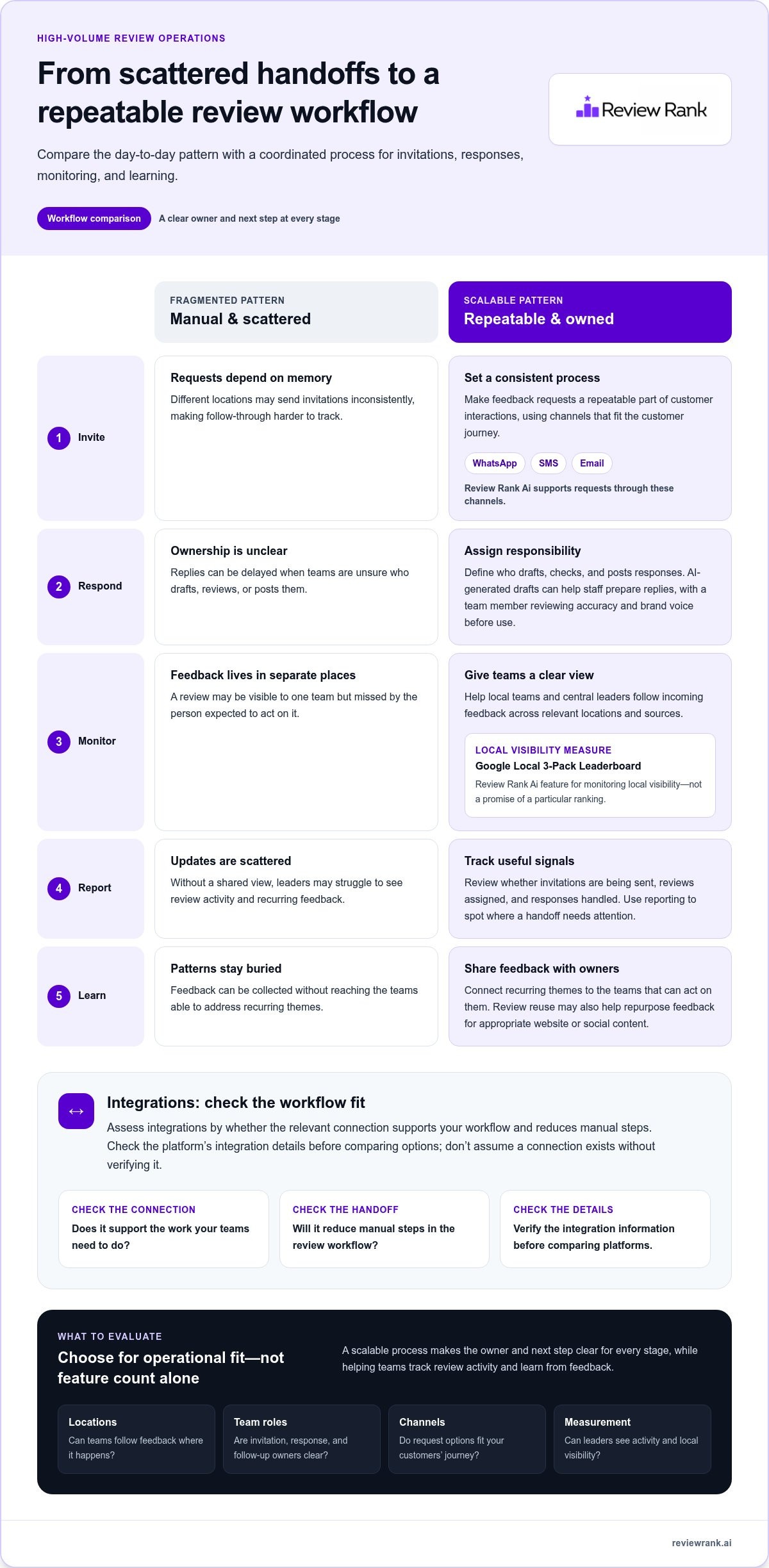
A dependable workflow makes each stage visible and repeatable. It clarifies who handles invitations, who monitors incoming reviews, who drafts or approves responses, and how teams share useful feedback. That structure helps businesses evaluate software for businesses with high review volume by operational fit, rather than by feature count alone.
Start by defining the stages and the owner for each one:
- Invite: Set a consistent process for requesting feedback after customer interactions.
- Respond: Assign responsibility for drafting, reviewing, and posting replies.
- Monitor: Give local teams and central leaders a clear way to follow incoming feedback.
- Learn: Share recurring themes with the teams that can address them.
Progress should be measurable without assuming reviews will produce a particular ranking or revenue result. Track operational indicators such as whether invitations are being sent, reviews are being assigned, and responses are being handled. Those signals show where the workflow is working and where a handoff still needs attention.
Which software features help manage reviews at scale?
Feature lists can look impressive and still leave teams with the same bottleneck: reviews arrive, but nobody knows what to do next. Evaluate each capability by the work it supports, who owns that work, and whether it gives local teams and brand leaders a useful view of progress. The best software for businesses with high review volume should make the review process easier to run, not add another layer of administration.
Use this checklist to focus your comparison:
- Invitations: Can teams use a repeatable process, with channels that match how customers prefer to communicate?
- Response support: Can staff draft replies efficiently while retaining control over accuracy, tone, and final approval?
- Monitoring: Can teams keep track of incoming reviews across relevant locations and sources?
- Reporting: Can leaders review activity and recurring feedback without relying on scattered updates?
- Review reuse: Can customer feedback be repurposed for appropriate website or social content?
For a broader view of how these capabilities fit into a platform, explore this automated reputation management software guide.
Automated requests and response support
Manually sending each invitation can make timing and follow-through harder to keep consistent. A repeatable invitation workflow helps teams apply the same process across locations, while channel choice helps the request fit the customer journey. Review Rank Ai supports review requests through WhatsApp, SMS, and email. Compare that mix with the channels your customers use and the way your teams handle follow-up.
AI-generated responses can help staff prepare replies faster, but they still need human oversight. A team member should check that the draft addresses the customer’s actual feedback and reflects the brand’s voice before it’s used. In a multi-location business, that balance can support a consistent standard without making every response sound detached from the specific experience.
Monitoring, reporting, and review reuse
Monitoring should help teams see where attention is needed. Review Rank Ai’s Google Local 3-Pack Leaderboard supports local visibility monitoring. Treat it as a measurement point, not a promise: ranking movement can be tracked alongside review activity, but review software shouldn’t imply that reviews guarantee a particular search position.
Reporting adds value when it helps teams spot patterns and act on them. For example, a group of clinics might notice recurring feedback about appointment communication, while a restaurant group may see comments repeatedly mentioning service during busy periods. Teams can route those themes to the people responsible for improving the experience, then monitor whether the same issues continue to appear.
Review Rank Ai also supports repurposing reviews for social media and company websites. Reusing positive feedback can help businesses present customer perspectives beyond review platforms. To see how these capabilities come together, explore Review Rank Ai’s review management platform.
How to compare high-volume review platforms without losing control
Automation doesn’t have to mean handing your reputation over to a system. The right platform can reduce repetitive work while your team keeps ownership of review decisions, response quality, and brand voice. Compare tools against the workflows you actually need, not the length of a feature list.
Platform fit depends on how well features support your workflow, not how many features a platform can list. Before evaluating vendors, mark each requirement as essential, helpful, or unnecessary. Then score each platform against the same criteria.
A practical scorecard for platform fit
Use this scorecard to compare software for businesses with high review volume. Give each platform a consistent rating, such as strong fit, partial fit, or gap, and note what evidence supports your judgment. Assess each item across locations and team roles, not just from a central administrator’s perspective.
Channels: Does the platform support the request channels your customer journey needs, such as WhatsApp, SMS, or email?
Workflow ownership: Can you define how local teams and brand-level teams divide invitation, monitoring, and follow-up work?
Response controls: Can staff review AI-generated drafts and retain responsibility for the final response?
Reporting: Does the available data help you assess review activity and local visibility in a useful way?
Integrations: Does a documented connection support the specific handoff you need with another tool? Review the vendor’s integration information and compare the workflow it describes, rather than assuming that a listed connection automates every step.
Review reuse: Can teams repurpose suitable reviews for the website or social media as part of their workflow?
Also map the review sources each location manages and who acts on feedback from each source. A platform may meet a central team’s reporting needs but still leave branch managers unclear about their responsibilities. The strongest scorecard makes those gaps visible before rollout.
Automation, human review, and responsible feedback handling
AI-generated responses can reduce drafting effort, but a person should check that a reply addresses the customer’s specific comments and sounds like the brand. Decide which responses need review before use and who owns that decision. Automation should accelerate the workflow, not remove accountability.
Be equally clear about the difference between collecting private feedback and managing public reviews. A private feedback route can give a business a channel to hear from customers directly; it should not be treated as a way to suppress, manipulate, or selectively prevent public reviews. Ask vendors to explain how their feedback features work, and consult current review-platform policies for the rules that apply to your business.
Apply the same standard to integrations: count a connection as valuable only when it supports a defined workflow and preserves the right team’s oversight. This keeps software selection grounded in operational fit, not promises of effortless automation.
Review Rank Ai combines review invitations, AI-generated responses, and other review management capabilities in one platform. Explore Review Rank Ai’s review management platform as you compare how tools align with your team’s requirements.
How integrations and channels fit into a high-volume review system
Connected tools can simplify a review operation, but only when the connection supports a real task your teams need to complete. Start by tracing how a customer interaction becomes a review invitation, where feedback is handled, and how teams report on the process. Then compare each platform connection against that map. A connection name alone doesn’t show which information moves or what work it supports.
Look for friction points in the current process. Staff may enter the same customer details in more than one place, or a task may pass between teams without a clear owner. Write down what information each handoff needs, who acts on it, and where the process stalls. Use those details to assess whether a documented integration could address the specific friction, rather than assuming it will automate the entire workflow.
Map the systems and handoffs your team actually uses
List customer touchpoints, review channels, the roles involved, and the reports each team relies on. For instance, a business might find that local staff handle customer follow-up while a central team prepares cross-location reporting. Note where those responsibilities overlap or where teams must re-enter information. This map turns a broad integration discussion into a clear set of operational requirements.
Response workflows have their own review and approval needs. The AI review response guide offers additional context for considering how response drafting fits alongside human review and team ownership.
Evaluate channels and integration fit
Assess each customer communication channel against the journey it needs to support. Consider where customers interact with the business, who manages invitations, and how the team will recognize whether its chosen approach is working. A channel can be available yet still create extra work if it doesn’t fit the team’s process or customer touchpoint.
Use the review software integrations page to examine documented connections and their stated purpose. For each relevant connection, record the task it supports, the teams involved, and what information or action the documentation describes. Avoid assuming that a connection syncs data, starts a process, or updates another tool unless those behaviors are explicitly documented.
A focused review of the workflow can also help teams decide what to test during platform evaluation:
- Customer touchpoint: Where does the interaction happen, and what details are needed for the next step?
- Channel role: How does the chosen communication method fit the customer journey and team process?
- Ownership: Who is accountable for the action at each handoff?
- Connection purpose: What task does the documented integration support?
- Reporting use: How will the team use the resulting information to assess its process?
Review Rank Ai offers a review management platform for businesses assessing how review work fits into their existing operations. Explore Review Rank Ai’s review management platform as you consider the connections and workflows your team needs.
Choose a review platform and put the workflow into action
A platform decision should lead to a working process, not another layer of complexity. Before rollout, turn your comparison into an operating plan: define the work, assign owners, and decide how you’ll review progress. This gives your team a practical way to test whether a platform supports daily operations and where adjustments are needed.
Build an evaluation plan around your operation
Document the locations involved, the teams that handle feedback, key customer touchpoints, and the bottlenecks your current process creates. Then decide what you want to measure. Keep indicators tied to work your team can influence, such as whether assigned tasks are completed, handoffs are clear, and recurring customer concerns reach the right people. Set owners for each responsibility before the new process begins.
- Map volume and locations. Identify where feedback is generated, which teams need to act, and where responsibilities differ between locations.
- Define workflows. Write down each step from the customer interaction through follow-up and reporting. Clarify who takes ownership when work moves between teams.
- Prioritize features. Separate must-have requirements from useful extras. Keep the list anchored to specific tasks, not features that sound impressive but don’t address a real bottleneck.
- Assess fit. Compare the platform with your workflow map. Consider whether local teams can complete their work and whether central leaders can understand progress without creating extra reporting burdens.
- Review progress. Check your chosen indicators regularly. Use missed handoffs, incomplete tasks, or repeated feedback themes to decide what to refine next.
Match Review Rank Ai capabilities to your priorities
Use the platform overview to assess whether Review Rank Ai’s workflow aligns with the requirements you’ve documented. Consider how its capabilities fit your team’s invitation process, response responsibilities, visibility tracking, feedback handling, and review reuse needs. Keep the evaluation grounded in the work your staff must do and the oversight your organization expects.
Give feedback handling particular attention. A process for identifying or routing negative feedback should support follow-up and learning, not be treated as a way to hide public reviews or control ratings. Likewise, decide who reviews outputs, who handles customer concerns, and how teams share themes that may require operational changes. Clear ownership keeps the rollout accountable as well as efficient.
Once the workflow is defined, establish a review point with the people who use it. Ask which steps are clear, where work still stalls, and whether the selected measures help the team spot issues early. Make adjustments based on those observations rather than assuming software alone will solve process gaps.
Ready to evaluate a platform against your operation? Explore Review Rank Ai and decide whether its review management approach fits the workflow you’re building.
Make your next review workflow a deliberate choice
Turn your evaluation into a practical starting plan. Choose one workflow to put into action, name the people responsible for each step, and decide when the team will assess what’s working. A focused rollout gives you room to catch gaps early and improve the process using what staff observe in day-to-day work.
The right software for businesses with high review volume should fit the way your teams operate as the business grows. Keep your requirements visible, review progress against the measures you selected, and adjust roles or steps when the process creates unnecessary friction. Consistent follow-through is what turns a platform decision into a durable operating habit.
Ready to take the next step? Explore Review Rank Ai’s review management platform and find a clearer path toward a workflow your team can run with confidence.
Frequently Asked Questions
What software is best for businesses with a high volume of reviews?
The best fit is software that matches your team’s review workflow, customer channels, and reporting needs. For software for businesses with high review volume, compare how each option handles invitations, response support, review monitoring, and feedback insights. Review Rank Ai combines automated invitations, AI-generated responses, and a Google Local 3-Pack Leaderboard. Evaluate these capabilities against the tasks your team needs to manage, not just the platform’s feature count.
How does review management software help multi-location businesses?
Review management software can help multi-location businesses organize review activity by branch and make it easier to spot where follow-up is needed. For example, a retail group could assign a local manager to handle location-specific customer concerns while a central team reviews patterns across branches. The practical benefit depends on defining who owns each task and using location-level information consistently, rather than letting reviews remain in separate, untracked inboxes.
Can review software send requests through WhatsApp, SMS, and email?
Yes. Review Rank Ai supports review invitations through WhatsApp, SMS, and email. To make channel choice practical, consider where the customer interaction takes place and which communication method fits that follow-up. A business might choose different channels for in-person appointments and online orders, for example. Set a consistent approach for each customer journey so teams know which channel to use and can assess invitation activity over time.
How can a business manage AI-generated responses without losing its brand voice?
Use AI-generated responses as drafts, then have a team member review them before posting. Give reviewers clear guidance on tone, preferred terminology, and how to handle sensitive or specific complaints. They should verify that each reply addresses the actual customer experience rather than relying on generic language. A business can also review edited responses periodically to keep its guidance aligned with how the brand communicates across locations and teams.
What integrations should high-volume businesses look for in review software?
Look for documented connections that support a specific handoff in your process. Start by identifying where customer interactions are recorded, which team initiates review follow-up, and what information staff need to complete that task. Then compare those needs with the vendor’s integration documentation. Review Rank Ai’s integrations page describes its available connections. Don’t assume a connection transfers data or triggers an action unless its documentation says so.
Can review management software improve Google Local 3-Pack visibility?
Review software can help a business monitor local visibility, but it can’t guarantee a place in Google’s Local 3-Pack. Review Rank Ai’s Google Local 3-Pack Leaderboard gives teams a way to observe ranking positions as they manage review activity. Treat visibility as a measurement to track, not a promised outcome. If positions change, compare the trend with your review workflow and other local marketing activity before drawing conclusions.
How can businesses handle negative feedback without filtering public reviews?
Separate internal follow-up from public review handling. Use feedback themes to identify issues for the relevant team, such as recurring confusion about appointment scheduling, while responding to public reviews with a direct, considerate reply. Negative feedback filtering should not be presented as hiding public reviews or controlling ratings. Review Rank Ai includes negative feedback filtering, which businesses can assess as part of their feedback workflow while keeping public review responses honest and accountable.