
Google Review Management Tool: How to Choose the Right Platform
Could a google review management tool save your team time without making customer feedback feel automated or impersonal? It can, when it supports a fair, consistent process rather than chasing ratings or hiding criticism.
Review requests and replies can quickly become another task on an already crowded staff list. And comparing platforms by feature count alone won’t show whether they fit the way your business works. The right choice starts with clear workflows: inviting all customers to share feedback, helping your team respond thoughtfully, and making concerns easier to follow up on while keeping public reviews accessible.
This guide explains how to compare review-request channels, response support, integrations, and local visibility tracking. You’ll also learn what to look for in a platform that works with existing customer communication, including requests by WhatsApp, SMS, and email. Review Rank Ai brings these review operations together with AI-generated response support and a Google Local 3-Pack Leaderboard, so you can manage feedback and monitor visibility without treating either as a ranking guarantee. Choose for fit, trust, and measurable oversight, not feature-list hype.
Key Takeaways
- Choose a google review management tool by mapping its features to your team’s actual review workflow, not by counting features.
- Compare how platforms handle review requests, response support, reporting, and the needs of multiple locations.
- Keep private feedback pathways separate from public review access; don’t steer customers based on whether their feedback is positive or negative.
- Assess integrations by tracing what triggers a request, where information moves, who owns the next step, and how you’ll verify the result.
- Use review software to support consistent operations and monitor local visibility, without assuming it can guarantee ratings or rankings.
What Does a Google Review Management Tool Actually Do?
A google review management tool is software that helps a business organize review requests, monitor customer feedback, manage response workflows, and track related activity. It can make routine tasks easier to coordinate, but it can’t guarantee a particular star rating, more reviews, or a place in local search results.
Think of it as operational support, not a shortcut to a perfect reputation. The broader practice of Online Reputation Management includes monitoring and managing how a business appears online. Review software focuses on workflows around feedback, while people remain responsible for making sure every customer interaction is accurate and appropriate.
Which review tasks can software help organize?
Software can help teams send review invitations, keep feedback visible, and organize responses so that new activity doesn’t disappear in a crowded inbox. For example, a business may invite customers through WhatsApp, SMS, or email, then review incoming feedback and coordinate who will respond. The right channel depends on how the business already communicates with customers.
There’s an important distinction: collecting private feedback isn’t the same as publishing or managing a public Google review. Customers decide whether to post publicly, and software doesn’t write their experiences for them. Teams still need to check responses for accuracy, tone, and context before they’re published. Automation can reduce repetitive admin; it shouldn’t replace judgment or make a customer feel they’re receiving a canned reply.
Review management also isn’t manual review writing or a full-service SEO agency. A platform can help organize invitations and response work, but it doesn’t create genuine customer experiences or take over every part of a business’s search strategy.
What does Google review management have to do with local visibility?
Google Business Profile information can appear in Google Search and Google Maps, where people compare nearby options. In relevant local searches, Google may also show a Local 3-Pack, a prominent set of local business listings. It’s a placement to monitor, not a position any software can promise.
Review activity is one part of a broader local presence. A tool can help a team keep requests and replies organized and observe visibility trends, but those capabilities don’t prove that the tool caused a ranking change. For a wider look at how reputation work fits into local search strategy, see this local SEO reputation guide.
For example, a multi-location business could use a leaderboard to compare local visibility across branches, then investigate changes alongside its review activity and other business information. That gives the team a clearer basis for action without confusing measurement with a ranking guarantee.
How to Compare Google Review Management Tool Features
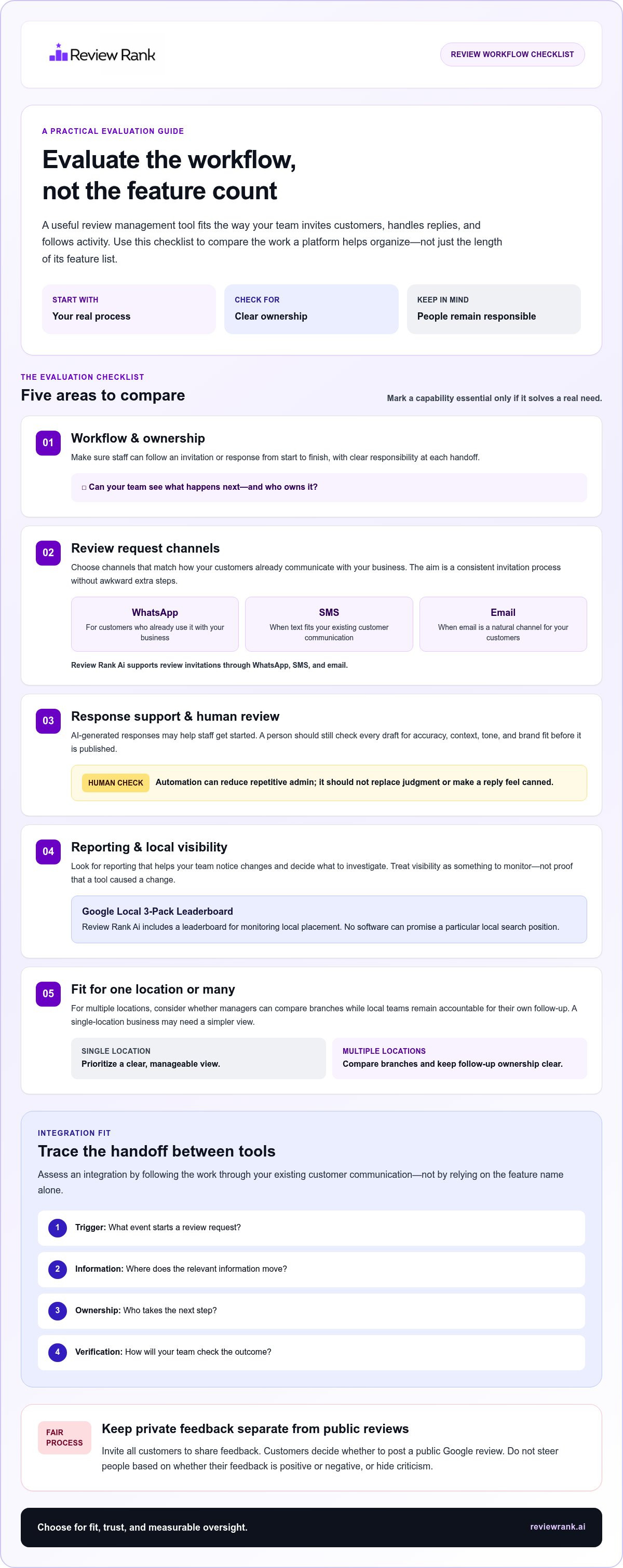
A feature list can look impressive and still leave your team doing the same work by hand. Compare tools against your actual review process: what triggers an invitation, how staff handle replies, what managers need to monitor, and whether the workflow suits one location or many. A useful comparison focuses on fit, not feature volume.
Use these categories to structure your evaluation. Mark a capability essential only when it solves a real bottleneck or supports a process your team intends to use.
- Workflow: Can staff understand how an invitation or response moves from start to finish? Look for clear ownership so requests and replies don’t get lost between teams.
- Request channels: Does the tool support the ways your customers already hear from you? Review Rank Ai sends review invitations through WhatsApp, SMS, and email, giving businesses options that can fit different communication habits.
- Response support: AI-generated responses can help staff get started, but a draft still needs a human review for accuracy, context, and brand fit. Avoid treating automated text as ready to publish without judgment.
- Reporting: Can you follow review activity and local visibility over time? Reporting is useful when it helps a team spot changes and decide what to investigate, not when it presents a metric as proof of guaranteed growth.
- Multiple locations: Can the view help managers compare branches while keeping local teams accountable for their own follow-up? A single-location business may need a simpler view, so don’t pay attention to a feature just because it sounds advanced.
Which request channels and response features matter?
Channel choice should follow customer context. A café might already use text messages for booking updates, while a professional service business may rely more on email. WhatsApp can suit customers who already communicate with the business there. The practical question is whether the available channels make it easier to invite customers consistently without adding awkward steps.
Some platforms also group feedback by themes or tone. Sentiment analysis refers to identifying patterns in opinion expressed in text; it can help teams notice recurring concerns, but it doesn’t replace reading specific feedback and understanding its context.
What should teams look for in reporting and multi-location workflows?
For visibility monitoring, Review Rank Ai includes a Google Local 3-Pack Leaderboard. It helps businesses track local placement, but monitoring isn’t a promise to improve or secure rankings. Compare reporting options with the decisions your team needs to make, such as where review activity is changing or which branch needs attention.
For broader platform considerations, explore this automated reputation management guide. If your priorities align with automated invitations, response support, and visibility tracking, Review Rank Ai brings these review workflows together in its review management platform.
Can a Google Review Management Tool Filter Negative Reviews?
No tool should prevent a customer from choosing to leave a public Google review because their feedback is negative. A private feedback form can help a business understand a concern and attempt service recovery, but it must remain separate from public review access. Every customer should have a fair opportunity to share their experience publicly.
Review gating means steering customers toward or away from public reviews based on their rating or sentiment. For example, sending satisfied customers to Google while diverting unhappy customers to a private form creates an uneven process. Don’t design invitations or feedback flows that do this. Google’s review policies can change, so check its current guidance before relying on detailed policy interpretations.
How can a business collect private feedback without restricting public reviews?
Offer private feedback as a parallel route for customers who want to explain a problem directly to the business. A restaurant might invite every diner to leave a public review while also making a separate contact option available for follow-up. The key is that the private route doesn’t depend on a customer’s rating, and it doesn’t remove or obscure the public option.
Private feedback supports service recovery; public review access remains open to every customer regardless of sentiment. That distinction protects customer choice and lets a team respond to issues without treating criticism as something to conceal. A review management platform may help organize feedback, but no filtering workflow should promise to hide a negative review from Google.
Review Rank Ai’s negative-feedback filtering should be understood as a way to help surface concerns for follow-up, not as a way to block public reviews or solicit only positive ones. Teams can use feedback to identify recurring service problems, assign an internal owner, and review whether the concern was addressed. Keep the customer’s choice to post publicly intact throughout.
How should teams use AI-generated review responses responsibly?
AI can help produce a response draft, but a team member should check it before publication. Confirm that the reply addresses the actual review, reflects what the business knows, and sounds appropriate for the brand. A polished response that invents details or misunderstands the situation can undermine trust faster than a slower, thoughtful reply.
Privacy matters, too. Don’t reveal sensitive customer information in a public response, even if the reviewer has shared details themselves. Keep the reply focused on the concern and, when a private conversation is more suitable, invite the customer to continue through an appropriate private channel without exposing additional information.
For example, if a clinic receives a complaint about a visit, the response should avoid confirming personal details or discussing care publicly. Acknowledge the feedback in general terms, then direct the conversation to a private channel. Use AI-generated text as support, not as a substitute for human judgment. This AI review response guide offers more detail on shaping replies that are useful, accurate, and considerate.
How Do Integrations Fit a Google Review Management Workflow?
An integration connects a review workflow with another tool a business already uses. Its value depends on what actually passes between systems and which tasks still need staff attention. Review Rank Ai’s integrations information is the place to see the documented connections and workflows; use those specifics, rather than assuming every system can connect or every handoff is automatic.
Before adopting an integrated workflow, map it from the business event that starts the process through to the team’s follow-up. WhatsApp, SMS, and email are review-invitation channels, not third-party connectors. Separate the channel used to reach a customer from the systems that may initiate or support the review process.
How should a team map an integration before adoption?
Start with a real business event, such as a completed appointment or purchase. Then trace each handoff: which system records that event, how the review workflow begins, and what information moves between the tools. Compare your map with the documented workflows on the integrations page so your plan reflects actual capabilities, not assumptions.
Use this sequence to make responsibilities clear:
- Identify the trigger. Define the event that should begin the review process, such as marking a service complete.
- Trace data movement. Note what information is passed, where it goes, and which system handles each step.
- Assign ownership. Decide who monitors problems, customer replies, and any follow-up tasks.
- Verify the outcome. Confirm that the expected event led to the intended workflow and that staff can complete their part.
This map helps expose a broken handoff. If a completed appointment doesn’t lead to the expected invitation, for example, the team can investigate whether the trigger, data transfer, or staff follow-up needs attention. Keep the explanation grounded in the documented integration behavior, and describe any manual step as manual.
How can teams assess whether a workflow is working?
Assess each stage on its own. Check whether the initiating event is recorded, whether the intended invitation is sent through the selected channel, and whether someone is responsible for customer responses and follow-up. Then review reporting separately. A workflow may handle one stage well while another still needs clearer ownership.
A simple process record can capture the trigger, the system involved, the intended channel, the person responsible, and the outcome. This gives managers a practical way to spot where a handoff breaks down without assuming that an integration guarantees a customer response or a change in local visibility.
Choose integrations that support a process your team can explain and maintain. Explore the review management platform alongside its documented integration workflows to see how they fit your operations.
When Is Review Rank Ai the Right Google Review Management Tool?
Review Rank Ai may be a good fit if your team wants review work to run through a clearer, more consistent process. The decision comes down to the tasks you need help managing, the channels your customers use, the time staff spend responding, and the visibility information managers want to track. Start with those needs, not a feature checklist.
Which business needs align with Review Rank Ai?
The platform is designed for businesses that want to organize review operations with software. Automated invitations can be sent through WhatsApp, SMS, and email, helping teams use established customer communication channels. This can be useful for a local service business following a completed job, or a multi-location group looking for a repeatable approach across branches.
AI-generated review responses can support teams handling a steady flow of feedback. Staff should still review drafts for accuracy, context, and tone before publishing. For businesses that want to monitor local visibility, the Google Local 3-Pack Leaderboard provides a way to track placement. It doesn’t guarantee a ranking or replace the wider work involved in local SEO.
Review Rank Ai also repurposes reviews for business websites and social media. That means customer feedback can be reused in those settings; it doesn’t mean the platform provides social media content management. The distinction matters: the tool supports defined review workflows rather than taking over every marketing function.
In short, the platform may suit a business that wants invitations, response assistance, visibility monitoring, and review repurposing in its review operations. It’s not a full-service SEO agency. If your priority is a broader search strategy, treat review software as one part of that work, not as a replacement for it.
What are the next steps for evaluating the platform?
Before evaluating the fit, write down the specific work you want to improve. Note how customers should receive invitations, who will review responses, what visibility information matters, and whether you need a process for one location or several. Then compare those needs with the platform’s documented capabilities and consider how the workflow fits your team’s responsibilities.
Explore the Review Rank Ai platform in the context of your review process. If your team is ready to discuss how its needs align with the platform, book a platform walkthrough.
The practical goal is simple: make review work more consistent, measurable, and manageable. Choose tools that help your team follow through, while keeping customer feedback genuine and your decisions grounded in what the reporting actually shows.
Turn Review Work Into a Clearer Routine
The right google review management tool should fit the way your team works and make the next step clear, without promising outcomes no platform can control. Use that standard as you evaluate your review process: what would make requests easier to manage, responses more thoughtful, and performance easier to monitor?
Review Rank Ai brings together review invitations through WhatsApp, SMS, and email, AI-generated responses, and a Google Local 3-Pack Leaderboard. These capabilities support review operations and visibility tracking, while your team stays responsible for genuine customer communication and decisions.
Ready to see how the platform could fit your workflow? Explore Review Rank Ai’s review management platform and take the next step toward making review work more consistent and manageable. A practical process starts with the right tools and grows through thoughtful follow-through.
Frequently Asked Questions
What is a Google review management tool?
It’s software that helps a business coordinate review-related tasks, from inviting customers to tracking feedback and preparing replies. For example, a clinic could use one to keep review follow-up from getting lost among appointment administration. Capabilities differ between platforms, so list the handoffs your team wants to simplify before comparing options. A tool can support a consistent process, but it can’t promise a particular rating, review volume, or Google Maps position.
Can a Google review management tool filter out negative reviews?
No tool should be used to keep customers with negative feedback from posting publicly. A business can offer a private way to share concerns, then use that feedback to investigate a service issue, but customers should retain the choice to leave a public review. Don’t send only satisfied customers to Google or make the public option depend on a rating. Check Google’s current guidance before using any feedback-routing workflow.
Can businesses ask every customer for a Google review?
Businesses can invite customers to share honest feedback, using a neutral request that doesn’t imply a preferred rating. For instance, after a completed appointment, a message could thank the customer and provide a clear route to leave a review if they choose. Don’t pressure people, offer incentives, or coach the wording of their review. Keep the invitation consistent so customers can decide freely whether to respond.
Does a Google review management tool improve local rankings?
A tool can help your team organize review activity and observe local visibility, but it can’t guarantee improved rankings. Search placement can change, so treat a leaderboard as monitoring information rather than proof that one action caused a result. To make comparisons more useful, record when you review performance and which location or search area you’re evaluating. Then consider review trends alongside other changes to the business’s online presence.
How can a business request Google reviews through WhatsApp, SMS, and email?
Choose the channel that fits how the customer already communicates with your business, then send a concise, neutral invitation. Identify your business, thank the customer, and let them decide whether to share feedback without requesting a particular rating. Review Rank Ai supports review invitations through WhatsApp, SMS, and email. For example, a business could use the channel its customers already recognize rather than adding an unfamiliar step after a transaction.
Should AI write every response to a Google review automatically?
No. AI can help draft replies, but a person should review each one before it goes public. Check that it addresses the specific concern, uses an appropriate tone, and doesn’t introduce inaccurate details or promises the business can’t keep. Never include private customer information in a public response. If a review raises a sensitive issue, pause automation and have the right team member shape a careful reply and handle any private follow-up.