
Google Local 3-Pack Ranking Tool: Track Local Visibility and Take Action
What if your business ranks in the Local 3-Pack on one street and disappears a few blocks away? A single Google search cannot show the full picture. A google local 3 pack ranking tool tracks visibility across selected locations, giving you a clearer view of where your business appears and where it does not.
Rankings can vary between searches and branches, but a leaderboard cannot tell you on its own whether those positions are bringing in calls, visits, or bookings. Treat rank data as a signal, not a business result or a promise of better rankings. Useful reporting shows what was observed, where and when it was observed, and what your team might investigate next.
This guide explains what a Google Local 3-Pack ranking tool can measure, what to compare when evaluating one, and how to connect visibility checks with review and customer-feedback workflows. You’ll also see how a reputation platform can bring together a Local 3-Pack Leaderboard, automated review invitations through WhatsApp, SMS, and email, AI-generated review responses, and integrations that support existing tools and processes. Measure the map, then use what you learn to guide your next move.
Key Takeaways
- A google local 3 pack ranking tool tracks local search visibility across selected locations, but it does not measure organic website rankings or manage your Google Business Profile.
- Compare tools by geographic detail, query tracking, reporting clarity, and fit with your workflow.
- Keep visibility observations separate from business outcomes such as calls, bookings, and qualified leads.
- Use a repeatable process: set a baseline, review changes, investigate context, and document your actions.
- Connect leaderboard observations with genuine customer feedback, review workflows, and integrations that support your existing tools.
What a Google Local 3-Pack ranking tool measures, and what it does not
A Google Local 3-Pack ranking tool records whether a business appears in local search results for selected queries and locations. It organizes individual observations so you can review local visibility over time. Visibility measurement shows where a business appeared under specified conditions; it does not guarantee a ranking or future position.
The Local 3-Pack is a distinct search feature, separate from a website’s standard organic listing. A business may appear in map-based results without holding the same position among the organic links below, or appear in organic results without appearing in the Local 3-Pack. This distinction matters when reading reports: a Local 3-Pack tool does not provide a complete measure of organic website rankings. It also does not replace Google Business Profile management. It records search observations, while profile edits and other listing tasks are separate activities. For background, see this overview of the Local Pack and its place in local search.
What does Local 3-Pack tracking show?
For a selected search, a tracking tool records whether a business appears in local results and may report its observed position. Geographic coverage depends on the tool’s tracking configuration. A scan may represent selected points or areas, not every possible searcher location. Treat each report as evidence about the tracked query, location, and observation time, rather than a prediction of what every nearby customer will see.
Tracking does not establish why a business appeared, disappeared, or changed position. It measures an outcome in search results, not the cause. A leaderboard can flag patterns for investigation, but it cannot prove on its own that a particular review, profile edit, or marketing action produced a ranking change.
Why one map search is not a complete ranking report
A search from one address offers only a narrow snapshot. Someone searching near one branch may see different results from someone searching across town. Query wording matters too: “dentist” and “emergency dentist” may return different local results. Observations can also vary over time, so one screenshot should not stand in for an entire service area or a lasting trend.
Make comparisons more useful by keeping the inputs steady. Track the same relevant search terms, locations, and reporting periods, then look for repeated patterns instead of reacting to one position. A multi-location business should compare branches separately rather than blending them into one average that could hide local gaps. For example, a restaurant group can review visibility around each restaurant, while a dental clinic can compare its branches for the same relevant searches. This gives teams a clearer basis for deciding what to investigate, while keeping the limits of the data in view.
How Local 3-Pack ranking tools collect and organize location-level data
A location grid is a set of selected map points across a target area. Each point is used to observe local search results for a chosen query, helping show how visibility may vary across a service area. Grid design and data collection differ between tools, so do not assume every platform uses the same coverage, spacing, or scan frequency.
To make a report useful, keep its inputs distinct. A query is the search wording being tracked. A location is the map point or area where results are observed. A reporting date identifies when the observation was recorded. A business listing is the profile being monitored. Changing any of these can change what a comparison means.
Location grids, search terms, and reporting periods
Selected map points can reveal differences that a single central search misses. A service business, for instance, might appear near its address but show less visibility in another part of its coverage area. Compare the same query wording at the same locations across reporting periods. Changing “plumber” to “emergency plumber” introduces a different search and makes the comparison less direct.
Grid size, coverage, and reporting frequency vary by tool. Review the product’s documented configuration rather than assuming a report represents every nearby searcher or the entire service area. Local visibility is one part of local search. Sources discussing Local SEO ranking factors also examine profile, review, and website signals, which a position report alone cannot explain.
Reading changes without overclaiming
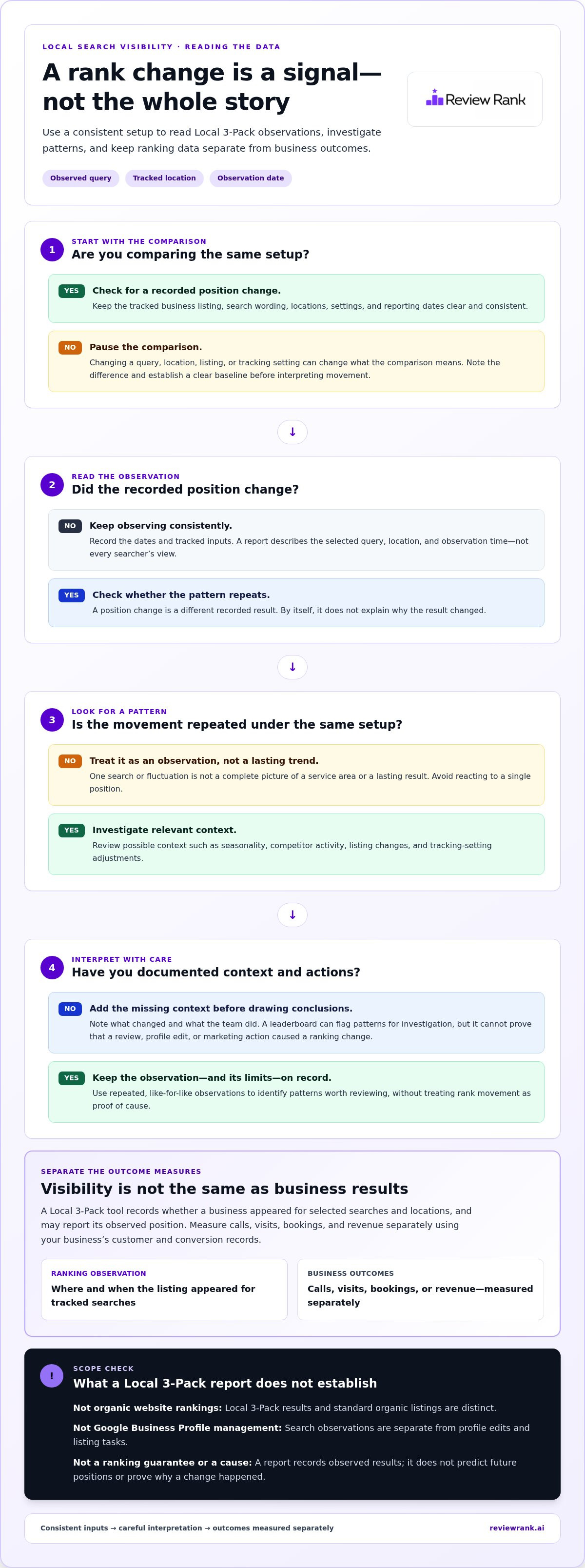
Start with a baseline. Record the tracked listings, queries, locations, settings, and dates before interpreting movement. Then compare repeated observations using the same setup. A position change is evidence of a different recorded result, not proof of more calls, visits, bookings, or revenue. Measure those outcomes separately using your business’s customer and conversion records.
Look for context before assigning a cause. Seasonality, competitor activity, listing changes, and adjustments to tracking settings may affect how you interpret a change. Note these factors alongside the report, and document actions taken so later reviews have a clear reference point. A google local 3 pack ranking tool is most useful when it supports consistent observation, not when a single fluctuation prompts a rushed decision.
Review Rank Ai’s Google Local 3-Pack Leaderboard is one input to an ongoing reputation workflow. Learn more about Review Rank Ai’s reputation platform and how visibility monitoring sits alongside review management.
How to compare Google Local 3-Pack ranking tools without chasing vanity metrics
Start with the decisions you need to make, not the biggest dashboard or the highest-looking position. A google local 3 pack ranking tool can reveal where visibility is stronger or weaker, but tracking alone does not change rankings. Choose reporting that helps your team interpret observations and decide what to investigate next.
| What to compare | What to look for | Why it matters |
|---|---|---|
| Geographic detail | Clear location coverage and observations relevant to each branch or service area. | A broad average can hide weak visibility in specific neighborhoods. |
| Tracked queries | Ways to monitor relevant searches with consistent wording. | Different wording can produce different local results, so comparisons need context. |
| Reporting clarity | Reports that identify the listing, query, location, and reporting date behind each observation. | Readable context helps non-specialists understand what changed without guessing. |
| Workflow fit | Reporting, sharing, history, or export options that support your team’s established process, where documented. | Insights are more useful when the people responsible for follow-up can access and act on them. |
Which features matter in a local ranking tracker?
Match the tool’s coverage to your actual footprint. A single-location business may need a focused view around its storefront, while a multi-location group needs to distinguish branches rather than blur them together. Check how the tool handles query tracking and historical comparisons, and whether its reports make settings and changes easy to follow. If you rely on integrations, look for documented connections that fit your existing tools and clarify what information or workflow they support. Do not assume an integration does more than its documentation states.
Sharing and export options can also matter when managers, branch teams, or analysts need to review findings together. Prioritize features your team will use. A long list of metrics adds little value if nobody can tell what was measured or what action the data supports.
How to spot unreliable or misleading ranking claims
Treat guaranteed top positions and unsupported performance promises as warning signs. Search visibility varies with the tracked query, location, and observation conditions. Check whether comparisons use consistent inputs and whether reports make those inputs clear. Keep the evidence in the right lane: a recorded position change is a visibility observation, not proof of increased calls, bookings, qualified leads, visits, or revenue. Measure those outcomes separately using business records.
A useful tracker does not promise a win. It gives your team a clearer view of local visibility, so you can investigate patterns, connect observations to relevant reputation or listing workflows, and assess outcomes with evidence rather than vanity metrics.
Turn ranking observations into a responsible local visibility workflow
A ranking report is a prompt to investigate, not a verdict on why visibility changed. Build a repeatable process that connects observations with listing details and genuine customer feedback. Keep cause and effect separate: a position shift and a new review may happen around the same time, but that alone does not prove one caused the other.
A simple review-and-action cycle for local teams
Use a consistent cycle, with a review cadence that fits your reporting needs:
- Establish a baseline. Record the listings, queries, locations, and reporting period you are monitoring.
- Review changes. Compare new observations with that baseline using the same tracking setup.
- Investigate context. Check relevant listing details and customer feedback, and look for changes in the locations where visibility shifted.
- Document actions. Note what you changed and why, then compare later reports against the original baseline.
Use customer feedback to inform service and reputation decisions, not to assume a ranking cause. Repeated comments may point to an experience issue worth addressing, but they do not prove that feedback caused a map position to change.
Where integrations fit into the workflow
Integrations can connect review activity with tools a business already uses. Their role depends on the specific connection, so understand what each documented integration supports before building it into a process. Review Rank Ai’s integrations page describes available connections and their functions. Review invitations can be sent through WhatsApp, SMS, or email, giving teams channel options for requesting honest customer feedback.
Use an impartial invitation process across channels. Do not offer incentives or direct only satisfied customers toward public reviews. Assign ownership for reviewing incoming feedback and responding. Review Rank Ai provides AI-generated review responses to support that follow-up. Keep leaderboard observations, customer feedback, and actions documented separately so your team can assess patterns without assuming one caused another.
A google local 3 pack ranking tool is a measurement input, not a ranking guarantee. Review Rank Ai’s reputation management platform brings local visibility monitoring into a broader review workflow.
Use Review Rank Ai’s Local 3-Pack Leaderboard to measure visibility
Review Rank Ai’s Google Local 3-Pack Leaderboard gives teams a dedicated way to monitor local search visibility. Use its observations to identify locations or searches that deserve closer attention, then investigate relevant listing details and customer feedback. The leaderboard measures visibility; it does not establish why a position changed or guarantee improved rankings.
What the leaderboard adds to reputation management
Rank observations become more useful when reviewed alongside customer feedback and response activity. Review Rank Ai also provides automated review invitations and AI-generated responses, helping teams bring reputation tasks into their ongoing workflow. Invitations can be sent through WhatsApp, SMS, and email. Customers write their own reviews, and the platform does not promise that review activity will produce a particular ranking outcome.
Choose a next step based on your visibility goals
Begin by identifying priority locations and relevant searches. Set a consistent routine for reviewing leaderboard observations, assign ownership for follow-up, and document actions so your team can assess later results in context.
Integrations can connect reputation workflows with platforms a business already uses. Review Rank Ai’s integrations information lists connections including Google Business Profile, Facebook, Yelp, and TripAdvisor. These platforms can form part of a business’s broader review and listing workflow; the specific role of each connection depends on its documented functions. See the Review Rank Ai integrations page for connection details.
A google local 3 pack ranking tool is a measurement input, not a shortcut to guaranteed rankings. Review Rank Ai’s reputation and local visibility platform brings the leaderboard and reputation tools together to support your team’s process.
Turn local visibility insights into consistent action
A google local 3 pack ranking tool is most useful when it shows how visibility varies across relevant locations and searches, not when one position is treated as the whole story. Compare consistent observations over time, investigate changes in context, and measure calls, bookings, and other business outcomes separately. Tracking provides evidence to guide decisions, not a guarantee of higher rankings.
Review Rank Ai brings local visibility monitoring together with reputation workflows. Its Google Local 3-Pack Leaderboard helps teams review visibility observations, while automated review invitations can be sent through WhatsApp, SMS, and email. AI-generated review responses support follow-up, while customer feedback remains genuine and authored by the customer.
Build a routine your team can sustain: monitor priority locations, review feedback, and document the actions you take. Explore Review Rank Ai’s reputation and local visibility platform to see how these capabilities can support your workflow. Clear measurement is a stronger starting point for your next local visibility decision.
Frequently Asked Questions
What is a Google Local 3-Pack ranking tool?
A Google Local 3-Pack ranking tool records a business’s visibility in local search results for selected queries and locations. Reports may show whether a listing appeared and its observed position at a particular time. This helps teams compare visibility across areas and reporting periods. It measures search observations, not organic website rankings, customer outcomes, or a guaranteed future position.
How does a Local 3-Pack rank tracker measure rankings in different locations?
A tracker checks local search results for selected queries at configured locations. Some tools organize those locations as map points in a geographic grid, while coverage and setup vary by product. For a useful comparison, keep the search terms, locations, reporting settings, and dates consistent. The result represents the tracked observations, not necessarily what every searcher in the area sees.
Can a Google Local 3-Pack ranking tool improve my rankings?
No. A Google Local 3-Pack ranking tool measures visibility; tracking alone does not improve rankings or guarantee a higher position. It can help identify patterns worth investigating, such as a location appearing less often for a relevant query. Teams can then review listing details and customer feedback, document any actions, and compare later observations. Treat ranking data as evidence, not proof of cause.
Why does my Google Local 3-Pack ranking change by location?
Local results can differ because the searcher’s location affects which businesses are nearby, and query wording affects which listings match the search. Competition and the time of observation can also shape what appears. A business may show prominently close to one branch but less often farther away. Compare consistent locations and queries over time instead of relying on one search or screenshot.
What should I compare when choosing a local ranking tool?
Compare geographic coverage, tracked queries, reporting clarity, and fit with your team’s workflow. Check whether reports identify the location, search term, listing, and observation date, and whether you can review history or share findings in ways the product documents. Choose reporting your team can interpret and use. Keep visibility metrics separate from calls, bookings, qualified leads, and other business outcomes.
Do reviews affect Google Local 3-Pack rankings?
Reviews can contribute to a business’s reputation and prominence in local search, but they do not guarantee a particular Local 3-Pack position. A ranking change alongside a new review does not prove that the review caused it. Invite customers impartially to share honest feedback, respond thoughtfully, and assess review patterns alongside other listing and visibility observations. Avoid treating review volume or ratings as a ranking promise.
Can I send review requests through WhatsApp, SMS, and email?
Yes. Review Rank Ai supports automated review invitations through WhatsApp, SMS, and email. These channels can help businesses build review requests into their customer follow-up workflow. Ask customers for honest feedback consistently, rather than directing only satisfied customers to leave public reviews or offering incentives. Review invitations support reputation management; they do not guarantee reviews, positive feedback, or improved rankings.