
Google Local 3-Pack Checker: Track and Improve Your Local Visibility
What if your business appears in the Google Local 3-Pack on one check but not the next? A google local 3 pack checker can show where your business appears for selected searches and locations, but one result is not proof of a lasting trend. Results can vary across locations and search contexts, and reviews alone don’t show whether local visibility is changing.
That uncertainty can make it difficult to choose what to address next. Make comparisons consistent, understand what the data can and can’t tell you, and connect visibility checks with your reputation workflow.
This guide explains what a Local 3-Pack checker measures, how to interpret its results, and how to track target areas over time without treating one ranking as the whole story. You’ll also learn how review activity can sit alongside visibility monitoring. Review Rank Ai’s Google Local 3-Pack Leaderboard helps businesses monitor local visibility, while the platform automates review invitations and generates AI-powered responses to customer feedback. Use visibility data to spot patterns, then choose focused actions to support your local presence.
Key Takeaways
- A google local 3 pack checker records visibility for selected searches and areas. It doesn’t establish one universal ranking or explain why a result appeared.
- Make tracking repeatable by keeping your target searches, locations, and comparison approach consistent.
- Compare tools by reviewing their location controls, keyword tracking, historical data, reporting, and usability. Confirm capabilities in current product information or a demonstration.
- Treat visibility changes as a reason to investigate business information, customer feedback, and service-area relevance, not as proof of a single cause.
- Review Rank Ai’s Google Local 3-Pack Leaderboard supports visibility monitoring alongside automated review invitations and AI-generated responses. Verify any other tool connections before relying on them.
What a Google Local 3-Pack Checker Measures, and What It Cannot Tell You
Google’s Local 3-Pack, also called the Local Pack or Map Pack, is the prominent group of local business results that can appear in Search, often alongside a map. It’s part of a Search Engine Results Page (SERP), but it isn’t a fixed position that every searcher sees in the same way.
A Google Local 3-Pack checker observes whether, and where, a business appears in local results for selected searches and locations. It helps you monitor visibility under defined conditions. It doesn’t reveal one universal ranking, guarantee placement, or prove that visibility will produce traffic, enquiries, or sales.
What does a Google Local 3-Pack checker show?
Depending on the tool, a report may show whether your business appeared for a chosen search and its reported position among local results. Location controls, keyword options, and reporting views vary. Check the tool’s current product information or test it before relying on its data.
Think of a result as one observation. For example, a clinic might appear for “dentist near me” at a selected point in town during one check. That doesn’t show how it appears across the rest of the area or for related searches. A snapshot can flag something to investigate, but it can’t describe your complete local visibility.
Why can local rankings look different from one check to another?
Local results depend partly on context. A search from one neighbourhood may show different nearby businesses than the same query made elsewhere. Query wording matters too: “emergency plumber” and “plumber” can return different results because they express different needs. Timing and the search environment can also make two checks difficult to compare.
For a fair comparison, keep your tracking conditions steady:
- Use the same search terms and spelling.
- Check the same defined locations.
- Keep device and other available search settings consistent.
- Record checks at a regular, practical frequency.
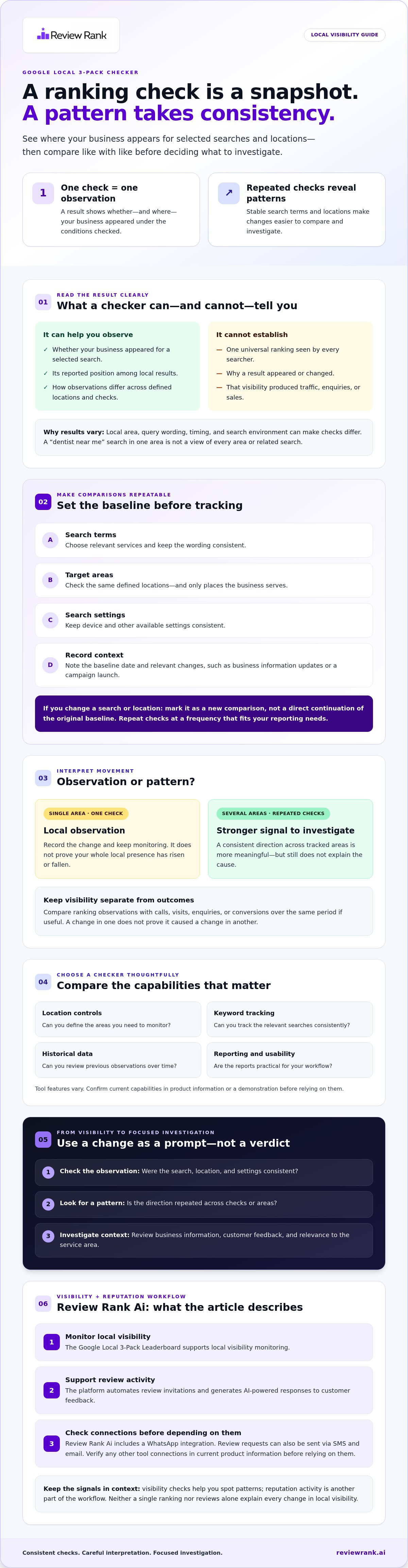
If one location changes while others remain steady, treat that as a location-specific observation, not proof that your entire local presence has risen or fallen. If the same direction appears across several tracked areas and checks, it’s a stronger signal to investigate, though it still doesn’t explain the cause. Consistent inputs turn scattered rank checks into more useful visibility tracking.
How to Use a Google Local 3-Pack Checker for Repeatable Tracking
A useful tracking routine turns separate checks into comparable observations. Set the conditions first, then measure again using the same approach. This makes it easier to spot where visibility may be shifting without mistaking one result for a lasting trend.
Set up a useful local visibility baseline
Start with searches that reflect what the business actually offers and where it serves customers. A dentist might track “family dentist” alongside the locations it serves, while a plumbing company could monitor a relevant service search across its genuine service area. Avoid adding places the business doesn’t serve just to expand the tracking map.
Before using a google local 3 pack checker, set up a simple record with:
- Search terms: Keep wording consistent between checks.
- Target areas: Use the same defined locations each time.
- Baseline date: Record when the first check was made.
- Context: Note relevant changes, such as updates to business information or a campaign launch.
Repeat checks at a frequency that fits your reporting needs. If you change a query or location, mark it as a new comparison rather than treating it as a direct continuation of the original baseline.
Read movement without overreacting to one result
Compare repeated observations across locations. If visibility changes in several tracked areas over multiple checks, treat that as a broader pattern to investigate. If only one area changes once, record it as a local observation and keep monitoring before drawing conclusions.
Keep visibility separate from business outcomes. You can compare ranking observations with calls, visits, enquiries, or conversions over the same period, but a change in one doesn’t prove it caused a change in another. Other factors may affect customer activity. For broader context on how reputation workflows fit into local visibility efforts, explore local SEO reputation management.
Observed rankings aren’t guaranteed to match every searcher’s results.
Use the same search terms, areas, and check frequency to make comparisons meaningful. If you want visibility monitoring alongside review workflows, explore the Google Local 3-Pack Leaderboard from Review Rank Ai.
How to Compare Google Local 3-Pack Checker Tools
The right checker depends on the decisions you need to make. A quick spot check can answer, “Does this business appear for this search right now?” Structured monitoring helps you compare defined searches and areas over time. Before choosing a google local 3 pack checker, compare the controls and reports you’ll actually use, not just the number of features listed in a sales description.
Which checker features matter for a local business?
Check whether the tool can represent your real service locations and relevant search terms. A business with one storefront may need different location coverage from a team tracking several branches. Historical views and clear reports also matter if you need to distinguish a sustained pattern from an isolated observation.
| What to compare | What to verify |
|---|---|
| Location controls | Can you select areas that reflect where customers search and where you serve? |
| Keyword tracking | Can you enter the specific services and search phrases relevant to your business? |
| History | Can you review earlier observations under comparable conditions? |
| Reporting | Are the results easy to interpret and share with the people who need them? |
| Usability and connections | Can your team work with the interface, and are any claimed connections to other tools documented? |
Capabilities vary by provider and may change. Confirm each item in current product information or a demonstration. Ask how the tool defines a location, when checks update, what the report represents, and what data or areas it doesn’t cover. Don’t assume a feature exists because another checker offers it.
What should a checker never promise?
A reporting tool observes search results; it doesn’t control Google’s placements. Treat guaranteed rankings, universal results, or certain lead growth as claims that need careful scrutiny. A checker can help you monitor visibility, but a report alone can’t prove that a particular change caused more calls or sales.
Ask for clear limits before relying on the numbers. If answers about data scope, update timing, or location coverage are vague, comparisons may be difficult to interpret. For related context on how reputation and search work together, read SEO reputation management.
For teams that want visibility monitoring alongside review workflows, Review Rank Ai offers a Google Local 3-Pack Leaderboard. Apply the same evaluation criteria: confirm the current reporting details and check whether they fit your team’s needs.
Turn Local 3-Pack Checker Results Into a Practical Action Plan
A visibility change is a signal to investigate, not a diagnosis. If a google local 3 pack checker shows weaker visibility for one search or area, repeat the check under consistent conditions. Then review relevant business details, customer feedback, and whether location or service information reflects where the business operates. Use current Google guidance when deciding what to adjust, and don’t assume one factor caused a ranking shift.
Keep the measures distinct. Local visibility, review activity, and customer outcomes each tell you something different. Looking at them together can help guide your next questions, but it doesn’t prove that a change in reviews caused a change in rankings or enquiries.
Connect ranking observations to reputation workflows
Track review activity and response practices alongside visibility, rather than treating them as substitutes for rank data. For example, if visibility observations change while review activity remains steady, record both trends and investigate other relevant business information before deciding what to adjust.
Review Rank Ai automates review invitations and generates AI-powered responses to customer feedback. These features support a review workflow, but they don’t establish a ranking effect or imply a connection to other business software. Request and handle feedback in line with current platform policies. For broader workflow context, read automated reputation management software.
Check integrations before connecting your existing tools
Before connecting other tools, confirm which integrations are currently supported and how each connection works. Check what information it shares, what setup is required, and which workflow it supports. Don’t assume that a connected tool syncs every record or triggers a particular action unless the integration details confirm it.
Keep confirmed platform features separate from unverified software integrations. Review invitations and AI-generated responses are part of Review Rank Ai’s offering, but that doesn’t confirm a CRM, booking system, or other connection. Verify any tool your team relies on against current product information before building it into your process.
To monitor local visibility alongside review workflows, explore the Review Rank Ai platform.
Evaluate the Review Rank Ai Google Local 3-Pack Leaderboard
Review Rank Ai includes a Google Local 3-Pack Leaderboard for monitoring local visibility. It helps businesses and teams observe how they appear in relevant local searches. Like any google local 3 pack checker, a leaderboard supports measurement and decision-making. It doesn’t control Google’s results or guarantee placement, traffic, or leads.
When does a Local 3-Pack Leaderboard fit your workflow?
A visibility leaderboard may suit businesses that want to monitor local presence alongside reputation activity. For example, a team can review visibility observations while separately tracking customer feedback and review responses. These measures provide different kinds of information. Looking at them together can guide questions, but it doesn’t prove one caused a change in the other.
Businesses with several locations should confirm that the current Leaderboard supports their required locations and reporting needs before choosing it. Don’t assume multi-location coverage or particular views without checking current product information. Match the tool to your actual workflow, not to an unverified feature list.
What to confirm before choosing a checker
Before adopting any checker, make sure its scope matches the way your business operates. Confirm the details directly with the provider:
- Tracked searches and areas: Can you monitor searches relevant to your services and locations you actually serve?
- Reporting and history: What does the tool report, and what historical comparisons are available?
- Setup and use: What’s required to configure and maintain the tracking you need?
- Connected tools: Which integrations are currently supported, what information flows between connected tools, and what setup is needed?
Check current product information before connecting other systems. Review Rank Ai offers a Google Local 3-Pack Leaderboard, automated review invitations, and AI-generated responses, but don’t infer additional integrations or data flows without verification. Ask the provider to clarify any connection that’s important to your process.
The Leaderboard’s value is in helping you monitor local visibility, not promising a better ranking. If its confirmed reporting and workflow fit your tracking needs, it may be worth evaluating alongside your existing review processes. Explore Review Rank Ai to assess the platform and its Google Local 3-Pack Leaderboard for your business.
Make Local Visibility Tracking Part of Your Next Move
A google local 3 pack checker is most useful when it turns repeatable observations into better questions, not when one snapshot is mistaken for a universal ranking. Track the same searches and areas over time, then investigate patterns without assuming they prove a single cause. Keep visibility data distinct from reviews and customer outcomes, while considering each measure as part of your broader local presence.
Review Rank Ai offers a Google Local 3-Pack Leaderboard to monitor local visibility alongside automated review invitations and AI-generated responses. Before choosing a tool, confirm that its reporting, coverage, and any integrations fit your needs.
Explore the Review Rank Ai platform and assess whether its Leaderboard and review features suit your workflow. Use consistent tracking and informed follow-through to build a clearer picture of your local presence.
Frequently Asked Questions
What is a Google Local 3-Pack checker?
A google local 3 pack checker records whether and where a business appears in Google’s local results for selected searches and areas. It helps you observe visibility under defined conditions, not find one universal rank that applies to every searcher. The locations, keywords, and reports available depend on the tool, so confirm its capabilities before using its results to guide decisions.
How can I check my business’s Google 3-Pack ranking?
Choose a checker that lets you track relevant search terms and locations, then record a baseline. For example, a café could monitor a service-related phrase across locations it actually serves. Repeat checks using the same terms and areas so you can compare like with like. A manual Google search can offer a quick observation, but it may not provide consistent location controls or historical comparisons.
Why does my Google Local 3-Pack ranking change by location?
Local results can vary because the searcher’s location and query context affect which businesses are relevant to that search. Someone searching near one branch may see a different set of businesses than someone across town, even with similar wording. Compare locations separately, and avoid treating one area’s result as representative of your whole service footprint. Keep search terms and check conditions steady to make changes easier to interpret.
Can a Local 3-Pack checker improve my Google ranking?
No. A checker measures observed visibility; it doesn’t change Google’s search results or guarantee improved placement. Its value is in showing where you may want to investigate. If visibility shifts, review relevant business information, customer feedback, and whether your location details reflect your actual service area. Treat those observations as prompts for informed action, not proof that one particular change will improve rankings, traffic, or leads.
How often should I check my Google Local 3-Pack ranking?
There isn’t one schedule that fits every business. Choose a practical frequency that lets you compare observations consistently without reacting to every fluctuation. Keep the same search terms and locations, and note relevant changes to business information or campaigns alongside the results. For a meaningful comparison, look at a pattern across repeated checks rather than drawing conclusions from a single snapshot.
What should I look for in a Google Local 3-Pack checker?
Check that the tool can represent your actual service locations and relevant search terms. Review whether it provides historical comparisons and reports your team can understand. Ask how it defines locations, when its data updates, and what its reports include or exclude. Verify feature claims against current product information or a demonstration, including any connected-tool details you plan to rely on.
Can review management and Local 3-Pack tracking work together?
Yes. Track visibility separately from review activity, then use both measures to guide questions about your local presence. Review invitations and responses support reputation workflows, but they don’t guarantee a particular ranking effect. Review Rank Ai offers a Google Local 3-Pack Leaderboard, automated review invitations, and AI-generated responses. Confirm any other integrations and follow current platform policies when requesting or responding to feedback.