
Customer Review Software: How to Choose a System That Scales
A review request missed in a busy inbox is a lost chance to learn from a customer and strengthen your online reputation. The right customer review software brings invitations, feedback, responses, and visibility into a repeatable workflow, so important conversations don’t get buried across channels or locations.
When comparing tools, look beyond feature lists. A system should fit how your business operates, work alongside the tools your team uses, and make review management easier without adding manual steps. It should also support genuine feedback, not shortcuts that compromise customer trust.
This guide explains how review software works and what to compare, from request channels such as WhatsApp, SMS, and email to response management, integrations, and reporting. You’ll learn how to build a consistent process for inviting customers, handling feedback, and tracking visibility, whether you run one location or manage several branches. The goal is a workflow that closes the loop from request to useful insight and can keep pace as your business grows.
Key Takeaways
- Choose customer review software that supports how your business collects, responds to, and learns from customer feedback.
- Build a repeatable workflow: identify the right customer moment, send a neutral invitation, respond to feedback, and review recurring themes.
- Compare invitation channels, response tools, reporting, integrations, and location management against your review volume and business structure.
- Map how integrations connect customer interactions with review requests and follow-up work, and understand what each connection does in the workflow.
- Launch with clear goals, then refine invitation wording and timing based on results while keeping requests customer-friendly.
What Is Customer Review Software, and What Should It Actually Solve?
Customer review software helps a business invite customers to share feedback, manage reviews, and identify useful patterns in what customers say. It can make review work more consistent, but it can’t guarantee more positive reviews, higher rankings, or business growth. Those outcomes depend on real customer experiences and how a business acts on feedback.
The category is easy to confuse with two different things. A review site is a public place where people read and post reviews. Review software helps a business manage parts of the process across review channels. A full-service marketing agency provides broader strategic or campaign work. Software supports a workflow, but it doesn’t replace the review platform or provide agency services.
The operational problem is straightforward: manual requests are easy to forget, feedback sits across different sites, and responses can be delayed while teams look for the right account or decide who should reply. A useful system makes these steps easier to organize, so customer feedback is less likely to disappear during a handoff.
Which review tasks can software bring into one workflow?
Review work involves several separate tasks, and platforms don’t all support the same capabilities. Before comparing tools, map the customer journey: someone completes a purchase or visit, receives an invitation, shares feedback on a review site, and gets a thoughtful response from the business.
- Invitations: Ask customers for feedback through a suitable channel, such as email, SMS, or WhatsApp.
- Review monitoring: Keep track of reviews on the sources supported by the platform.
- Response support: Help a team organize and respond to customer feedback.
- Feedback organization: Review comments to spot recurring topics and potential service improvements.
These capabilities can connect steps in the process, but they can’t make feedback authentic on a business’s behalf. The customer supplies the review; the business remains responsible for its service and response.
Who benefits from customer review software?
A single-location business may need a reliable way to keep requests and replies from slipping through the cracks. A restaurant can invite diners to share feedback after a visit. A clinic can organize patient comments, while a local service business can keep track of feedback after a completed job.
Retail businesses can use a consistent process to collect and manage feedback after purchases. For a business with several locations, the challenge expands: teams need a shared approach while still being able to see which location a review relates to. High-volume businesses benefit from defined responsibilities and repeatable steps, rather than leaving each team to manage requests and replies differently.
In short, the right customer review software solves an operational problem: it gives a business a clearer path from customer interaction to organized feedback and response. The best fit depends on how customers engage, how many teams handle reviews, and which tasks currently fall through the gaps.
How Customer Review Software Moves Feedback from Request to Response
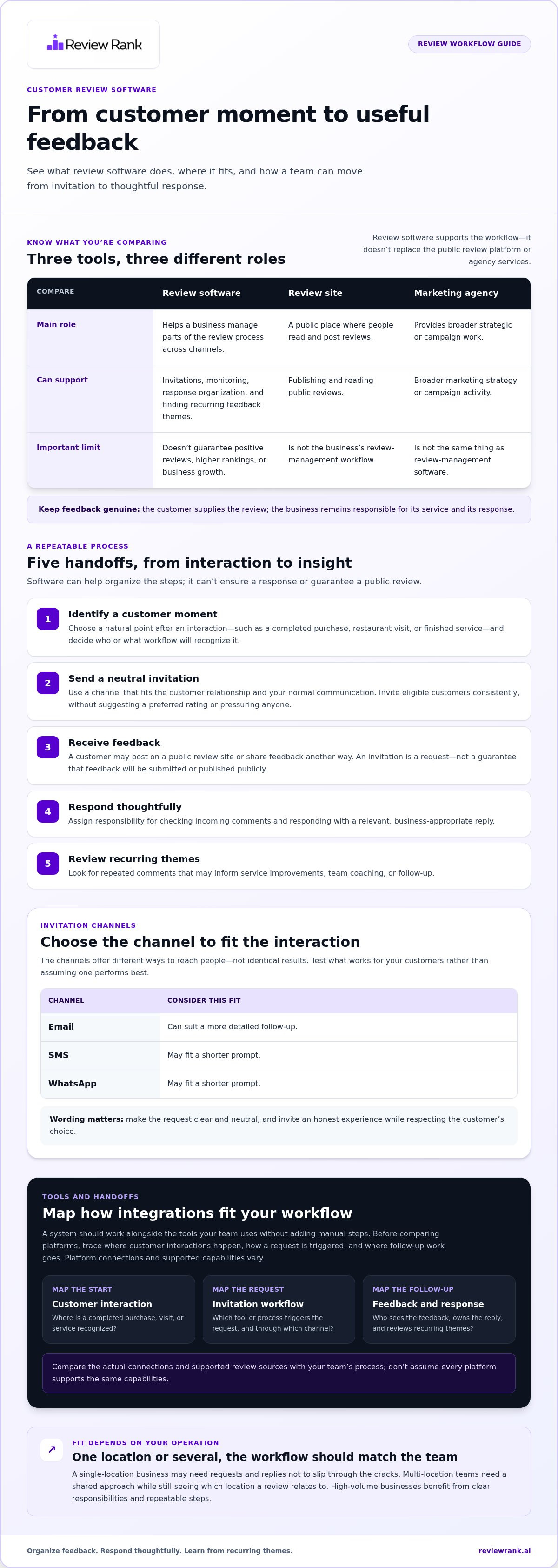
A dependable review process has clear handoffs. Someone identifies the right customer moment, the invitation reaches the customer through a suitable channel, and the business has a plan for handling whatever feedback arrives. Customer review software can help organize these steps, but it can’t ensure that someone responds or that a customer publishes a public review.
- Identify a customer moment. Choose a natural point after an interaction, such as a completed purchase, restaurant visit, or finished service. Decide which team or workflow will recognize that moment.
- Send an invitation. Use email, SMS, or WhatsApp based on the customer relationship and how your business normally communicates. These channels offer different ways to reach people, not identical results.
- Receive feedback. A customer may post on a public review site or share feedback through another route. An invitation is a request, not a guarantee that feedback will be submitted or published publicly.
- Respond thoughtfully. Assign responsibility for reviewing incoming comments and addressing them with a relevant, business-appropriate response.
- Review trends. Look for recurring comments that can inform service improvements, team coaching, or follow-up.
How do automated review invitations work?
A business can send a request after a customer interaction or schedule invitations as part of its process. The trigger might be a completed transaction or service, depending on how the business tracks customer moments. Choose a channel that fits the interaction: email can suit a detailed follow-up, while SMS or WhatsApp may fit a shorter prompt. Test what works for your customers rather than assuming one channel performs best.
Keep the wording clear and neutral. Invite eligible customers consistently, and don’t suggest a preferred rating or pressure anyone to leave positive feedback. A simple request to share an honest experience respects the customer’s choice and keeps the invitation focused on genuine feedback.
How should teams manage incoming reviews and responses?
Monitoring helps a team notice feedback and route it to someone who can respond. For example, a location manager might address a comment about an in-store experience, while a central team monitors patterns across branches. Set clear ownership and a review routine so feedback doesn’t sit unnoticed. The Digital.gov Customer Experience Toolkit also offers guidance on collecting and analyzing feedback as part of improving customer experience.
AI-generated response support can help staff prepare a draft, but the business should review it before publication. Check that it addresses the customer’s actual point, uses an appropriate tone, and doesn’t introduce details the team can’t stand behind. The final response remains the business’s responsibility. Review Rank Ai’s automated review invitations and response tools help bring these steps into one workflow.
How to Compare Customer Review Software for Your Business
A feature list can look impressive and still leave your biggest workflow gaps untouched. Compare each platform against the work your team needs to do: invite customers, manage incoming reviews, understand patterns, and coordinate across locations. Select software by workflow fit, not by the length of its feature list.
Start by marking each capability as essential, useful, or optional. Then compare tools against the same criteria, using your current review process as the baseline.
| Area | What to compare | Priority question |
|---|---|---|
| Invitation channels | Email, SMS, and WhatsApp options; how requests can be scheduled or triggered | Can the invitation fit the customer interaction and your team’s routine? |
| Response tools | Review monitoring, response drafting, and ways to organize replies | Can the right people find feedback and handle responses consistently? |
| Reporting | Review activity, recurring feedback themes, and location-level views | Will the reporting help you decide what to improve? |
| Integrations | Connections with the systems your team uses and the workflow each supports | Does a connection reduce duplicate work or keep a key handoff visible? |
| Location management | How reviews and reporting are organized across business locations | Can teams distinguish local performance while following a shared process? |
For integrations, look beyond a list of logos. Focus on what information or action moves between tools, and whether the connection supports a real step in your workflow. Keep essential functions separate from extras. For example, automatically repurposing reviews for a website or social media can extend the use of feedback, but it may be optional if your immediate priority is managing invitations and responses.
Which features matter most for single and multi-location teams?
For one location, prioritize a straightforward invitation process, an organized place to monitor feedback, and response support your team can use. A small clinic or retailer may value simplicity over complex reporting. With several branches, location-level visibility and a consistent process become more important. Franchise groups may also need reporting that helps compare locations, alongside a shared approach to managing feedback.
Weight criteria by operational load. A business with a high volume of customer interactions may put more emphasis on repeatable workflows and clear ownership. A business with fewer reviews may focus on ease of use and making each response manageable.
How can businesses judge trust, transparency, and practical fit?
Look for a clear explanation of how invitations are sent, what happens when feedback arrives, and how responses are prepared. Requests should invite honest feedback without nudging customers toward a positive rating. Avoid workflows that send only satisfied customers to public review sites. That approach distorts what the feedback represents and can prevent teams from seeing problems they could address.
Finally, test the workflow against a real scenario: a customer completes a purchase, receives an invitation, leaves feedback, and the appropriate team responds. If the process is confusing or creates extra manual steps, the feature list isn’t solving the operational problem.
How Integrations Connect Review Software to Everyday Business Tools
An integration connects tools or steps in a business process. In a review workflow, that connection can help carry a customer interaction into an invitation process, support response work, or make feedback easier to review. The value isn’t the number of connections on a list. It’s whether the workflow removes a handoff your team currently handles manually.
Use this simple map to define the workflow you want. It shows the steps to consider when connecting customer interactions, invitation channels, and review follow-up.
| Source system or touchpoint | Trigger to define | Message channel | Resulting action |
|---|---|---|---|
| Completed purchase or customer visit | The interaction is marked complete | Email, SMS, or WhatsApp | Send a neutral invitation to share feedback |
| Review or customer feedback source | New feedback is available for the team | Not applicable | Route it into the team’s review and response process |
| Review reporting workflow | Feedback is collected for analysis | Not applicable | Review patterns and identify possible process gaps |
Review Rank Ai supports review invitations through email, SMS, and WhatsApp. These channels let businesses choose an appropriate way to reach customers as part of their review process. Integrations connect that process with everyday business tools, helping teams organize the handoffs between customer interactions, invitations, and follow-up.
What should an integrated review workflow make easier?
A well-matched workflow helps a team connect a relevant customer moment with an invitation, rather than relying on someone to remember each request. It can also reduce repeated data entry or unclear handoffs. Across locations, consistent reporting can help teams see where invitations or responses are being missed and where a process needs attention.
How should teams evaluate integration fit before rollout?
First, map the tools and customer touchpoints your staff already use. Mark where information is entered twice, where requests get delayed, and who handles responses. Then compare those needs with the workflows outlined in Review Rank Ai’s integrations guide. Start with one workflow and define how the connection should support the intended handoff before expanding it across teams or locations. This keeps the rollout grounded in actual work, not assumptions.
For a broader view of how connected review tasks support reputation workflows, explore Review Rank Ai’s review workflow tools. A clear integration map helps make review software a practical part of the team’s process.
How to Launch a Customer Review Software Workflow That Keeps Improving
A strong rollout starts with a process your team can repeat, not a dashboard full of settings. Set a baseline first, then use customer review software to make the workflow easier to run and measure. Keep the goal focused on consistent invitations, thoughtful responses, and useful feedback. You can monitor review visibility, but no software can guarantee ranking gains.
- Define goals. Choose practical measures, such as whether eligible customers receive invitations, how consistently the team responds, and which feedback themes need attention.
- Map customer moments. Identify the interactions that make sense for an invitation, such as a completed purchase, visit, or service. Assign responsibility for each step.
- Choose channels. Select email, SMS, or WhatsApp based on the customer touchpoint and your communication process. Keep requests neutral and give customers room to share an honest experience.
- Configure the workflow. Set up the invitation process, clarify who monitors incoming reviews, and define how responses are reviewed before publication.
- Review results and refine. Check whether the process is working as intended. Test invitation wording or timing carefully, changing one element at a time so the team can judge what helped.
What should teams measure after launch?
Use a baseline that reflects both activity and follow-through. Track whether invitations are sent through the intended channels, whether incoming reviews receive a business response, and which customer comments appear repeatedly. For local visibility, monitor changes over time without treating ranking movement as a guaranteed result of the workflow.
For businesses with multiple locations, review the same measures by branch. A gap in invitation activity may point to a process that isn’t being followed. A repeated comment across locations may signal an experience issue worth investigating. Keep measurement useful: each metric should help the team decide what to adjust next.
How can Review Rank Ai support the ongoing workflow?
Once your process and measures are clear, bring the right tools into the routine. Review Rank Ai combines automated invitations through WhatsApp, SMS, and email with AI-generated review responses and a Google Local 3-Pack Leaderboard for visibility monitoring. Teams can review AI-generated responses before using them, keeping final responsibility with the business.
The platform also includes negative feedback filtering and can automatically repurpose reviews for social media and business websites. These features help businesses manage feedback and make customer reviews useful across channels. Repurposed review content remains customer feedback, not a substitute for an authentic customer experience. Use each capability where it fits your workflow, then keep checking whether it helps the team act on feedback with less manual effort.
Ready to bring invitations, responses, and visibility monitoring into one review workflow? Explore Review Rank Ai and see how the platform can support your process.
Make Every Customer Interaction Count
The best next step isn’t adding more complexity. It’s choosing a review process your team can sustain, then improving it as you learn what customers respond to and where work still gets missed. Well-fitted customer review software should support that progress without making authentic feedback feel like a numbers game.
Review Rank Ai brings review invitations, response support, visibility monitoring, negative feedback filtering, and review repurposing into one platform. Build a workflow around real customer experiences, keep your team accountable for the conversations that follow, and use each new insight to sharpen the process.
Explore Review Rank Ai’s customer review platform and take the next step toward a review workflow that can grow with your business. Start with a clear process, keep learning, and give every customer interaction the chance to make a difference.
Frequently Asked Questions
What is customer review software?
Customer review software supports the collection and management of customer reviews. To assess whether a tool fits, connect its capabilities to a specific business need, such as reducing missed invitations or helping staff organize feedback for follow-up. A clear use case makes it easier to distinguish a practical tool from a collection of features your team may never use.
How does customer review software work?
It follows the rules and processes a business sets up. Before launch, decide which interactions qualify for an invitation, how duplicate or incomplete customer records will be handled, and who owns follow-up when a response needs more than a standard reply. These decisions matter because software can apply a configured process, but the business must define what should happen in unusual cases.
Can customer review software send invitations through WhatsApp, SMS, and email?
Yes. Review Rank Ai supports review invitations through WhatsApp, SMS, and email. When choosing among channels, consider where the customer already expects to hear from your business and whether the message is easy to act on there. Keep the invitation consistent in purpose, but tailor its length and presentation to the format rather than copying the same message everywhere.
Does customer review software guarantee a higher Google ranking?
No. A review platform can’t promise a higher Google ranking. For a useful comparison over time, record the locations and search terms you monitor, then consider changes alongside business activity rather than crediting every movement to review software. A local visibility leaderboard can make shifts easier to observe, but it doesn’t control Google’s results or establish why a position changed.
Can review software remove negative customer reviews?
Review software can’t promise to remove a negative review from a public site. Understand how negative feedback filtering works as part of your review workflow, and keep internal follow-up separate from any changes to a public review. Maintain a clear record of the customer concern and the action your team takes, so follow-up remains useful regardless of whether a public review changes.
How much does customer review software cost?
There’s no single standard price for customer review software; providers set their own pricing and plan structures. Compare the total scope against your needs, including the number of locations or brands, the tools your team will use, and integration requirements. Consider how billing changes as your operation grows, and avoid paying for capabilities that don’t support a defined workflow or business goal.
What should a multi-location business look for in customer review software?
Look for reporting that lets the business compare locations without losing an overall view. During evaluation, check how branches are identified, whether location names match the organization’s internal structure, and how teams can distinguish local patterns from group-wide themes. A useful test is to trace one customer comment from its location record into a consolidated report and see whether the context remains clear.