
Convince Your Boss: Compare Automated Replies With Human Approval
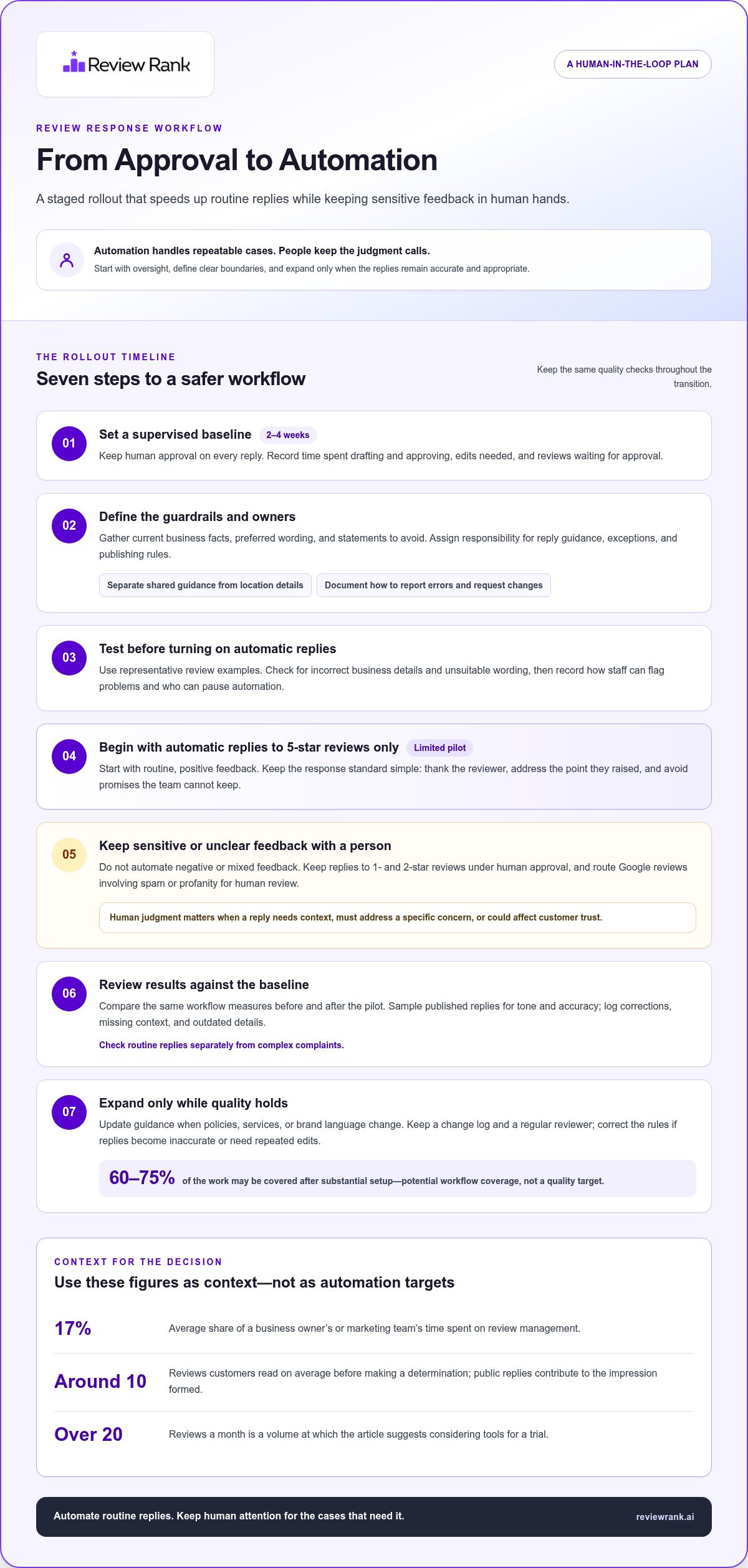
Human approval is a starting point, not a permanent bottleneck. To convince your boss to automate review responses, propose keeping approval on every reply for 2 to 4 weeks, then starting with automatic replies to 5-star reviews only. Keep negative, mixed, spam-related, and profane feedback in human hands.
It makes sense to be cautious: a quick response still needs to sound appropriate, protect customer trust, and accurately represent the business. But approving every routine reply can slow the team down and leave less time for reviews that need a thoughtful response.
This article offers a practical comparison of automated replies and human approval, including trade-offs you can take to your boss. You’ll learn how to stage a rollout, set clear guardrails, handle negative or mixed feedback, and decide when automation is ready to expand. The goal isn’t to remove judgment. It’s to focus human attention where it matters most.
Key Takeaways
- Compare automated replies with human approval by weighing speed and consistency against the need for judgment and oversight.
- Build a rollout plan with clear rules for which reviews can receive automatic replies and which should be escalated.
- Understand how review-response software uses review details and preset guidance to generate replies, and where human review still adds value.
- Assess automation’s ROI by comparing time saved and review-management outcomes with the cost of the tool.
- Explore how review invitations and response tools can fit into your workflow, including requests sent through WhatsApp, SMS, and email.
Benefits and risks of automating review replies
Review replies need a balance: speed for routine feedback and judgment for sensitive cases. Review management takes an average of 17% of a business owner’s or marketing team’s time, making task allocation a practical comparison point.
Benefits of Automated Replies
Automated replies can handle routine feedback with a consistent tone and less manual drafting. For example, a restaurant could use an approved response to thank customers who praise a meal, while staff focus on reviews describing a service problem. Automation suits repeatable interactions; human approval leaves more room for individual circumstances.
Risks of Automated Replies
A reply can miss context, sound generic, or address a concern inaccurately. Keep human approval for replies to 1- and 2-star reviews, and route Google review replies involving spam or profanity to human review. For example, a complaint about a delayed appointment needs context before a response can explain what happened or offer an appropriate next step.
Consistent Review Responses
Consistency means each response follows the same standards for tone, acknowledgment, and next steps. Customers read around 10 reviews on average before making a determination, so a business’s public replies contribute to the impression formed across those reviews. Use a simple rule: thank the reviewer, address the point they raised, and avoid making promises the team can’t keep.
Review Response Automation ROI
Compare the time spent drafting and approving replies before and after automation. Then account for the tool’s cost and check whether replies remain accurate, relevant, and consistent. If routine replies need fewer edits but complex complaints still require staff attention, measure those workflows separately rather than treating every response as an equal saving.
| Option | Speed | Context handling | Best fit |
|---|---|---|---|
| Automated replies | Fast for routine cases | Uses set guidance | Repeatable feedback |
| Human approval | Depends on staff review | Adapts to individual details | Sensitive or unclear feedback |
| Hybrid workflow | Automates selected cases | Escalates flagged reviews | Mixed review volumes |
Use review volume to decide whether automation deserves a trial: consider tools when the business receives over 20 reviews a month. Keep the rules specific. Skip a Google review if it already has a reply, and use a short, neutral response when a Google review has no text.
Before comparing results, record the current workflow: time spent drafting, edits needed, and reviews awaiting approval. After a trial, compare the same measures and inspect samples for tone and accuracy. Automate routine replies, keep human approval for feedback that requires judgment, or use a hybrid approach when both needs matter.
Automation setup and ongoing management
A reliable setup starts with clear ownership, approved information, and a record of decisions. Map who maintains reply guidance, who handles exceptions, and who can change publishing rules. For a multi-location business, name the person responsible for keeping each location’s details current.
Prepare the workflow before launch
Create a reference sheet with current business details, preferred wording, and statements staff must avoid. A hotel, for example, can document its check-in language and approved service descriptions. Separate organization-wide guidance from location-specific details so a shared response doesn’t mistakenly describe the wrong branch.
Before enabling automation, assign an owner to each setup task. Then test the process with representative review examples and record decisions:
- Gather current business facts and approved brand language.
- Identify staff responsible for guidance, exceptions, and publishing controls.
- Review test outputs for incorrect details and unsuitable wording.
- Document how staff report errors and request rule changes.
This preparation gives managers a reference point when business information changes. For example, if a salon updates its appointment policy, the designated owner can revise the approved guidance instead of letting outdated wording circulate.
Expand carefully and keep monitoring
After substantial upfront setup, automated tools can cover roughly 60-75% of the work. Treat that figure as potential workflow coverage, not a target that overrides quality. Assign a regular reviewer to sample published replies and log corrections, missing context, or outdated details.
Make rule changes traceable. A simple change log can record the date, the guidance updated, the reason, and the person responsible. If a retail chain changes its returns wording, this record helps managers distinguish a one-location update from a policy change across every branch. Clear ownership prevents conflicting edits.
Give staff a simple escalation route. They should know where to flag a questionable reply and who can pause the relevant automation. For example, an employee who spots the wrong branch name can report it to the assigned owner, who updates the location guidance and checks the correction.
Measure the rollout with practical checks
Track operational measures that reflect setup quality: corrections by issue type, outdated details found, and unresolved ownership questions. Compare locations using the same definitions. If one branch repeatedly needs wording corrections, investigate whether its local information differs or its staff need clearer guidance.
Schedule a review of the reference sheet whenever policies, services, or brand language change. Keep an approved example for each common scenario, and retire examples that no longer match current practice. This maintenance gives the team a controlled way to refine automation without expanding its scope by default.
Businesses building a fuller feedback workflow can connect response planning with automated review invites.
How automated review-response software works
Review-response software brings customer feedback into a process for drafting, checking, and publishing replies. A related workflow can send review invitations through WhatsApp, SMS, and email. These channels deliver the request; the reply workflow handles feedback after it appears. Keep those two tasks distinct when explaining the system to your team.
1. Review invitations reach customers
An invitation workflow sends a request through a communication channel such as WhatsApp, SMS, or email. A business can use these channels to ask customers for feedback after an interaction. For example, an auto repair shop might send a request after completing a service. The channel delivers the invitation; it doesn’t determine what the customer writes or how a later response should read.
Describe these channels as part of the customer-feedback process, not as links to unrelated business software. Keep the invitation wording clear and identify the business asking for feedback. That makes the request recognizable across channels and gives staff a consistent starting point for collecting customer opinions.
2. Review details guide the response
Once feedback is available, response software uses its content and rating to help shape a reply. A comment about a repair taking longer than expected calls for a different response than praise for clear explanations. The review provides immediate context, while approved business details and tone guidance help keep the draft relevant.
Instructions should define the voice and boundaries. A business might ask for concise wording, a respectful tone, and no claims about actions staff haven’t verified. Those rules help prevent a response from inventing reasons for a delay or promising a resolution the team hasn’t approved.
3. Drafting, review, and publishing
The software can generate a reply for a person to review or publish according to the workflow’s settings. An approver should compare the draft with the customer’s actual comment and the facts available to the business. For example, if a repair customer says the issue returned, staff should verify the service record before a public reply describes the work performed.
Reviewers can correct wording that misses the point, uses an unsuitable tone, or includes an inaccurate detail. Those edits can also show managers where response guidance needs improvement. Keep final approval with the person responsible for public customer communication.
4. Keep channel and reply workflows distinct
WhatsApp, SMS, and email are channels for sending review requests. They don’t show that a response system connects to booking, payment, or customer-management tools. Avoid promising that customer records automatically populate replies unless that connection is part of the actual setup.
Map the steps clearly: send an invitation, receive customer feedback, prepare a response, then review or publish it. This simple workflow shows where each tool fits and prevents confusion between requesting a review and replying to one. Keep instructions and business details current so every stage supports accurate communication.
Responding to negative and mixed feedback
A critical review is useful input, not a cue for a defensive reply. Before drafting, identify what the reviewer says happened, what they want addressed, and what the business can responsibly say in public. For example, a pet-boarding customer may praise the staff but describe confusion about pickup instructions. The response should recognize both points without turning the exchange into an argument.
Separate the feedback from the rating
Read the review as a description of an experience, not a score to rebut. Identify the specific issue, such as unclear instructions, a missed appointment, or a product that failed. Then distinguish firsthand details from assumptions. If a reviewer says an employee ignored them, the business can acknowledge the frustration without publicly declaring what the employee intended.
This distinction also helps teams choose the right reviewer. Staff who understand the service can assess operational details, while a manager can handle policy issues or wider patterns. Record the review’s main concern in neutral language before drafting. That small step reduces the chance of answering the rating instead of the customer’s actual point.
Use a clear response structure
Build the reply around acknowledgment, a relevant response, and a practical next step. For an electrician receiving feedback about an unclear arrival window, acknowledge the inconvenience, explain the communication process only if verified, and offer a private way to discuss the specific visit. Don’t ask the reviewer to post personal information publicly.
Keep the wording direct and natural. A canned apology followed by unrelated praise can make the response feel inattentive. Instead, refer to the concrete issue in plain language. Remove details that identify employees or customers, and don’t announce a remedy until the business has decided what it can provide.
Handle mixed feedback without sounding defensive
When a review includes praise and criticism, give each part its due. Suppose a customer likes a furniture delivery team but says the assembly instructions were confusing. Acknowledge both experiences, then address the instructions instead of using the compliment to soften or dismiss the problem.
Don’t challenge the reviewer’s feelings or demand a public correction. If the business has evidence that clarifies a factual point, present it calmly and briefly. A reply should help future readers understand how the business responds, not try to win a debate with one customer.
Set escalation rules for sensitive cases
Define who handles complaints involving disputed transactions, personal circumstances, or allegations about staff conduct. A manager can review the record, consult the relevant team, and approve a careful public response. Keep the public reply limited to what can be shared, then move case-specific discussion to a private channel.
After resolving a case, note what the team learned. If several customers misunderstand the same instruction, revise the customer-facing wording or service process. That follow-up turns an individual complaint into a useful operational signal without exposing private details in the public response.
How can I calculate the ROI of review response automation?
Build the case with your own operating data, not promised outcomes. Compare the value of time freed up and any measured business changes with the tool’s full cost. Keep response efficiency separate from revenue: changes in bookings or sales can have several causes.
Set a baseline before the trial
Record the current workflow before automation begins. Track staff time spent drafting, editing, approving, and publishing replies. Include time spent correcting mistakes or chasing approval. For example, a clinic can log review-response work by location and task, then compare the same categories during its trial.
Also record review volume, reply coverage, and how long reviews wait for a response. These measures show whether the workflow changes, even if they don’t prove automation caused more sales. Use consistent definitions: count a reply as complete only after publication, not when someone saves a draft.
Separate measurable benefits from assumptions
Group potential gains into operational savings, customer-response outcomes, and business outcomes. Calculate staff time freed up by comparing baseline hours with trial hours. If finance assigns an internal labor value, use its approved method. Don’t substitute an estimated wage or count every saved hour as cash recovered.
For customer-response outcomes, compare reply coverage and turnaround using the same review sources and locations. For business outcomes, examine relevant booking or sales trends alongside other changes, such as a promotion or seasonal demand. A hotel’s booking increase during a campaign shouldn’t automatically be credited to faster replies.
Use a transparent calculation
Apply this formula: ROI = (measured value minus total cost) divided by total cost. Use the period and cost categories approved by your finance team. Include the software expense and internal setup, training, review, and maintenance time. If a value can’t be measured reliably, leave it out rather than presenting it as a return.
To convince your boss to automate review responses, show the source for each input, who recorded it, and how it was calculated. For example, compare saved response-work hours with the tool’s total cost, then report reply-quality measures separately. A clear calculation is more persuasive than a sales estimate because another manager can reproduce it.
Present a decision, not just a percentage
Summarize the baseline, trial results, costs, and unresolved risks on one page. State which review categories were automated and which still needed human attention. Recommend continuing, adjusting, or stopping based on the evidence. A concise, reproducible case can help convince your boss to automate review responses while keeping the decision grounded in your team’s results.
Review Rank Ai: Automated Review Invites
Review Rank Ai connects review collection with response workflows through Automated Review Invites, AI-Generated Review Responses, and Negative Feedback Filtering. It’s a practical next step when your team wants to reduce repetitive review work while keeping clear rules for sensitive feedback.
Review requests can be sent through WhatsApp, SMS, and email. AI-generated replies support response drafting, while Negative Feedback Filtering helps identify feedback that needs closer attention. You can also automatically repurpose reviews for social media and your website, extending the value of customer feedback beyond review platforms.
If you’re ready to explore a more structured review workflow, visit Review Rank Ai.
Turn the comparison into a clear next step
Make your proposal about control, not just speed. Show your boss how a defined workflow can reserve human attention for cases that need judgment, while routine response work follows agreed rules. Then present the measures your team will use to assess whether the change is working. A focused recommendation gives decision-makers something concrete to evaluate.
To convince your boss to automate review responses, connect the workflow to the business’s priorities. That might mean reducing repetitive work, improving oversight across locations, or keeping local reputation activity visible. Review Rank Ai’s Google Local 3-Pack Leaderboard helps businesses monitor and improve local search rankings, adding a local visibility measure to the discussion.
Review Rank Ai offers review management tools that can support a more structured process. Contact Review Rank Ai to discuss how its offerings could fit your team’s review workflow. Take the next step with a clear plan, practical measures, and human judgment where it matters.
Frequently Asked Questions
What are the benefits of automating customer review responses?
Automation can help teams respond more consistently and free staff to focus on customer issues that need judgment. For a business with several locations, shared response rules can help maintain a recognizable voice across branches. Automation can also make unanswered feedback easier to spot. Treat these as workflow improvements, then track whether customers receive clearer, more relevant replies.
How much time and money can review response automation save?
Savings depend on review volume, time spent on each reply, and how much editing remains necessary. Track staff hours for drafting, approvals, and corrections before and during a trial. Compare the time saved with the tool’s full cost, including setup and ongoing oversight. Don’t assume every freed hour becomes cash savings; report labor capacity and direct financial savings separately.
What review response tasks should be automated versus handled by a person?
Automate repeatable acknowledgments when a review is clear and the response requires no case-specific decision. Keep a person involved when a reply depends on order status, appointment details, a refund decision, or a customer’s individual circumstances. For example, a retailer can automate thanks for praise while staff verify a delivery complaint before responding. Assign an owner to review cases flagged by automation.
How can AI-generated review responses be personalized and kept on-brand?
Give the system approved examples, tone guidance, and accurate business details. A neighborhood café might prefer friendly, concise replies, while a law firm may use a more formal voice. Personalize replies by referring to the reviewer’s specific comment, not by inserting names or details the team can’t verify. Check drafts for repeated phrases and update examples when the brand’s wording changes.
What are the risks of automated review responses, including inaccurate or inappropriate replies?
Automation can misread sarcasm, misunderstand a reviewer, or produce a reply that doesn’t match the business’s actions. Duplicate responses can also leave a poor impression if staff and software both reply. Assign someone to monitor published replies and pause automation if a recurring error appears. Record the issue, correct the instructions, and review new drafts before restoring that workflow.
What steps can I use to propose a review automation pilot to my boss?
Present a focused pilot with a defined review category, an accountable owner, and measures your team can track. Show sample replies that demonstrate the intended tone, along with examples that should remain under staff control. Explain how you’ll monitor errors and gather feedback from employees using the workflow. End with a decision point: continue, revise the rules, or stop based on observed results.