
Benefits of Automated Review Management: From Feedback to Measurable Momentum
What if customer feedback could move your business forward without becoming another task on your team’s list? The benefits of automated review management begin with a more consistent process: send requests, keep track of feedback, and respond without letting reviews pull focus from core work.
It’s easy to see why review management gets pushed aside. Requests and replies take time, and feedback can arrive across different channels. Automation can make follow-up more manageable, but it shouldn’t make your business sound less human. Thoughtful oversight still matters, especially when a customer raises a concern.
This article explores how review automation can save time, support faster and more personal responses, and turn recurring feedback into practical insights. You’ll also see how invitations through WhatsApp, SMS, and email, along with integrations that connect review activity with other tools, can help create a clearer workflow. Whether you run a café, clinic, or local service business, the goal is steady progress you can measure, not a promise of reviews or rankings you can’t control.
Key Takeaways
- Build a repeatable review workflow so requests and responses don’t depend on someone remembering every follow-up.
- The benefits of automated review management include making feedback easier to organize and recurring service issues easier to spot.
- Keep responses relevant with human oversight; automation should support thoughtful communication, not replace it.
- Connect review invitations to customer touchpoints through WhatsApp, SMS, or email, and consider how integrations fit into your existing tools.
- Track workflow consistency, response handling, feedback themes, and local visibility to understand progress over time.
What automated review management changes in a busy business
Automated review management is the use of software to support review invitations, responses, monitoring, and the practical use of customer feedback. The shift is operational: instead of relying on someone to remember every follow-up, a business can build review tasks into a more repeatable workflow.
That workflow can make review activity easier to coordinate, but it can’t create the customer experience behind a review. A request doesn’t guarantee a response, and automation can’t turn an unhappy visit into a positive one. It helps a business listen and follow up consistently. The service itself still has to earn the feedback.
Review activity is one part of Online Reputation Management, the broader work of managing how a business is represented online. For a local business, the practical value starts with clear steps: identify an appropriate customer interaction, invite feedback, monitor what comes in, and decide how to respond or act on it.
Which review tasks can automation support?
Software can help send review invitations after suitable customer interactions, such as a completed appointment, restaurant visit, retail purchase, or local service job. It can also help teams monitor incoming feedback and use AI to draft or generate responses for staff to review. The team can then check that a reply reflects the customer’s specific comment and the business’s own understanding before using it.
These are operational tasks, not a promise of positive reviews. Automation can help make invitations and response handling more consistent, but customers decide whether to share feedback and what to say. A useful process makes it easier to hear from customers without trying to script their experience.
Why does review work become difficult as a business grows?
Review follow-up often competes with immediate work. A clinic team may be managing appointments, while a restaurant handles service during a busy shift. Retail staff support shoppers, and a plumbing or cleaning team may move between jobs. When invitations and replies depend on memory, they can happen irregularly or be missed during busy periods.
Growth adds coordination. A business with several locations or brands may need to keep track of which customer interaction prompted an invitation, where feedback appeared, and who should handle a response. A repeatable workflow gives teams a shared way to manage those steps, while leaving room for local context. A response to a hotel guest’s comment may need a different perspective than one addressing a retail service issue.
That’s where the benefits of automated review management become practical: teams can organize routine review work instead of rebuilding the process each time. Automation supports customer relationships by helping businesses follow up and pay attention. It doesn’t replace genuine experiences, thoughtful judgment, or the people responsible for improving service.
The practical benefits: faster follow-up, clearer insights, stronger proof
Automation makes review work easier to repeat. Instead of starting from scratch after every customer interaction, a team can use a consistent invitation and response workflow. That can reduce the time spent remembering routine steps, while keeping customer choice at the centre: an invitation creates an opportunity to share feedback, not a promise that someone will submit a review.
How does automation improve consistency without promising more reviews?
A repeatable process helps staff follow the same steps across busy days. Teams can track whether invitations were sent after appropriate interactions and whether incoming feedback received attention. These are useful process measures. They show whether the workflow is happening, not whether customers will respond or leave positive reviews.
For example, a hotel might review invitation activity after guest stays, while a home services business may check its process after completed jobs. If invitations are going out less consistently during peak periods, the team can adjust its workflow without treating review volume as a guaranteed result. That distinction keeps expectations realistic and measurement useful.
How can review feedback support business decisions?
Customer comments can reveal recurring strengths and friction points that are easy to miss one interaction at a time. Group feedback by topic, then look for patterns worth investigating. A restaurant might see repeated praise for a particular part of the dining experience; a clinic might notice questions about appointment communication. A professional services firm could review comments about clarity, while a retailer might track feedback on product availability or service. For home services, recurring mentions of arrival updates may point to a process worth checking.
Patterns are signals, not automatic conclusions. Compare review themes with conversations customers have directly with staff and with relevant operational information. If reviews mention delays, for instance, check the team’s scheduling records and ask staff what they’re seeing. This helps distinguish a recurring issue from an isolated comment, and turns feedback into a practical question the business can act on.
Consistent feedback workflows give teams faster access to customer insights, so they can investigate patterns while the details are still useful.
Reviews can also provide customer language that helps other people understand what a business does well. With appropriate permission and careful selection, positive feedback can be repurposed on a website or social media, extending its visibility beyond the original review page. Choose comments that reflect genuine experiences and provide useful context; don’t present a review in a way that changes its meaning.
The benefits of automated review management are clearest when teams measure what they can control: invitation consistency, response handling, recurring feedback themes, and the actions taken in response. Review Rank Ai brings review workflows and feedback reuse together; explore automated review management tools as one way to organize those activities.
Automation versus manual review work: keep efficiency and authenticity together
Manual review work gives staff direct control, but each invitation, check, and reply takes attention. A repeatable automated workflow can make routine tasks more consistent, while human oversight keeps communication grounded in the customer’s actual experience. The strongest approach isn’t automation instead of people. It’s automation for routine steps, with people responsible for judgment.
Compare the approaches across four practical areas:
- Consistency: A defined workflow can prompt follow-up more reliably than memory alone.
- Team effort: Automation can handle routine process steps; staff can focus on context and customer concerns.
- Responsiveness: AI-generated replies can give teams a draft to review, rather than requiring every response to begin from a blank page.
- Oversight: Manual review remains valuable for checking accuracy, tone, and whether a response addresses the issue.
There’s a real risk: templated automation can sound impersonal. A reply that thanks every customer in the same generic way may miss the specific point they raised. The benefits of automated review management depend on using tools to support relevant communication, not to make every interaction look identical.
Where does human judgment still matter?
People should check responses when a review raises a sensitive concern, describes a complex situation, or includes details the business needs to verify. Confirm that the reply is accurate, respectful, and appropriate before it goes out. A negative review is a chance to understand the customer’s concern and consider what should change. A generated response can help with wording, but it can’t resolve the underlying service issue.
That distinction matters across industries. A clinic, restaurant, or home services team may need to understand what happened before responding. A quick, polished reply that sidesteps the concern can erode trust. Treat AI output as a starting point when context calls for care, not as a substitute for listening, investigating, or following through.
What does trustworthy automation look like?
Trustworthy automation starts with invitations tied to genuine customer interactions and clear, neutral wording. It never fabricates review text, misrepresents a customer’s experience, or promises a particular rating or volume of feedback. A process for handling negative feedback should help the business notice and address concerns, not prevent customers from sharing honest feedback publicly.
Review the workflow regularly: check invitation wording, inspect how responses are handled, and look for patterns in customer feedback. If an automated reply doesn’t fit a review, update it before it reaches the customer. Keep a clear distinction between software assistance and decisions made by your team. Those checks help automation stay efficient without sacrificing authenticity. Explore automated review management tools as part of building a workflow that pairs efficiency with human judgment.
How review automation connects with WhatsApp, SMS, email, and other tools
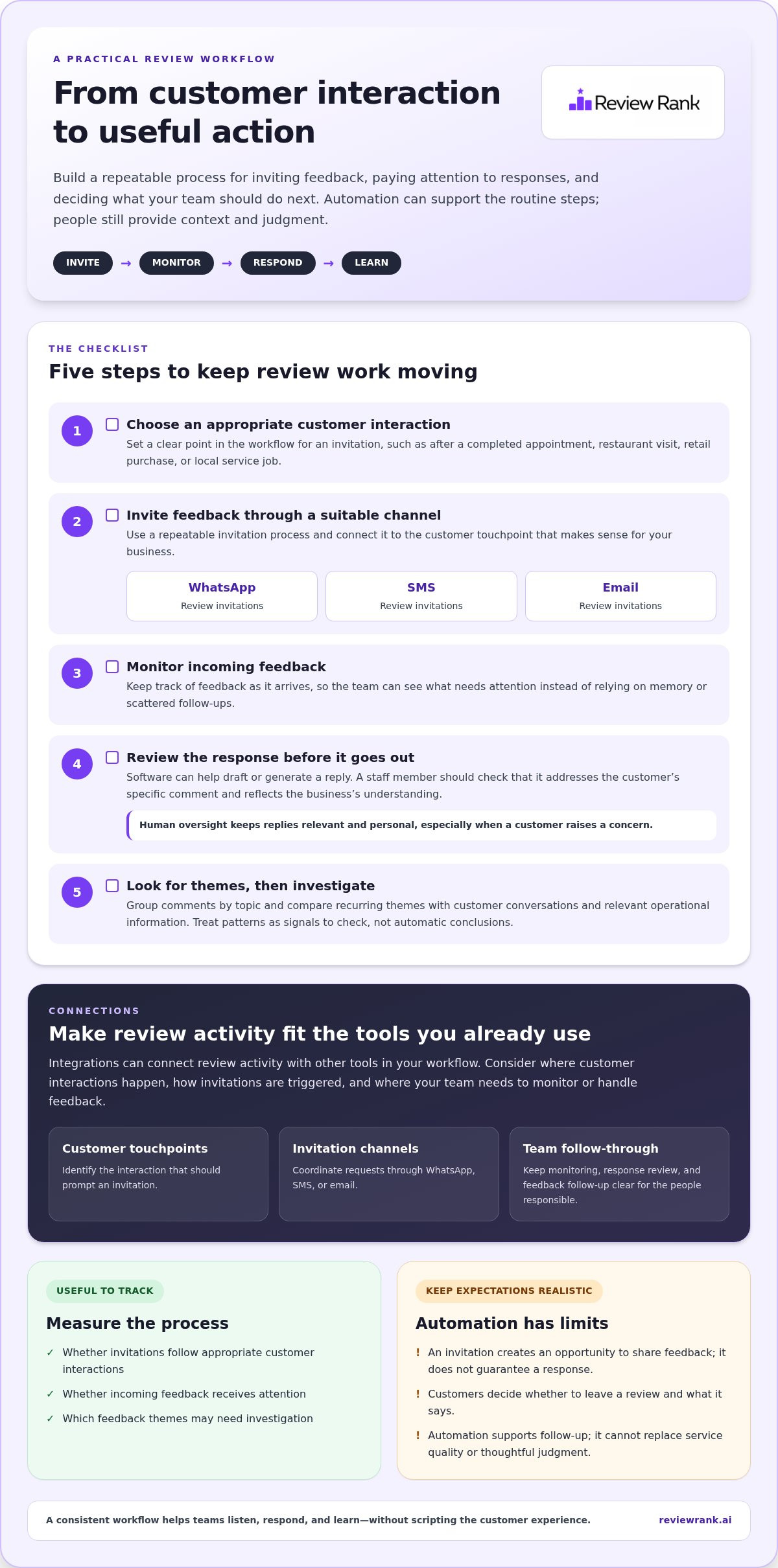
A review request works best when it fits naturally into the customer journey. Start with a completed interaction, such as a restaurant visit, clinic appointment, retail purchase, or finished service job. Then choose a suitable communication channel, send a clear invitation, and make it easy for the customer to share feedback. Once feedback arrives, the team can review it and decide whether a response or follow-up is appropriate.
Review Rank Ai can send invitations through WhatsApp, SMS, and email. That gives businesses options for reaching customers through familiar communication channels. The right choice depends on the interaction and the way the business already communicates with its customers. A message should be relevant, easy to understand, and clearly connected to the experience being reviewed. No channel should be treated as automatically best for every business or customer.
How should a business choose between WhatsApp, SMS, and email?
Consider the existing customer relationship and the context of the interaction. A business that already uses email for appointment follow-up may find it fits naturally after a clinic visit. A local service business may prefer a concise message following a completed job. The channel matters less than a sensible, recognizable invitation that explains why the customer is receiving it and gives them a straightforward next step.
Review the wording across channels before using it. Keep the invitation polite and specific, and avoid language that pressures customers or implies that only positive feedback is welcome. The aim is to invite an honest account of the experience, not to steer what a customer says.
What should teams verify in an integration workflow?
A connected tool can help review activity fit into a broader business process, but the details matter. Before relying on an integration, understand which systems connect, what information passes between them, and where the team should handle review follow-up. Don’t assume that customer records, invitation triggers, or review data move automatically in a particular way. Check the documented connection details and align the workflow with the team’s actual process.
For example, a business may want to understand whether an interaction in another tool can support an invitation workflow, or whether staff need to start that step separately. Also clarify how incoming review information is viewed and who takes responsibility for a response. These questions help teams set realistic expectations and avoid gaps between a customer interaction and follow-up.
Review Rank Ai’s available integrations and connection details provide a starting point for understanding how connected tools fit into review management. The benefits of automated review management become easier to assess when a business can see how invitations, feedback, and follow-up fit its own day-to-day workflow.
To explore how review requests and responses can fit into a more connected process, explore Review Rank Ai’s review management tools.
Turn review management benefits into a repeatable growth workflow
Automation works best when it follows a clear business process. Start small, define what you want the workflow to improve, then adjust it using what your team learns. The benefits of automated review management become easier to assess when each step has an owner and a practical measure.
- Define the goal. Decide whether the priority is more consistent invitations, clearer response handling, or better visibility into customer feedback.
- Map customer touchpoints. Identify moments when an invitation makes sense, such as after a completed appointment, stay, purchase, or service job.
- Choose communication channels. Use channels that fit how your business already communicates with customers, and keep invitation wording relevant.
- Review outcomes. Look at workflow consistency, response handling, recurring feedback themes, and local visibility over time.
This sequence keeps the process manageable. It also prevents teams from mistaking activity for impact: sending invitations is a workflow measure, while customer responses and local ranking movement are outcomes to monitor, not promise.
How can businesses tailor the workflow to their industry?
The right customer touchpoint depends on the service. A restaurant could invite feedback after a dining visit; a dental clinic after an appointment; a hotel after a stay; and a professional services firm after a completed engagement. A retailer might connect follow-up to a purchase, while an automotive business could use a completed service visit as a relevant moment.
Pet services, education providers, and local trades can also map invitations to meaningful milestones, such as a grooming appointment, course completion, or finished repair. For franchises and multi-location groups, set shared process standards, then leave room for each location to respond to its own customer context. Consistency should guide the workflow, not flatten every response into the same script.
Which outcomes should teams review regularly?
Check whether invitations and responses are being handled consistently across the channels your business uses. Review recurring feedback alongside customer conversations and operational context. A pattern in comments can point to a question worth investigating, but it shouldn’t replace checking what happened with the team or service involved.
Local visibility is another useful signal to monitor over time. Review Rank Ai connects automated invitations and AI-generated responses with a Google Local 3-Pack Leaderboard for tracking local rankings, plus review reuse on websites and social media. These capabilities can support a connected workflow, but no tool can guarantee a particular ranking or customer response.
Use what you learn to refine the process: clarify invitation timing, improve how feedback reaches the right people, and keep response review aligned with customer context. To assess how a connected workflow could fit your business, explore automated review management tools.
Make your next review workflow easier to sustain
The best next step is one your team can keep doing. Choose a single point in the customer journey where review follow-up feels uneven, decide who owns the process, and set a regular moment to check whether it still fits the way the business operates. That gives automation a clear job and keeps it connected to real customer experiences.
The benefits of automated review management grow from steady practice, not from switching on a tool and expecting outcomes to take care of themselves. Keep the process useful for staff and considerate of customers. If a step creates confusion, refine it. If feedback highlights a concern, make sure it reaches someone who can act on it.
When you’re ready to see how a platform could support that workflow, explore Review Rank Ai’s automated review management platform. Start with a clear goal, build at a pace your team can manage, and turn customer feedback into a stronger habit.
Frequently Asked Questions
What is automated review management?
Automated review management uses software to support recurring tasks such as inviting customers to leave feedback, organizing reviews, and preparing responses. It gives a team a defined process to follow, while staff remain responsible for accuracy and customer care. For example, a business can decide which completed interactions prompt an invitation and who checks replies. Automation can’t create an authentic customer experience or guarantee that anyone will leave a review.
Can automated review management make customer communication feel impersonal?
Yes, especially if every customer receives identical wording or a response ignores what they actually wrote. Keep invitations relevant to the interaction, and review generated replies before using them. A simple check helps: does the message name the concern or experience accurately, and does it sound like something your business would say? For sensitive feedback, involve a person who can understand the context and guide an appropriate next step.
How soon can a business expect results from automated review management?
There’s no universal timeline or guaranteed outcome. Results depend on the customer journey, existing follow-up habits, channel use, and how consistently the team acts on feedback. Begin with measures you can control, such as whether invitations were handled and replies reviewed. Then observe feedback patterns and local visibility over time. A short-term change in search position alone doesn’t prove that automation caused it or predict future movement.
Can review management automation work for a small business?
Yes. A small team can use automation to make review follow-up easier to manage without building a complicated process. Start with one clear customer touchpoint, such as a completed repair, appointment, meal, or purchase, and decide who checks incoming feedback. A neighborhood retailer, independent clinic, or local service company can then adjust the workflow as its customer interactions and team capacity change.
Can businesses send automated review requests through WhatsApp, SMS, and email?
Yes. Review Rank Ai supports invitations through WhatsApp, SMS, and email. Choose a channel that fits how your business already communicates with customers, and make the message easy to recognize and understand. Respect customer choice, and follow applicable platform requirements and any permissions needed for your communications. Don’t assume one channel will outperform another without evidence from your own workflow and customer interactions.
Does automated review management guarantee a higher Google ranking?
No. Review automation can help a business organize feedback and monitor local visibility, but it can’t guarantee a higher Google ranking. Search results may change for reasons beyond a business’s review workflow. Use ranking tracking to observe movement over time, not as a promise of a particular position. Pair that monitoring with accurate business information and service improvements informed by customer feedback.
How should a business handle a negative review when using automation?
Read the concern carefully, check relevant details with the team, and respond calmly with a useful next step. For example, a service business can review job notes before addressing a complaint about an appointment or repair. AI may help draft a reply, but staff should check context and accuracy. Treat recurring criticism as a cue to investigate, and don’t make access to public review channels depend on whether feedback is positive.