
Automated Review Collection for Local Businesses: Build a Workflow That Wins
Automate the follow-up, not the customer’s voice. A review request should feel like a thoughtful next step after a real experience, not another message sent on autopilot. That’s the difference between a workflow that earns trust and one customers ignore.
If requests are easy to forget, staff are stretched across locations, or you’re unsure which tools belong in the process, you’re not alone. Automated review collection for local businesses can make invitations consistent without making them impersonal. The key is to choose a sensible moment, use a channel that suits the customer, and leave room for genuine feedback.
This guide shows you how to build a practical review invitation workflow, from deciding when to ask to choosing between email, SMS, and WhatsApp. You’ll also see how integrations can connect review collection with the tools your business already uses, and how to track feedback and put genuine reviews to work across your online presence. The goal is simple: less chasing for your team, a smoother experience for customers, and a steady process you can manage across one location or many.
Key Takeaways
- Build automated review collection for local businesses around a clear customer touchpoint, with neutral wording that invites honest feedback.
- Choose email, SMS, or WhatsApp to fit your customers and workflow, then use integrations to reduce manual handoffs between tools.
- Adjust request timing and tone to the customer journey, whether you serve patients, guests, homeowners, clients, or shoppers.
- Track whether requests are sent consistently and how your team follows up, without treating review outcomes as guaranteed.
- Use customer feedback to refine your process and make genuine reviews more useful across your business’s online presence.
What Is Automated Review Collection for Local Businesses?
Automated review collection for local businesses is a repeatable process for inviting customers to share honest feedback after an interaction with a business. Instead of relying on staff to remember every follow-up, a business uses a planned workflow to send an invitation through an appropriate channel. The invitation can be automated. The opinion never is.
That distinction matters. Requesting a review means giving customers a clear, neutral opportunity to describe their experience. It does not mean writing or editing their words, promising a particular rating, or guaranteeing that anyone will post. Customers decide whether to respond and what to say. A trustworthy process leaves that choice with them.
What does review-collection automation actually do?
A typical workflow connects a customer touchpoint to a timely invitation, then gives the customer a straightforward way to share feedback. The business can use the same basic sequence across repeat interactions, while adjusting the message to fit how its service works.
- Customer interaction: A visit, appointment, completed job, or stay creates a natural point to follow up.
- Invitation: The customer receives a concise request with a clear path to leave feedback.
- Customer response: They choose whether to post a review and express their own experience in their own words.
- Team follow-up: Staff review incoming feedback and decide whether a personal response or service-recovery conversation is appropriate.
Automation handles the repeatable delivery, not the relationship. A workflow can reduce the chance that an invitation gets forgotten, but it can't resolve a service issue or replace a thoughtful reply. Those moments still call for human judgment, especially when a customer raises a concern.
Why do local businesses need a repeatable process?
Customer interactions happen throughout the day, often while teams are serving the next guest, completing a repair, or coordinating appointments. A manual reminder may be postponed, then missed altogether. The risk grows across multiple locations, where each team might have a different habit for following up. A defined process gives staff a consistent starting point without requiring them to remember every request themselves.
Consistency also helps connect invitations to real customer touchpoints. A restaurant might follow up after a visit, while a home-services company could use a completed job as its natural moment. The aim isn't to pressure every customer or chase a predetermined review count. It's to make a fair, clear invitation part of the customer journey, so feedback isn't requested only when someone happens to remember.
Review collection is one piece of a broader local presence, not a substitute for it. It doesn't replace service quality, responding to reviews, keeping business information accurate, or other local SEO and reputation-management work. It creates a dependable way to invite feedback; the business still needs to listen, learn, and act on what customers share.
How to Build an Automated Review Invitation Workflow
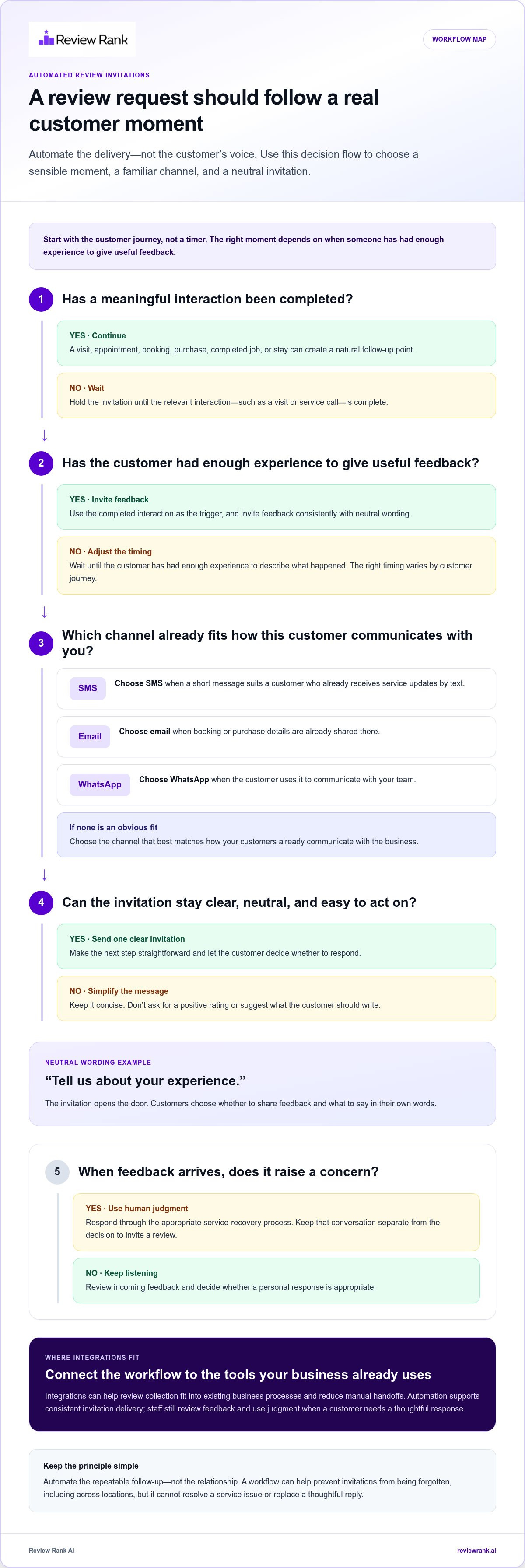
A dependable workflow starts with the customer journey, not a timer. Map the moments when a customer has completed a meaningful interaction, then decide how your team will invite feedback, handle replies, and review the process. This gives automated review collection for local businesses a clear purpose: make invitations consistent while keeping the customer’s experience at the centre.
Choose a natural moment to invite customer feedback
Match the invitation to a completed interaction: a purchase, appointment, booking, visit, or service call. The right moment depends on when the customer has had enough experience to give useful feedback. A retailer might follow up after a purchase is completed; a contractor could use the close of a job. Avoid guessing whether the customer was satisfied. Invite feedback consistently, using neutral language such as, “Tell us about your experience.” Don’t ask for a positive rating or suggest what the customer should write.
Set up requests across WhatsApp, SMS, and email
Choose a channel that fits how your customers already communicate with your business. A short message may suit a customer who regularly receives service updates by text. Email can work naturally when booking or purchase details are already shared there. WhatsApp may fit customers who use it to communicate with your team. Review Rank Ai supports review invitations through all three channels.
Keep the sequence simple. After a completed interaction, send one clear invitation through the channel selected for that customer. If your team already uses connected business tools, integrations can help the review workflow fit into existing processes and reduce manual handoffs. Review Rank Ai's automated reputation management guide explores how review invitations sit within wider reputation work. To see how an invitation workflow can be supported, explore automated review invitation tools.
Keep customer feedback authentic and actionable
The invitation opens the door; the customer decides whether to walk through it and what to say. Keep the message direct and make the next step easy to understand. Don’t promise an outcome, offer a reward for a particular rating, or edit customer feedback to change its meaning.
Separate a service-recovery conversation from the decision to invite a review. If a customer reports a problem, respond through the appropriate service channel and work to address the concern. Don’t use private feedback to screen customers or send public review invitations only to people expected to be positive. Review platforms can change their policies, so verify current guidance for each platform before building requests around its rules.
Finally, assign someone to review how the workflow is working. Check whether invitations are being sent at the intended customer touchpoints, whether the channel and wording fit, and whether customer replies receive appropriate attention. Adjust the process when it creates confusion or extra work. The goal isn’t to automate every conversation. It’s to make the invitation dependable and leave room for your team to respond like people.
Which Integrations and Review-Request Channels Fit Your Business?
The best setup is the one that fits how your business already serves customers. A well-planned system can connect a customer interaction with a review invitation, while your team stays in control of the experience. For automated review collection for local businesses, that means choosing channels customers expect and integrations that simplify the steps, not adding technology for its own sake.
How can integrations reduce manual work?
Integrations can reduce duplicate entry and missed follow-ups by helping connect business tools with the review-invitation workflow. For example, a team could use its customer-management system to identify a completed interaction, then handle the invitation process through its review workflow rather than re-entering customer details by hand. The specific connection and information exchanged depend on the supported integration, so avoid assuming a tool automatically passes every field or starts every action.
Review Rank Ai’s review and business-tool integrations can help businesses assess how review platforms and operational tools may fit together. Consider the workflow from the team’s perspective: where does the customer information live, which step requires manual effort, and where do follow-ups tend to get overlooked? A useful connection should make the handoff clearer, not create another process staff must maintain.
How should a business choose an invitation channel?
Let the existing service relationship guide the choice. An appointment-led clinic may already communicate with customers by email, while a repair business may use SMS for practical service updates. A retailer with repeat visits might prefer the channel customers already recognize from its regular communications. These are starting points, not assumptions about individual preferences.
Email gives a business room for a clear explanation and a direct review link. SMS is concise and may fit an established text-message relationship. WhatsApp can suit customers who already use it to communicate with the business. Review Rank Ai supports review invitations through email, SMS, and WhatsApp, so businesses can align the channel with their communication habits. Don’t send every customer a request through every channel. Keep the experience focused, and account for channel preferences and applicable platform guidance.
What should teams check in a connected workflow?
Before relying on a connected process, review the basics: is the contact information accurate, is the chosen channel appropriate, and is the invitation easy to understand? Make sure your team knows how customer contact preferences are recorded and how to handle a missing detail, an unexpected reply, or a complaint that needs a personal response. Those exceptions should reach a person, not disappear into an automated sequence.
Keep technical expectations grounded in the documented connection. Check which tools are supported and what each integration is designed to do; don’t assume that a listing means every customer record, trigger, or activity syncs automatically. A short walkthrough with the staff who handle bookings, sales, or service completion can reveal unclear handoffs before they disrupt the customer experience.
With the right channels and a straightforward handoff, automation can support consistency without making communication feel mechanical. Review invitation workflows can bring those steps into a more manageable process.
How Review Collection Changes Across Local-Business Industries
A useful review invitation fits the customer’s experience. A clinic appointment, a hotel stay, a completed repair, and a shop purchase each have different natural follow-up moments. The core workflow can stay consistent, but timing, wording, and staff involvement should reflect the service. That’s how automated review collection for local businesses can support a smooth process without making every customer interaction feel identical.
Which workflow fits appointment-based businesses?
For a salon, the natural touchpoint may be after an appointment is complete. A professional services firm might follow up after a project milestone or consultation, when the client has had a meaningful opportunity to experience the service. In a clinic, keep the request separate from care decisions and make sure it doesn’t imply that feedback affects treatment.
Use simple wording that invites an honest account, not praise. If a customer raises a sensitive or complex concern, route it to a staff member who can respond personally. An automated invitation can support routine follow-up, but it shouldn’t replace a thoughtful conversation or include private details in the message.
How can hospitality and retail teams request feedback?
A restaurant could invite feedback after a completed visit, while a hotel might choose a point after checkout so the guest can reflect on the stay. A retailer might follow up after a purchase has been completed. These examples illustrate possible touchpoints, not universal timing rules. Match the moment to when customers can reasonably assess the experience.
Keep each message relevant. A restaurant invitation can refer to the visit; a retail request can mention the purchase without asking the customer to praise a particular product or employee. A hotel’s wording may suit a longer stay better than a quick transaction. The customer should understand why they’re receiving the request and have a straightforward way to respond.
What changes for multi-location and service-area businesses?
Teams with several branches need a repeatable process, but local context still matters. A shared invitation framework can help staff follow the same basic approach, while the location, service, and customer touchpoint shape the message. For example, a home-services business could consider an invitation after a job is complete, with the wording reflecting the work performed rather than assuming the customer’s opinion.
Clear ownership helps prevent gaps: define who monitors requests and who handles replies that need personal attention. Businesses can also review feedback by location to understand where customers are describing different experiences. Review Rank Ai includes a Google Local 3-Pack Leaderboard, which helps businesses track local visibility without guaranteeing a particular ranking.
Build the workflow around the customer journey, then adapt it by industry and location. Explore review invitation tools to support a consistent process across your business.
How to Measure and Improve Automated Review Collection
A review workflow should be judged by what your team can control. Invitations sent, customer replies reviewed, and follow-ups handled are operational signals. Whether a customer chooses to post, what they write, and how a platform displays or ranks reviews are outcomes your business can’t guarantee. Keep that distinction clear as you assess automated review collection for local businesses.
Which signals show whether the workflow is working?
Start with consistency. Are invitations going out at the customer touchpoints you intended? Are the right locations and teams represented? Do customer replies receive appropriate attention? These checks can reveal practical gaps, such as missed handoffs or unclear ownership, without setting an arbitrary review-volume target.
Look at customer feedback for recurring themes as well as individual concerns. Compare what customers are saying with the service experience your team aims to deliver, then decide what deserves follow-up. The Google Local 3-Pack Leaderboard can help monitor local visibility, but it’s a tracking feature, not a promise of ranking position or movement.
How can a team improve without losing authenticity?
Review the workflow periodically with the people who handle customer communication. Check whether the invitation still makes sense for the touchpoint, whether its wording is clear, and whether the channel fits the customer relationship. If staff routinely need to explain the request, revise the message. If a reply needs judgment or care, assign a person to handle it.
AI-generated responses can help teams prepare replies, but human review remains important. Check that each response addresses the customer’s actual comments and reflects the business’s voice before posting. Negative feedback is a prompt to understand and address a concern, not a reason to silence a customer or limit who receives an invitation. Feedback filtering should support a team’s internal attention to customer concerns, not suppress public criticism.
What does an automated platform add to the process?
A platform can bring repeatable invitations and review follow-through into a more manageable workflow. Review Rank Ai supports review invites through WhatsApp, SMS, and email, alongside AI-generated review responses, a Google Local 3-Pack Leaderboard, negative feedback filtering, and automatic repurposing of reviews for social media and websites. These tools support review operations; they don’t replace service recovery, guarantee public reviews, or act as a full-service marketing agency.
Repurposing genuine reviews can help make customer feedback useful beyond the original review platform. Keep the source and meaning intact, and make sure any use fits the context and permissions involved. Then use what your process reveals to refine invitation wording, channel choices, and team follow-through.
Ready to put the framework into practice? Book a Review Rank Ai walkthrough to see how review collection and follow-up tools can fit your workflow.
Make Your Review Workflow Part of the Customer Experience
The next step is to make review invitations a dependable part of how your business follows through with customers. Start with one clear touchpoint, decide who owns the process, and give your team a simple way to flag messages that need a personal response. Then refine the workflow as you learn what feels natural for your customers and practical for your staff.
That steady approach is the real advantage of automated review collection for local businesses. Automation can help the process stay on track, while your team keeps feedback honest, human, and useful. Progress comes from building a routine you can maintain, not from chasing a quick spike in reviews.
Ready to put a more consistent process in motion? Book a Review Rank Ai walkthrough and explore how review workflows can fit your business. A thoughtful next step today can make customer feedback easier to manage tomorrow.
Frequently Asked Questions
Is it safe to automate Google review requests?
It can be appropriate to automate invitations if the process follows Google’s current policies and invites customers to share honest feedback. Keep the request neutral: don’t offer a reward for a review, pressure customers, or direct only people expected to be satisfied to post publicly. Check Google’s current Business Profile review guidance when setting up or updating your process, since platform rules can change.
Can I send review requests through WhatsApp, SMS, and email?
Yes. Review Rank Ai supports review invitations through WhatsApp, SMS, and email. Choose a channel based on the customer’s communication preferences and the relationship they already have with your business. For instance, a customer who receives appointment updates by email may find an email request familiar. Keep messages concise, use accurate contact details, and respect customer communication preferences.
How do review-collection integrations work with other business tools?
Integrations connect parts of a business workflow so staff may have fewer manual steps when managing review activity. A team might use a customer or booking system to keep interaction records, then manage review invitations through a connected review platform. The exact connection and information exchanged depend on the integration. Check the documented details for each tool before assuming a particular record or action will sync.
How often should a local business send review invitations?
There isn’t one schedule that fits every business. Base invitations on meaningful completed interactions, then avoid repeatedly contacting the same customer about one experience. A business with recurring appointments might define which visit makes the most sense for feedback, while a one-time service might use the completed job. Review the process for duplicate or mistimed requests and adjust it to suit your customer journey.
Can automated review collection work for multiple business locations?
Yes. A shared process can help locations follow a consistent approach, while each invitation reflects the branch or service involved. For example, a customer’s appointment at one clinic should be associated with the correct location in the team’s review workflow. Assign clear responsibility for monitoring feedback at each branch, so location-specific questions reach people who understand that customer’s experience.
What should a business do when a customer leaves negative feedback?
Read the feedback carefully and respond with a calm, relevant next step. If the concern needs investigation or personal details, move the service conversation to an appropriate private channel, but don’t use that conversation to pressure the customer to change or remove a review. Share recurring issues with the team responsible for the service, so feedback can inform practical improvements.