
Automated Reputation Management Software: Choose a Connected Review Workflow in 2026
What if the best automated reputation management software doesn’t just send more review requests, but connects every customer touchpoint without making feedback feel like a numbers game? When requests and follow-ups depend on staff remembering, opportunities slip through. And when reviews are scattered across channels, it’s hard to respond consistently or see what customers are telling you.
You need a workflow that fits the way your business already communicates. This guide compares the features that matter, from customer imports and CRM connections to review requests by WhatsApp, SMS, and email. It also explores how automation can support follow-ups and responses while keeping customer trust at the centre.
You’ll see what to look for in integrations, safeguards, and credible progress signals, so you can choose software with confidence. The goal is practical: build a consistent request process, connect review activity with existing tools, and turn feedback into clear next steps for your business.
Key Takeaways
- Choose automated reputation management software that connects review requests, follow-ups, responses, and tracking in one practical workflow.
- Look for customer import and CRM sync to link review campaigns with the tools and processes your business already uses.
- Compare WhatsApp, SMS, and email options, and prioritize outreach that feels personal rather than generic.
- Measure requests sent, responses received, review volume, and response workload to identify where your workflow needs attention.
- See how Review Rank Ai brings review automation, AI-generated responses, Google Business Profile support, and review sharing together.
What Automated Reputation Management Software Does for Local Businesses
A customer leaves happy, the team moves on to the next job, and nobody sends the review request. A new review appears later, but the reply gets buried under calls, bookings, and day-to-day work. Handle every step manually and the process can quickly become inconsistent. Automated reputation management software gives local businesses a repeatable way to manage customer feedback, from inviting customers to share feedback to tracking reviews and sharing them on other channels.
Online reputation management covers more than collecting star ratings. The broad idea is to understand and manage how a business is perceived online, as outlined in What is Online Reputation Management? For local operators, review-management software focuses on practical review activity: requests, follow-ups, responses, monitoring, and sharing. It supports the work. It doesn’t replace the customer experience that earns an honest opinion.
Which Reputation Tasks Can Software Automate?
A connected workflow can send review invitations through channels such as WhatsApp, SMS, and email, then follow up automatically. Review Rank, for example, supports customer import and CRM sync, so review outreach can fit into an existing customer process rather than relying entirely on staff to remember each request. Its review-request workflow includes an automatic follow-up after two days.
Software can also help organize incoming feedback, track review activity in a dashboard, assist with responses using AI, and repurpose reviews for a website or social channels. These tasks reduce repetitive admin and make it easier to spot outstanding replies or gaps in outreach. AI can help draft a response, but the business remains responsible for making sure it reflects the customer’s feedback and the company’s voice.
Automation is not a review-writing service, a full-service SEO agency, or social-media management. It coordinates review-related steps; it doesn’t run every part of a marketing program or write customer opinions. A request invites a customer to share their genuine experience. It cannot manufacture that experience or guarantee a positive review.
How Reviews Fit Into Local Visibility and Customer Trust
People comparing nearby businesses may use public reviews to assess service, consistency, and how a business responds when something goes wrong. Recent, authentic feedback can help potential customers form a clearer impression. A thoughtful response can also show that a business pays attention, including when feedback is critical.
Reviews are one part of a broader local presence, not a lever that guarantees a particular Google Maps or search position. Search visibility depends on more than review volume, and no review workflow can promise a place in the local results. Treat local search reputation as a combination of credible customer feedback, attentive responses, and accurate business information. A well-run workflow makes review activity more consistent; it does not control how a platform ranks businesses.
The distinction matters: reputation software helps teams collect and manage feedback reliably, while customers decide what they say and search platforms decide what they show. Use automation to remove avoidable delays, then focus on the service and genuine responses that earn trust.
How Review Requests, Follow-Ups, and Integrations Work Together
A review workflow works best when each step has a clear handoff: customer details enter the process, a campaign sends an invitation, follow-up happens on schedule, and activity is tracked. That connection matters more than a long list of standalone tools. With automated reputation management software, the aim is to make review outreach a repeatable part of customer communication, not another task staff have to remember.
From Customer Import to Review Request
Review Rank supports CRM sync and customer import, giving a business a way to bring customer details into its review workflow. Its done-for-you campaign setup helps establish the request process. As general workflow advice, choose a natural point after a completed service or visit to invite feedback, while the customer experience is still fresh. Keep the invitation clear and let each customer decide what to share.
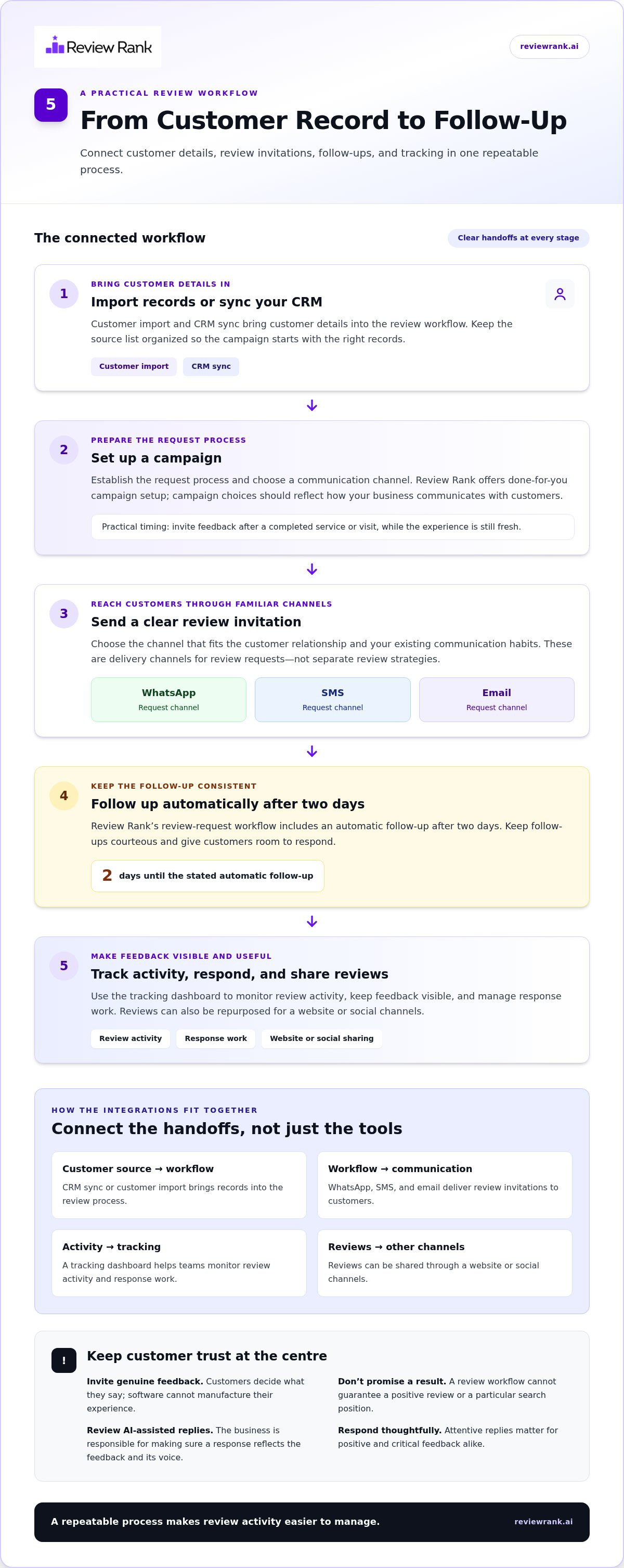
Here’s how the connected workflow can run:
- Import customer details. Connect through CRM sync or import customer information into the workflow. Keep the source list organized so the campaign starts with the right customer records.
- Set up a campaign. Establish the request process and choose the communication channel. Review Rank offers done-for-you campaign setup; the exact campaign choices should reflect how your business communicates with customers.
- Send a review request. Requests can be sent through WhatsApp, SMS, or email. Use the channel that makes sense for the customer relationship and your existing communication habits.
- Follow up. Review Rank sends an automatic follow-up after two days. This timing is a stated platform feature; more generally, a follow-up should be courteous and give customers room to respond.
- Track activity and respond. Review activity can be monitored in the platform’s tracking dashboard. From there, teams can keep feedback visible, manage response work, and consider sharing reviews through connected marketing channels.
What the WhatsApp, SMS, Email, and CRM Connections Do
WhatsApp, SMS, and email are delivery channels for review requests, not separate review strategies. Their value is that a business can invite feedback through familiar communication routes rather than relying on one method. CRM sync and customer import connect customer details with the request workflow; don’t assume that means every CRM product or additional data function is supported.
Once reviews arrive, AI-powered review responses can help with the response stage, while a team member should ensure each reply fits the specific feedback. To explore the workflow in practice, Review Rank’s review automation platform brings requests, follow-ups, tracking, and review sharing into one process. A connected system keeps the steps moving; thoughtful communication keeps them human.
How to Compare Automated Reputation Management Software Without Losing Trust
A feature list is only useful if it maps to the work your team actually does. Compare tools by how they handle the whole review workflow, from inviting customers to learning from feedback, not by broad claims about reputation monitoring, social media, or search visibility. The right fit should save staff time while keeping each interaction considerate and genuine.
Which Features Matter for Your Review Workflow?
Use this comparison framework to assess whether a platform fits your current customer communication process. Separate essential functions from features that sound impressive but won’t solve a real operational need.
| Capability | What to compare | Practical question |
|---|---|---|
| Request automation | Whether invitations can follow a consistent customer workflow | Can the process reduce missed requests without disrupting service? |
| Follow-up | Whether follow-ups are part of the workflow and can be managed consistently | Does the timing suit your customer relationship? |
| Channels | Support for WhatsApp, SMS, and email | Can you reach customers through channels your business uses? |
| AI responses | Tools that assist with drafting replies | Can staff review and personalize responses before they represent your business? |
| Integrations | CRM sync and customer import options | Can customer details enter the process without unnecessary manual steps? |
| Tracking | A clear view of requests, incoming reviews, and response workload | Can you see what needs attention and assess activity over time? |
| Review sharing | Options to repurpose reviews for your website or social channels | Can useful customer feedback be shared without turning the tool into a social-media management service? |
Prioritize the gaps that cause friction today. A business that regularly forgets to invite customers may value request automation and follow-up first. A team with reviews arriving faster than it can reply may care more about response support and a consolidated view. Assess CRM sync and customer import against your actual workflow, rather than assuming every platform connects to every system.
Can Review Automation Protect Trust While Saving Time?
Yes, if automation invites honest feedback instead of trying to control what customers say. Keep requests neutral: don’t offer incentives for reviews, fabricate feedback, or ask only customers expected to leave positive comments. Public criticism should remain visible; resolving a service issue privately is different from filtering or suppressing a posted review.
AI can help staff prepare responses, but it shouldn’t make judgment calls on sensitive or complex feedback. Have a person check that a reply addresses the customer’s actual concern and sounds appropriate. This keeps efficiency from tipping into canned, impersonal communication.
Finally, treat dashboards as operational tools. Compare requests sent, reviews received, and response workload over time to understand whether the process is functioning. Review activity may support visibility, but software can’t promise a Google Maps position or revenue outcome. For a workflow that brings review requests, response support, and tracking together, explore Review Rank’s review-management platform.
How to Set Up and Measure a Review Automation Workflow
A campaign is only useful if it fits the customer journey and gives your team a clear way to learn from the results. Start with a real service moment, make the invitation easy to understand, then assess whether requests are being sent and feedback is receiving attention. With automated reputation management software, the aim is a steady process, not a made-up benchmark or a promise of a certain review count.
Launch the First Campaign Around a Real Customer Moment
Choose a natural point after a completed service, visit, or purchase. For example, a repair business might invite feedback after finishing the job, while a clinic could build outreach around a completed appointment. Keep the message warm and neutral. Invite an honest account of the experience, without asking for a particular rating or suggesting what the customer should write.
Use a simple launch sequence:
- Define the moment. Agree on the customer interaction that should trigger an invitation, and make clear which team member or process identifies it.
- Prepare the contact list. Import the relevant customer details or use CRM sync so the campaign starts with an organized set of contacts.
- Configure the outreach. Choose WhatsApp, SMS, or email and review the message for clarity, tone, and a straightforward invitation to share feedback.
- Check the follow-up and ownership. Review Rank’s automatic follow-up is scheduled after two days. Assign responsibility for monitoring incoming feedback and handling replies, rather than assuming automation covers the entire customer conversation.
Track Progress and Learn From Customer Feedback
Set a baseline before assessing performance. Record the activity your team can observe, then compare it over consistent reporting periods that make sense for your business. Avoid judging the workflow against an unsupported industry target. A change in review volume is useful context, but it doesn’t explain by itself why customers responded or what they valued.
- Requests sent: Check whether eligible customer interactions are making it into the campaign.
- Responses received: Compare incoming feedback with invitations sent, while remembering that customers choose whether to respond.
- Review volume: Track changes over time and note which locations, services, or customer moments are associated with feedback.
- Response workload: See whether the team can keep up with public replies and identify where a handoff or review process needs attention.
Read the comments, not just the totals. If customers repeatedly mention unclear scheduling or a confusing handoff, share that pattern with the team responsible for the experience. Review campaign language and feedback handling regularly, too. This helps keep outreach useful and responses personal as the workflow develops. These are the practical signals that make reputation management tools valuable: they help a business organize action, not guarantee rankings or revenue.
Build a review workflow your team can manage with Review Rank’s review automation platform.
How Review Rank Connects Review Automation to Local Business Growth
Review Rank brings the main parts of a local review workflow into one platform. Automated invites help keep outreach moving, follow-ups reduce reliance on staff memory, and AI-generated responses support the work of replying to feedback. CRM sync and customer import connect customer details with campaigns, while a single dashboard gives the team a place to track review activity.
That workflow can support visibility and customer trust, but it doesn’t guarantee a ranking or a business result. Review Rank supports Google Business Profile, and strong customer feedback can be shared across marketing channels, including a business website and social channels. This is review sharing, not social-media management. Review requests can be sent by WhatsApp, SMS, and email, with an automatic follow-up after two days. Done-for-you campaign setup helps establish the process, while the business remains responsible for delivering good service and responding thoughtfully.
What Review Rank Includes for Review Management
These features connect the steps buyers can assess when comparing automated reputation management software:
- Requests and follow-ups: Automated review invites create a repeatable outreach process, supported by the platform’s automatic follow-up.
- Channels and customer information: WhatsApp, SMS, and email provide request options, while CRM sync and customer import connect contact details with campaign setup.
- Responses and tracking: AI-generated responses assist with replies, and the tracking dashboard helps teams monitor activity.
- Google support and review sharing: Google Business Profile support and the ability to share strong feedback extend the workflow beyond collecting reviews.
Together, these capabilities help local businesses organize review activity without turning the platform into a full-service SEO agency. Teams can use the information they gather to improve service and keep customer feedback visible, while treating search visibility as an outcome they can support, not control.
What the Case Studies Show, and What They Do Not Promise
Review Rank’s case studies illustrate results achieved by individual businesses. An accountancy case went from 0 to 73 verified 5-star Google reviews and generated six-figure recurring annual income within 90 days. A restaurant gained 239 new 5-star reviews and overtook a competitor for the number-one Google Maps spot. A senior-care business saw a 437.5% review-volume increase in the first week and appeared for 10 additional search terms.
These examples show what happened in those cases, not what every business should expect. Different starting points, customer experiences, and workflows can lead to different results. Individual results may vary. Use case studies as context, then measure your own review activity against your business’s baseline.
If a connected review workflow fits your goals, explore Review Rank’s review-management platform. There’s no long-term contract, so you can consider the workflow without a long-term commitment.
Make Your Next Review Workflow More Consistent
Your next step doesn’t need to be a major overhaul. Identify one customer moment where review requests are often missed, then build a workflow that makes follow-up and feedback easier for your team to manage. The right automated reputation management software should fit the way you serve customers, save time on repeatable tasks, and leave room for genuine human responses.
Review Rank has a 4.9/5 overall user rating, and 500+ local business leaders have joined. Those signals can help inform your evaluation, alongside how the platform’s workflow fits your day-to-day operations. Review Rank has no long-term contract, so you can explore its approach without committing to one.
See how Review Rank automates your review workflow, then decide which repeatable step you’re ready to improve first. A more consistent process starts with one clear action, and your team can build from there.
Frequently Asked Questions
What does automated reputation management software do?
Automated reputation management software helps a business organize recurring review tasks so they’re less likely to be overlooked. For example, a local service team can use it to keep customer invitations and incoming feedback visible without relying on one employee’s memory or inbox. Depending on the platform, it may also help staff prepare responses and share customer feedback. It supports the process, but customers remain the source of reviews.
Can review management software remove negative Google reviews?
No. Review management software shouldn’t be used to erase honest public criticism. A business can respond professionally, acknowledge the concern, and work to address the underlying service issue. If a review appears to violate Google’s policies, use Google’s own review-reporting process. Keep private service recovery separate from public review handling: resolving a customer’s concern doesn’t mean their published review should be hidden or suppressed.
How long does it take to see results from review automation?
There’s no fixed timeline. Results depend on factors such as how often customers interact with the business, how consistently eligible customers receive invitations, and whether they choose to leave feedback. Early on, focus on whether the process is running as intended, not on a promised increase in reviews. A small business with occasional customers may see a different pace from one with frequent customer interactions.
Does automated review software guarantee a higher Google Maps ranking?
No. Review software can help a business manage feedback, but it can’t guarantee a specific Google Maps position. Search visibility reflects factors beyond review activity, and platforms control how listings appear. Treat review management as one part of building a credible local presence. Track review activity alongside customer service improvements, but don’t judge the software by an assured ranking outcome it cannot promise.
Is review automation suitable for a small local business?
Yes, it can suit a small business if review follow-up is a recurring task that staff struggle to manage consistently. Start by identifying who handles new feedback and what should happen when a customer raises a concern. For a small team, a clear process can matter more than a long feature list. Choose tools that reduce repetitive work without adding unnecessary steps to customer interactions.
Can automated review requests comply with Google’s review policies?
They can, provided the campaign invites honest feedback without trying to influence its content or rating. Keep the invitation neutral, avoid incentives, and don’t selectively ask only customers expected to leave positive reviews. For example, use the same straightforward request process for eligible customers rather than sending a special prompt after praise. Review campaign wording and practices regularly against Google’s current review policies.
Does reputation management software replace a marketing or SEO agency?
No. Review software focuses on review-related work, such as organizing invitations, feedback, and responses. It doesn’t replace broader marketing planning or a full SEO strategy. A business might use software to make review follow-up more consistent while handling other marketing needs separately. Define the boundary before adopting a tool: identify which review tasks it will support and which wider marketing responsibilities remain with your team or agency.