Automate Google Reviews for Local Business Reputation
Google reviews shape how customers judge a local business and whether it stands out in search. To automate Google reviews, businesses can streamline review invitations and use AI to draft responses while keeping feedback genuine and replies relevant. Automation saves time, but it should support thoughtful reputation management, not replace it.
It makes sense to want a faster way to keep up with feedback. Reviews give customers a public view of the experience your business delivers, and responding helps show that you pay attention. This article explains how review automation can support feedback collection, replies, reputation, and local visibility, and what to consider when assessing automated replies under Google policy. You’ll also see how integrations connect review workflows with tools such as email, SMS, and WhatsApp, and how to decide whether automation fits your business.
Key Takeaways
- Use CRM or booking events to prompt review requests at a relevant point in the customer journey, and keep every invitation genuine.
- Tailor replies to each review’s rating and comments so automation supports thoughtful responses instead of generic ones.
- Track how review quality and customer feedback shape reputation and local visibility, without treating reviews as a guaranteed ranking shortcut.
- Connect review workflows with tools such as WhatsApp, SMS, and email to make requests and feedback easier to manage.
- Use centralized review insights to spot recurring customer concerns and decide what your business should improve next.
Is it against Google policy to automate review replies?
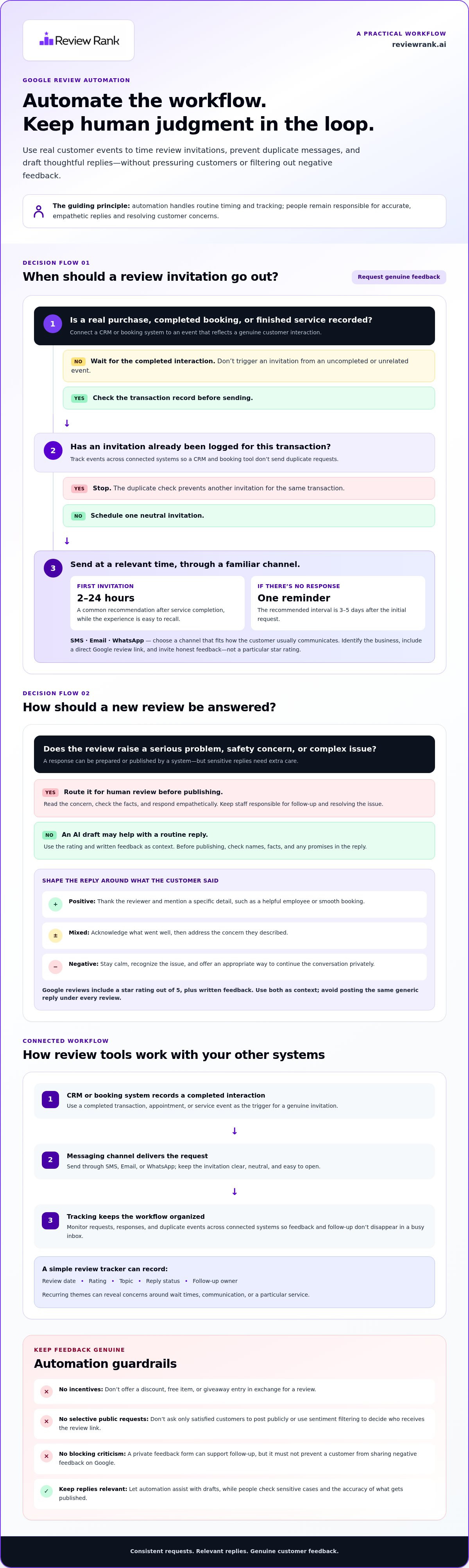
Automation itself doesn't make a review reply improper. The priority is genuine customer feedback: a system can prepare or publish a response, but it shouldn't create reviews, change customer opinions, or prevent negative feedback from being shared. Review sensitive replies before publishing, especially when a customer describes a serious problem.
Yes, businesses can automate Google reviews by sending requests after genuine customer interactions. Connect a CRM or booking system to a completed transaction or appointment event, then trigger one neutral invitation to leave feedback on the Google Business Profile. For example, a salon could send a request after a completed appointment, while a hotel could trigger one after checkout.
Set timing around the actual experience. A common recommendation is to send the first invitation 2 to 24 hours after service completion, while the visit is still easy to recall. If the customer hasn’t responded, an automated reminder can follow 3 to 5 days after the initial request. Use tracking to prevent duplicate messages when a CRM and booking tool both record the same transaction.
SMS makes a review request easy to open on a customer’s phone. Keep the message brief, identify your business, and include a direct link to its Google review page. Email or WhatsApp can serve the same purpose when they fit the customer’s usual communication channel. Invite honest feedback, not a particular star rating.
Google review policies prioritize authentic feedback. Don’t offer a discount, free item, or giveaway entry in exchange for a review, and don’t ask only satisfied customers to post publicly. A private feedback form can help you follow up on concerns, but it shouldn’t prevent customers from sharing negative feedback on Google. Don’t use sentiment filtering to decide who receives the public review link.
How much do Google review automation tools cost? Pricing depends on the case, including features, review volume, locations, and integrations, and is given after a quote request.
To automate Google reviews responsibly, build a workflow that respects customer choice and gives staff control where judgment matters:
- Trigger an invitation only after a recorded purchase, completed booking, or finished service.
- Send one clear request, then use a single reminder after the recommended interval.
- Use AI-generated drafts for replies, but review negative or complex cases manually.
- Track requests, responses, and duplicate events across connected systems.
This approach makes review collection more consistent without pressuring customers. Automation handles routine timing and tracking, while staff stay responsible for accurate, empathetic replies and resolving the issues customers raise.
Why Are Google Reviews Important For Business?
Google reviews give prospective customers a public view of real experiences. A Google review includes a star rating out of 5 stars, plus written feedback that can reveal what customers value or where service falls short. For a local business, that visible record can support trust before a customer calls, books, or visits.
Which Google review automation tool is right for a small business? Look for Google Business Profile support, organized review monitoring, and relevant response suggestions that staff can review before publishing. The right fit should also match your review workflow and preferred communication channels.
Response quality matters as much as speed. A reply that addresses the details of a review shows that you’re listening; the same generic line under every rating can seem inattentive. Use the rating as context, then respond to what the customer actually said.
- Positive rating: Thank the reviewer and refer to a specific detail, such as a helpful employee or a smooth booking.
- Mixed rating: Acknowledge what went well, then address the concern the customer described.
- Negative rating: Respond calmly, recognize the issue, and offer an appropriate way to continue the conversation privately.
An AI-generated response can use a review’s rating and written content to create a first draft. Set a tone that suits your business, such as professional, friendly, or casual. Before publishing, check names, facts, and promises, especially when a review raises a service or safety concern.
Templates help teams respond consistently, but they should leave room for specific details. Use a brief structure: greet the customer, refer to their feedback, and give a clear next step when needed. For example, a café could thank a guest for mentioning a particular drink instead of posting the same stock sentence beneath every five-star rating.
Monitoring helps ensure new feedback doesn’t disappear in a busy inbox. Assign someone to review incoming posts, flag urgent concerns, and record recurring themes. A simple tracking sheet can include the review date, rating, topic, reply status, and follow-up owner. Over time, these notes can reveal patterns in wait times, communication, or a particular service.
For a small team, automation should reduce repetitive work while leaving judgment with people. Compare tools by how they handle review monitoring, response suggestions, approval controls, and reporting. A practical workflow can generate a draft, route sensitive feedback for manual review, and keep ordinary replies moving. Explore review response workflows as one way to structure that process.
Review collection and replies work best as connected parts of customer care. A new rating is more than a public score: it’s an opportunity to learn, respond, and improve the experience behind your Google presence.
Why Google reviews matter for business reputation and local search visibility
A Google Business Profile often creates a potential customer’s first public impression of a local business. Reviews reveal more than a star rating: customers describe service, communication, and the details that shaped their experience. These comments help people assess a restaurant, clinic, repair service, or nearby shop before choosing it. Regularly monitoring profile reviews also helps owners spot issues while they can still act on them.
Reviews can influence both customer decisions and local discovery. In the United States, 81% of online users use Google to check out local businesses. Reviews influence 88% of customers when discovering and patronizing local businesses. About half of customers are willing to travel farther and pay more for a business with higher reviews. These figures point to a practical opportunity: earn authentic feedback, respond carefully, and make the Google profile useful to people comparing nearby options.
Google reviews can also affect how a business appears in search results. Higher ratings and more positive reviews may help a business appear higher in local listings, though reviews are only one part of local visibility. The Google Map Pack features the top three search results described for local queries. Review patterns, profile accuracy, and the relevance of a business to a search all matter when customers scan those results. Birdeye’s State of Online Reviews 2025 report states that Google hosted 81% of all customer reviews.
Treat feedback as operational evidence, not just a public score. If negative reviews repeatedly mention unclear appointment updates, review your booking process and customer messages. If customers praise a staff member or service, identify what contributes to that experience and reinforce it across the team. Group feedback by topic, location, and response status to turn individual comments into practical improvements.
Monitoring Google Business Profile reviews gives teams a chance to respond and investigate promptly. Assign someone to check incoming feedback, record recurring issues, and route service concerns to the right person. If you manage multiple locations, track each profile separately so a pattern at one branch doesn’t get lost in group-wide averages. Negative reviews deserve attention, and positive comments can reveal what customers value most.
Customize response drafts with the correct business name and a tone that fits your brand. A clinic may choose a measured voice, while a café may sound warmer and more conversational. Keep replies tied to the reviewer’s actual comments, and verify names and service details before publishing. A consistent voice supports your reputation; a copied response that ignores the review can undermine it.
Centralized review management and customer feedback insights
A single review workspace gives a local business one place to organize feedback across its Google Business Profile locations. Record each review’s location, rating, topic, reply status, and follow-up owner. For a business with several branches, separate location records make it easier to see whether a service issue is isolated or recurring. A clear overview turns scattered comments into information managers can act on.
Use customer feedback to identify operational patterns, not just individual complaints. If several guests mention long waits, compare those comments with staffing schedules and busy periods. If customers repeatedly praise clear appointment updates, share that practice with other teams. Assign each theme to an owner, choose a practical change, and review later feedback to see whether the concern continues.
Centralized alerts can help staff route time-sensitive feedback to the right person. For example, a negative review about a missed home repair appointment could go to the service manager, while praise for a technician could reach their supervisor. Focus alerts on actionable issues. Too many low-priority notifications can bury the feedback teams need to respond well.
- Service: Group comments about delays, cancellations, or unclear updates.
- Staff: Note recurring mentions of helpful or unresponsive team members.
- Product or facility: Track feedback about quality, cleanliness, or availability.
- Resolution: Record the action taken and whether later comments reflect a change.
Customer testimonials can strengthen an online presence when reused responsibly. Choose genuine public reviews that describe a specific experience, then preserve the customer’s meaning and attribution. A bakery might feature a review praising a custom cake on its website, while a contractor could highlight feedback about clear project communication. Don’t edit a testimonial to change its meaning or imply an outcome the customer didn’t describe.
Connect review management with tools your team already uses, such as a CRM, booking system, or shared reporting sheet. A completed appointment can provide context for follow-up, and a centralized record can help staff avoid duplicate outreach. Limit customer details to what the team needs to address feedback, and assign access according to staff responsibilities.
For a multi-location business, compare feedback by branch before making broader changes. If one clinic receives comments about appointment reminders while another gets praise for its reception, each needs a different response. Reviewing themes regularly can help managers prioritize training, process updates, or customer communication improvements without treating every review as the same problem.
Centralized management works when each review leads to an appropriate response, service follow-up, or operational decision. Track those actions alongside the feedback, then share relevant insights with the people who can improve the customer experience.
Benefits for review generation and local visibility
A consistent review request process helps a business collect feedback beyond the occasional customer who remembers to post. Connect each request to a completed appointment, purchase, or stay, then send every eligible customer the same neutral invitation. For example, a hotel can send a request after checkout, while a repair shop can trigger one after a completed service. Regular invitations make review collection part of customer follow-up, rather than a task staff must remember each time.
Choose a channel customers already use. Email can provide a clear explanation and review link; SMS makes the next step easy to access on a phone; WhatsApp can fit into an existing conversation. Keep each message direct and invite honest feedback. Don’t ask only happy customers to post publicly or offer a reward for a positive rating. That can undermine trust and the value of the feedback.
To automate Google reviews effectively, connect invitations to a genuine customer event and track whether each request was sent. A new review can prompt an alert, send a draft to the right team member, and create a record of whether someone replied. Staff can then focus on personal details instead of manually checking platforms throughout the day. For a business with several locations, assign each review to its branch so the people closest to the customer can respond with useful context.
Reviews contribute to local visibility by giving searchers recent, specific evidence about customer experiences. They can influence local search rankings, but they don’t guarantee a place in Google’s Map Pack. Manage the full profile by keeping business details accurate, responding to feedback, and making it easy for customers to share genuine experiences. A leaderboard can help teams track local ranking changes alongside review activity, rather than judging progress by review count alone.
Businesses that automate Google reviews can create a more consistent feedback loop. Look for repeated comments about service quality, communication, or convenience, then use them to improve the customer experience. A café might spot repeated praise for quick counter service; a dental clinic might notice questions about appointment instructions. Sharing selected, genuine reviews on your website or social media can extend their reach while preserving the reviewer’s meaning.
- Trigger a neutral review prompt after a real customer interaction.
- Use email, SMS, or WhatsApp according to the existing communication flow.
- Route new feedback to the responsible team and track response status.
- Review customer comments alongside profile accuracy and local visibility.
The clear takeaway: automation creates consistency, while genuine feedback and relevant follow-up create value. Explore review automation workflows to see how connected invitations, responses, and visibility tracking can support your process.
Review Rank Ai: Automated Review Invites
Review Rank Ai helps businesses build a consistent review workflow with Automated Review Invites and AI-Generated Review Responses. Review invitations can be sent through WhatsApp, SMS, and email, connecting follow-up with the channels customers already use.
For teams managing customer feedback across locations, the Google Local 3-Pack Leaderboard supports local ranking monitoring, while Negative Feedback Filtering helps identify feedback that needs attention. These tools can support review management alongside staff oversight and genuine customer responses.
If your business wants a more organized way to request reviews and manage feedback, visit Review Rank Ai to learn more.
Make Your Review Workflow Work Harder
Give review management a clear owner and a practical routine. Decide who monitors new feedback, who handles complex concerns, and how customer comments reach the team responsible for service improvements. Review Rank Ai automates invitations and AI-powered responses, helping make the routine easier to manage without making customer conversations feel mechanical.
Start with one customer journey, such as a completed appointment or purchase. Map when a request should go out, which channel suits the interaction, and how staff will handle replies that need judgment. Then review the workflow regularly. If customers receive duplicate prompts or feedback goes unanswered, refine the handoff before expanding to other locations or teams.
A thoughtful plan to automate Google reviews can make feedback easier to manage while keeping customer trust at the centre. Contact Review Rank Ai to explore how its tools could fit your review workflow. Build a process your team can sustain, then use each customer insight to make the next experience better.
Frequently Asked Questions
How do review requests get sent automatically?
An automated request is triggered by a customer event recorded in a business system. For example, a completed service appointment can prompt a message with a direct review link. The workflow can send the invitation by email, SMS, or WhatsApp, depending on the selected channel. Before launch, map the event to the correct customer record and location, then test the message to ensure customers receive a clear, accurate request.
How can automated reviews help with local SEO?
Automation helps businesses consistently invite customers to share genuine experiences and can create more opportunities for recent feedback on their Google Business Profile. Review content can also show potential customers what a business does well. A local plumber, for example, may see comments about punctual arrivals, while a restaurant may receive feedback about menu options. Track review activity alongside profile accuracy and local search visibility, but don’t treat automation as a promise of a specific ranking.
How do you know which employee or location earned a review?
Use the original customer record to connect each invitation with the correct branch, appointment, or staff member. A booking system may already record the location and assigned employee; include those details in your internal records before sending a request. When a review arrives, compare its date and service context with that record. Don’t guess based on the reviewer’s name or wording, since neither may reliably identify the staff member or location.
How long does it take to set up?
Setup involves connecting your Google Business Profile, organizing customer records, choosing the event that triggers an invitation, and preparing message content. A single-location service business with clear booking records has fewer routing decisions than a group with several branches. Test the entire customer journey, including the review link and message channel, before enabling automated sending.
How can businesses automate requests for Google reviews?
Start by choosing a genuine customer milestone, such as a completed repair, purchase, or hotel checkout. Connect that event to the customer record, select a suitable communication channel, and write a neutral request that invites honest feedback. Set a process for recording whether the message was sent, then prevent repeat requests for the same transaction. This gives staff a dependable workflow without asking customers for a particular rating.
What tools automate Google review requests and follow-ups?
Review management platforms can connect invitations with customer records and organize follow-up workflows. Look for features that support your preferred communication channels, track sent requests, and associate each interaction with the correct business location. For example, a multi-branch clinic needs a clear way to route feedback to the branch involved. Choose a tool that fits your existing records and staff process, so review requests don’t become a separate manual task.
How do you set up automated Google review requests step by step?
Connect the Google Business Profile and organize customer records from your CRM or booking system. Select a completed transaction or appointment as the trigger, then map each record to its location. Prepare a concise, unbiased invitation and choose email, SMS, or WhatsApp. Test the message with a sample record, confirm that the review link leads to the right profile, and check that the workflow won’t send duplicate requests before enabling it.
Can Google review requests be automated through SMS and email?
Yes, businesses can automate review invitations through SMS and email. SMS works well when a customer already receives service updates by text; email can provide more context alongside the review link. A restaurant might send a concise post-visit text, while an accounting firm may use an email after completing a client engagement. Keep either message neutral, identify your business clearly, and invite honest feedback rather than requesting a positive review.